
AI voice technology has moved far beyond the robotic text-to-speech tools many of us remember. Today, creators, marketers, educators, authors, podcasters, agencies, and businesses increasingly want AI-generated speech that sounds natural enough to become part of their actual content production workflow.
We recently took a detailed look at VocalLab AI, and what immediately stood out to us was how much functionality the platform brings together under one roof. Instead of focusing exclusively on text-to-speech, VocalLab AI combines AI voice generation, voice cloning, custom voice design, speech-to-text transcription, video dubbing, subtitle generation, audiobook creation, multi-voice projects, developer integrations, and AI-assisted workflows inside a browser-based environment.
That makes VocalLab AI relevant to a considerably wider audience than someone who simply needs to turn a paragraph of text into audio.
In this VocalLab AI review, we will explore how the platform works, the features available, the different voice-generation options, and the types of users who can get the most value from it.
What Is VocalLab AI?
VocalLab AI is an AI-powered voice and audio production platform built around neural text-to-speech technology. At its core, we can enter written text, select or create a voice, customize how that voice should perform the content, generate audio, and export the result for use in videos, podcasts, advertisements, audiobooks, online courses, social media content, and other projects.
However, describing VocalLab AI as simply a text-to-speech generator would undersell the product.
The platform has developed into a broader AI voice studio where we can work with hundreds of professional voices, clone voices from short recordings, design entirely new voices from written descriptions, transcribe existing recordings, translate and dub videos, produce synchronized captions, and build longer multi-speaker audio projects.
The current platform also includes four different speech-generation models, each optimized around different priorities such as fidelity, expressiveness, language coverage, speed, or economical high-volume generation. VocalLab Studio supports directed performances and broad multilingual coverage, while Studio Flash, Pro, and Lite provide alternative balances between generation speed, fidelity, and resource usage.
For us, this broader approach is one of the strongest aspects of VocalLab AI. It means we can potentially manage several stages of an audio-content workflow without moving between multiple unrelated tools.
VocalLab AI Interface and Workflow
A Browser-Based AI Voice Studio
VocalLab AI works through a browser-based studio, which keeps the production process relatively straightforward. The main creation areas include Text to Speech, Speech to Text, Audiobooks, Dubbing, Voice Cloning, Voice Design, the Voice Library, saved voices, workspace functionality, and developer tools.
The basic text-to-speech workflow is easy to understand. We choose a voice, enter or paste the script, customize the generation settings, produce the audio, listen to the result, and then download it.
For longer or more sophisticated productions, the AI Voice Studio provides a block-based workflow where different text sections can be assigned different voices. A complete project can then be generated and combined into a single audio file.
This structure is particularly useful because our requirements can change dramatically depending on the project. A 30-second social media narration may require only one voice and a short script, while an audiobook, podcast, training module, or dialogue-driven video may contain numerous sections and speakers.
VocalLab AI provides workflows for both scenarios.
AI Text-to-Speech Generation
Turning Scripts Into Natural AI Voiceovers
Text-to-speech remains one of the central features of VocalLab AI.
We can paste a script into the generator, choose an appropriate voice, adjust the delivery settings, and generate ready-to-use speech. The system supports numbers, dates, currencies, questions, abbreviations, and longer scripts, making it practical for everyday content production rather than only short demonstrations.
The platform also automatically handles longer text by splitting larger scripts into chunks and joining the resulting audio together. This is useful when working with longer narrations because we do not have to manually divide every script before generating it.
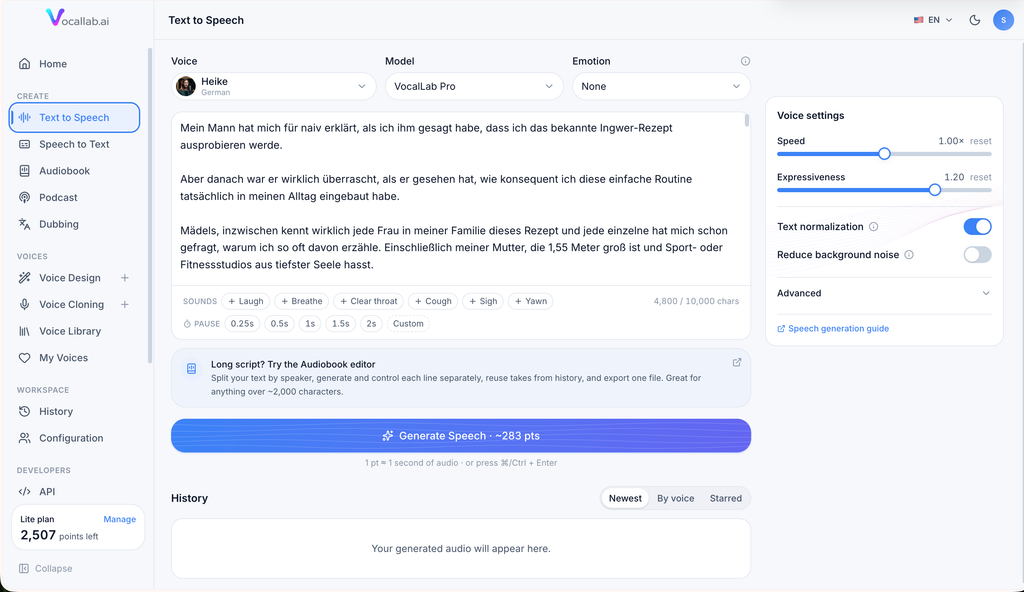
For creators, this opens up plenty of possibilities. We can generate narration for YouTube videos, Instagram Reels, TikTok videos, product explainers, educational content, sales presentations, advertisements, tutorials, documentaries, podcast segments, and other voice-led formats.
For digital marketers and businesses, the same technology can be used for promotional videos, training content, customer education, social campaigns, e-learning, and client deliverables.
Large AI Voice Library
Hundreds of Professional Voices
One of the biggest factors determining whether AI-generated speech works is the underlying voice.
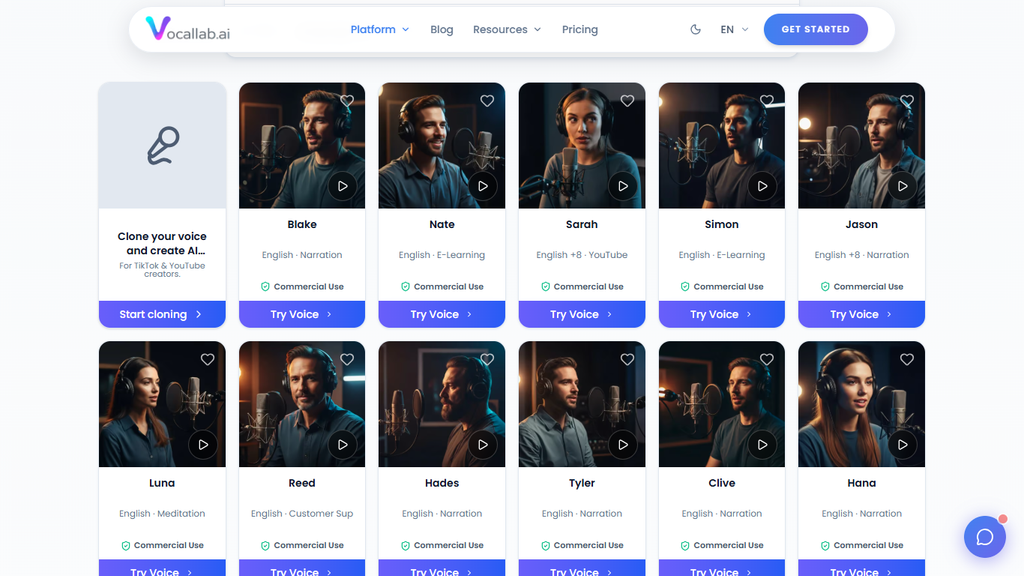
VocalLab AI provides access to hundreds of professional AI voices. The current catalog can be explored using attributes such as language, accent, age, style, tone, and other characteristics, making it easier to narrow the library according to the intended content.
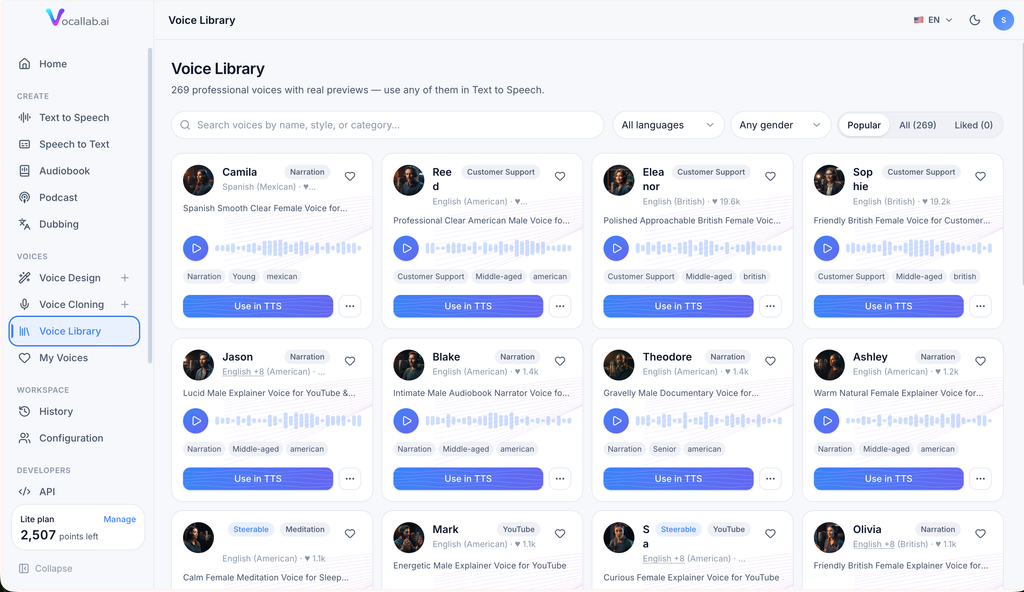
The AppSumo product listing currently highlights 260 professional voices that users can browse according to characteristics such as accent, age, gender, and style.
We like this approach because voice selection is not merely cosmetic. The ideal voice for a meditation track can be completely different from the ideal voice for an energetic advertisement, a serious business presentation, a children’s story, or a documentary.
Having a broad voice library means we can treat voice selection as part of the creative process instead of simply accepting a generic narrator.
Multiple VocalLab AI Voice Models
VocalLab Studio
VocalLab Studio is designed for expressive and directed speech generation. It is the model we would consider when the way something is said matters almost as much as the words themselves.
The standout feature here is voice steering. Rather than relying only on a generic emotion selector, we can place plain-English performance instructions inside the script and tell the AI how we want a particular line delivered.
Studio also provides broad multilingual coverage, making it especially useful for international content.
VocalLab Studio Flash
Studio Flash focuses more heavily on speed while retaining broad language coverage.
According to VocalLab AI’s current documentation, Studio Flash is designed to begin generating substantially faster than Studio while using fewer points. It also recognizes non-verbal tags such as laughter, making it suitable for high-volume workflows where speed matters.
For creators producing a steady stream of short-form videos, automated content, localized media, or multiple variations of a script, this type of faster model can be particularly practical.
VocalLab Pro
VocalLab Pro is positioned around high-fidelity natural speech within its core supported languages.
We see this as a useful general-purpose model when the priority is producing polished narration without requiring detailed performance steering.
VocalLab Lite
VocalLab Lite provides another option for draft production, long-form workflows, and higher-volume generation.
The presence of several models gives VocalLab AI more flexibility than a one-model platform because we can choose the engine according to the job rather than forcing every piece of content through the same generation process.
Voice Steering and Expressive AI Speech
Direct the Performance Using Natural Language
Voice steering is one of the features that makes VocalLab Studio particularly interesting.
With the Studio model, we can add performance instructions directly to a script. For example, we can ask the voice to speak warmly, slowly, quietly, energetically, deliberately, reassuringly, or with another desired delivery style.
The system can interpret directions relating to emotion, mood, speed, volume, pitch, tone, articulation, and vocal style.
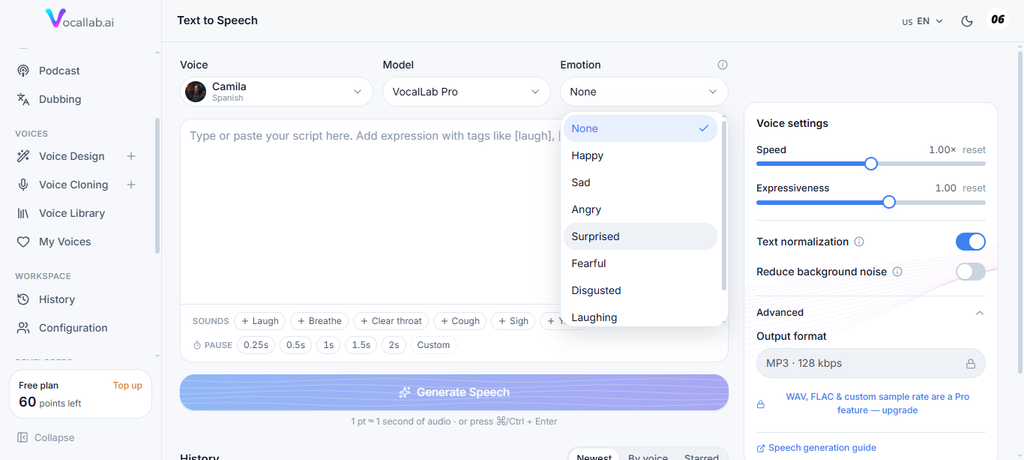
This gives us significantly more creative control than merely choosing “happy” or “sad” from a menu.
Natural Non-Verbal Sounds
VocalLab AI also supports non-verbal sounds that can make generated speech feel more conversational.
We can insert tags for laughter, sighing, breathing, coughing, yawning, or clearing the throat. These can be placed at specific points within the script, allowing us to use them where they naturally fit the dialogue.
This can be particularly effective for conversational videos, character narration, storytelling, podcast-style content, and social media voiceovers.
Custom Pauses and Emphasis
Timing plays an enormous role in how natural speech sounds.
VocalLab AI supports configurable break tags that allow us to insert exact periods of silence into the narration. We can also use punctuation and formatting to influence natural pauses and emphasize individual words.
These details may seem small, but together they allow us to move beyond simply generating speech and start directing an AI performance.
AI Voice Cloning
Create a Reusable AI Version of a Voice
Voice cloning is another major VocalLab AI feature.
The system can create a custom AI voice using a relatively short recording. VocalLab AI currently recommends a recording of approximately 5 to 30 seconds, which can either be uploaded or recorded directly through the browser.
Once the clone has been created, it appears alongside the other available voices and can be used for future text-to-speech generation.
This is especially valuable when consistency is important.
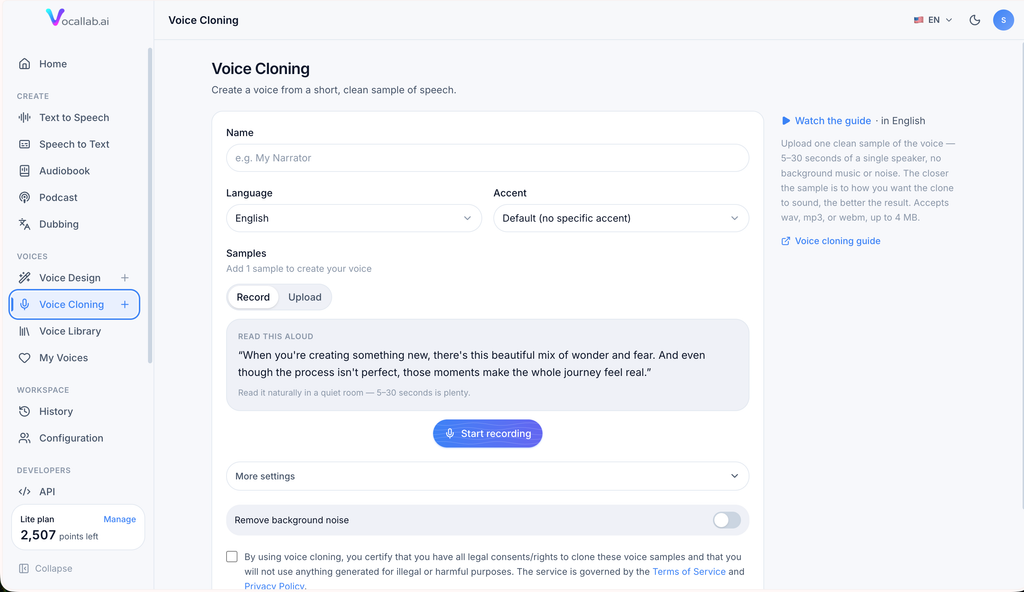
For example, creators who want their content to maintain the same recognizable voice across numerous videos can generate new scripts without recording every narration manually. Businesses can maintain a consistent audio identity across training or marketing content, while agencies can organize reusable voices for different projects.
VocalLab AI also includes an optional noise-removal feature during the cloning process, helping clean up recordings before they are analyzed.
The platform requires users to confirm that they own or have permission to clone the voice, which is an important component of responsible voice-cloning workflows.
Extensive Language and Accent Options for Voice Cloning
Language support is another area where VocalLab AI has expanded considerably.
The current voice-cloning interface provides a searchable selection covering hundreds of languages. Core languages include English, Spanish, French, German, Dutch, Portuguese, Italian, Japanese, Korean, Chinese, Russian, Arabic, Hindi, Hebrew, and Polish, while additional languages extend the platform’s reach significantly further.
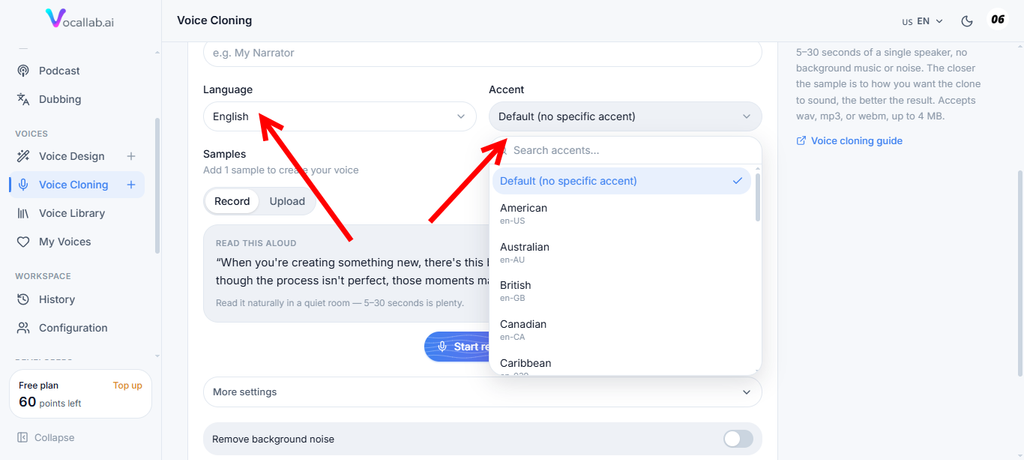
Several languages also provide multiple accent variations. English, for example, includes a broad range of accents spanning American, British, Canadian, Australian, Indian, Irish, Scottish, South African, and other regional styles.
This is useful for global campaigns because localization becomes more specific than simply translating text from one language to another.
A cloned voice can also read text in another language, adding another level of flexibility to multilingual content production.
Voice Design
Create a Completely New Voice From a Description
Voice Design takes a different approach from voice cloning.
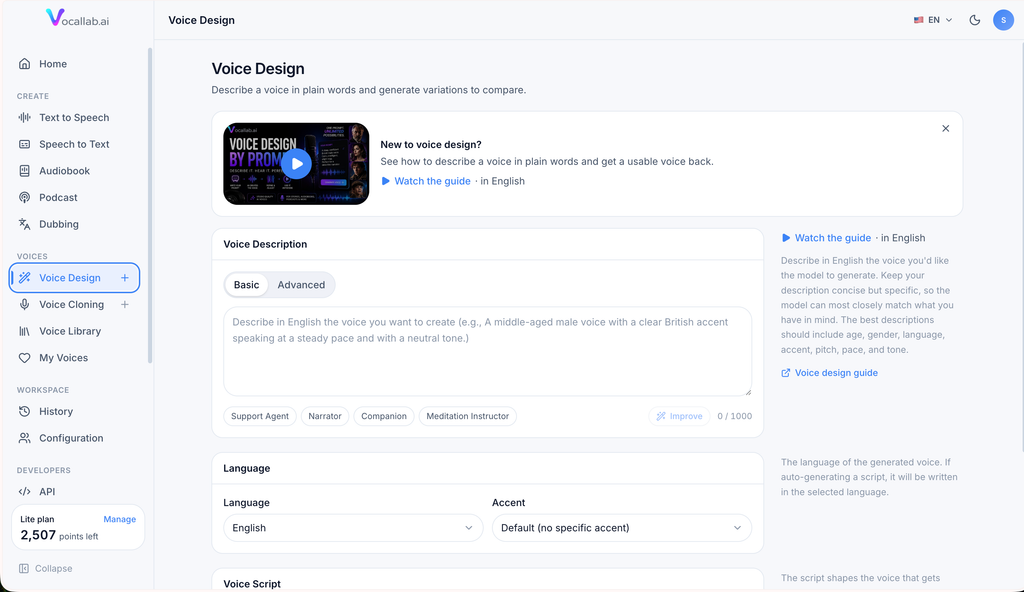
Instead of starting with an existing audio sample, we simply describe the type of voice we want. VocalLab AI then creates original voice variations that match the requested characteristics.
We can define attributes including age, gender, accent, pace, emotion, tone, pitch, volume, speed, clarity, fluency, personality, texture, dialect, and audio quality.
This is particularly appealing when we have a particular creative direction in mind but do not already possess a suitable recording.
We might want a calm British narrator, an energetic young American presenter, a warm meditation instructor, a polished customer-support voice, or a cinematic storyteller. Voice Design lets us start from the concept rather than searching endlessly for the closest existing option.
Basic and Advanced Voice Design
VocalLab AI provides both Basic and Advanced methods for creating voices.
Basic mode allows us to describe the desired voice naturally in text.
Advanced mode separates the voice into individual attributes, giving us more structured control over the output.
The system also provides presets such as Support Agent, Narrator, Companion, and Meditation Instructor, which can help us establish a starting point quickly.
Another useful feature is the ability to choose the target spoken language independently from the English-language voice description. The current Voice Design system provides a searchable language list covering hundreds of options along with regional accent controls for supported languages.
Speech-to-Text Transcription
Turn Existing Audio Into Written Content
VocalLab AI also works in the opposite direction through its Speech to Text functionality.
Rather than turning text into speech, we can upload existing audio or video and convert the spoken content into written text.
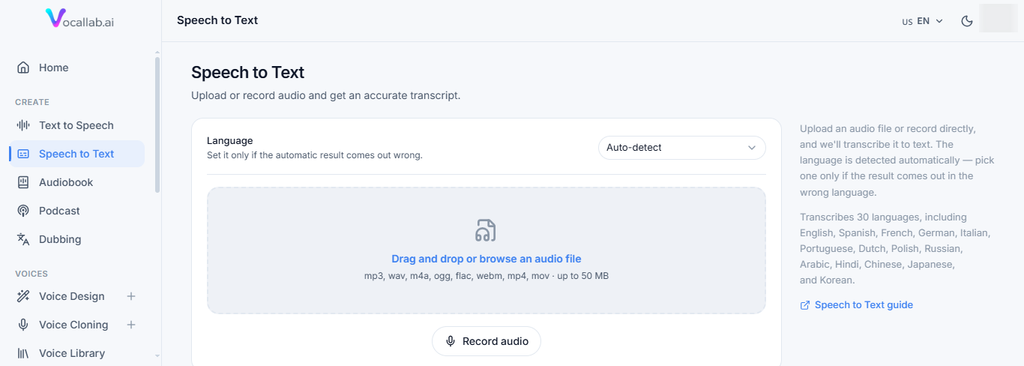
The transcription system currently supports 30 languages and can process anything from a short voice recording to recordings lasting several hours.
We can upload formats including MP3, WAV, M4A, OGG, FLAC, WebM, MP4, and MOV. When we upload video, VocalLab AI extracts the audio automatically.
Longer recordings are divided at natural pauses, transcribed in sections, and then reassembled into the completed transcript. Background processing means longer jobs can continue even when we leave the page and return later.
This creates another useful workflow for content teams. We can take interviews, podcasts, lectures, meetings, recordings, or video content and convert them into text for editing, repurposing, or further voice production.
AI Video Dubbing
Translate and Re-Voice Video Content
Video dubbing significantly extends what we can do with VocalLab AI.
The platform analyzes an uploaded video, transcribes what is being said, identifies the timing of individual lines, translates those lines into another language, and generates replacement speech while preserving the timing of the original content.
That timing element matters.
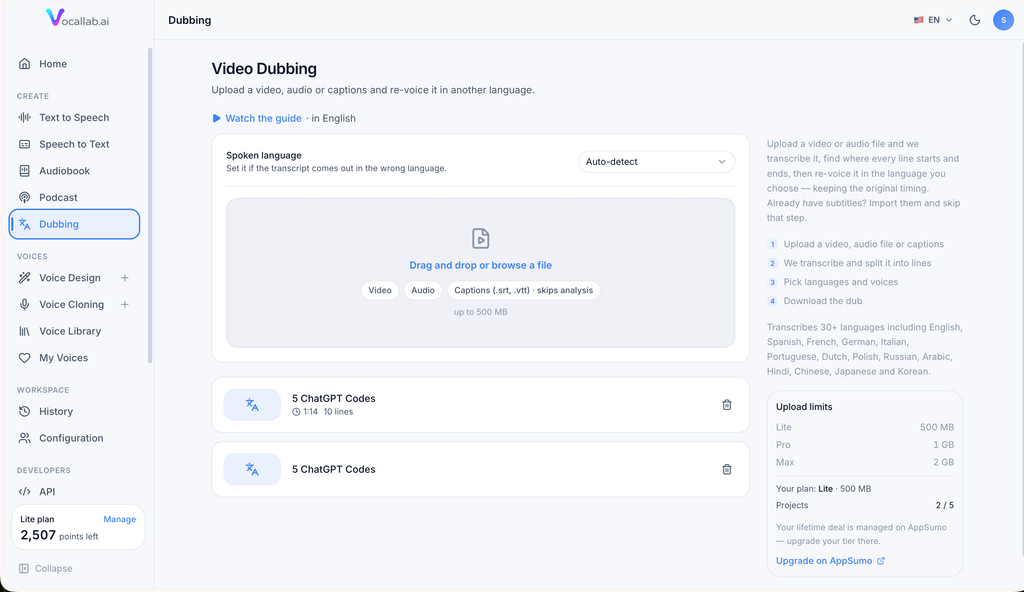
A direct translation can frequently be longer or shorter than the source sentence. VocalLab AI therefore evaluates translated lines according to the available speaking window and provides feedback about how well the translated delivery fits the original timing.
We can edit individual translated lines, choose which lines should be re-voiced, assign different voices to different sections, regenerate specific lines, preserve the original audio where appropriate, and manage multiple takes.
The ability to retain previous takes is particularly useful because experimenting with another delivery does not automatically remove the version we already generated.
Once the dub has been completed, VocalLab AI can rebuild the track and create the downloadable video.
For creators expanding internationally, this can transform one original video into content suitable for multiple audiences without requiring an entirely separate dubbing workflow.
Automatic SRT Captions
Audio and Captions From the Same Workflow
VocalLab AI automatically supports SRT caption generation alongside AI-generated audio.
The platform calculates word-level timestamps so the subtitle timing follows the speech closely. This makes it particularly useful for caption-heavy video formats such as YouTube Shorts, Instagram Reels, TikTok videos, tutorials, and educational content.
The word-level timing can also support karaoke-style caption experiences where words are highlighted in sequence as they are spoken.
SRT remains one of the most widely supported subtitle formats, so generated captions can be brought into popular video platforms and editing workflows without requiring a proprietary caption format.
For us, combining audio and caption creation is a practical productivity feature because voice generation and subtitle production often happen within the same content workflow anyway.
Audiobook Creation
Convert Books and Manuscripts Into Audio
One of VocalLab AI’s most ambitious capabilities is its audiobook production environment.
We can build audiobooks manually or import an existing manuscript. Supported import formats currently include EPUB, PDF, DOCX, and TXT.
When a compatible book is imported, VocalLab AI can analyze the content, separate it into chapters, detect dialogue, identify who is speaking, and prepare the content for voice assignment.
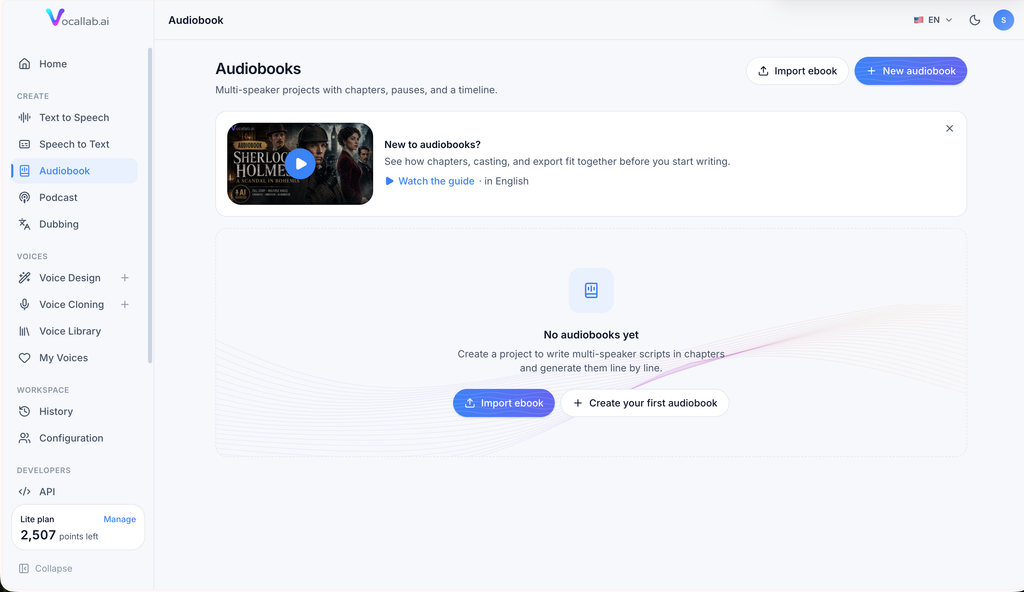
We can then cast voices manually or use automatic casting to assign appropriate voices to the different characters.
This goes considerably beyond simply pasting a 100-page manuscript into a standard text-to-speech generator.
Chapter-Based Audiobook Editing
The audiobook workspace organizes projects into chapters and blocks.
Speaker blocks contain spoken content, while pause blocks allow us to create configurable silence between sections. Blocks can be reordered, moved, edited, deleted, or assigned different voices.
A single audiobook can therefore contain narration, multiple character voices, pauses, emotion, and generated dialogue in a structured environment.
For fictional books, children’s stories, dramatized content, educational material, and multi-speaker productions, the ability to assign a different voice to each character provides far more creative flexibility than a single-voice narration.
Import, Analyze, Cast, Generate, and Export
The full audiobook workflow is relatively cohesive.
We can import the manuscript, allow VocalLab AI to analyze the structure, review the detected speakers, choose voices, generate individual sections or complete chapters, and finally export the project.
The final export combines the generated chapters in sequence and includes the silence added through pause blocks, producing one finished MP3 file.
For authors and publishers experimenting with AI-assisted audiobook production, this makes VocalLab AI one of the more comprehensive areas of the platform.
Multi-Voice Content Production
Multi-voice generation is useful outside audiobooks as well.
VocalLab AI’s Studio workflow allows us to assign different voices to different text blocks. This creates opportunities for dialogue, interviews, character conversations, educational scenarios, fictional podcasts, training simulations, and other multi-speaker formats.
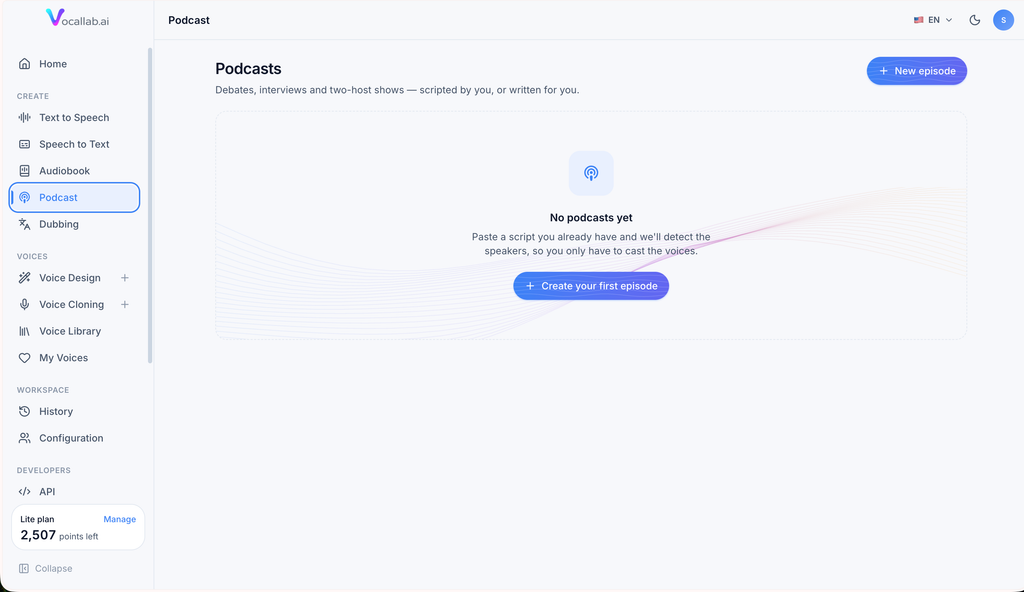
From our perspective, this matters because modern AI audio creation is increasingly moving toward complete productions rather than isolated voice clips.
A system that helps manage multiple speakers naturally becomes more useful as the complexity of a project increases.
Multilingual AI Voice Generation
International content production is clearly an important part of VocalLab AI’s feature set.
The core voice models support major languages including English, Arabic, Chinese, Dutch, French, German, Hebrew, Hindi, Italian, Japanese, Korean, Polish, Portuguese, Russian, and Spanish.
The Studio generation models extend language and locale coverage significantly further, while Voice Design and Voice Cloning provide even broader searchable language selections.
This gives marketers, creators, educators, and businesses a strong foundation for localized digital marketing and international content production.
Instead of building a completely separate production pipeline for every market, we can potentially use the same platform to generate different language versions, design region-specific voices, clone authorized voices, produce captions, and dub video content.
MP3, WAV, and Caption Export Options
Once audio is generated, VocalLab AI supports common formats designed to fit standard editing workflows.
MP3 provides a convenient format for everyday publishing and video production, while supported plans also provide WAV export when higher-quality uncompressed audio is required.
SRT subtitle files can accompany generated content, helping move the finished assets directly into video-editing and publishing tools.
This makes VocalLab AI suitable for workflows involving tools such as Adobe Premiere Pro, Final Cut Pro, DaVinci Resolve, CapCut, YouTube, TikTok, and similar production environments.
Rather than attempting to replace a full video editor, VocalLab AI focuses on producing audio and caption assets that can move cleanly into the rest of the production process.
Audio History and Voice Organization
When we generate content repeatedly, organization becomes important.
VocalLab AI maintains generation history according to the selected plan, allowing previously created audio to remain accessible for a defined period.
Cloned voices and designed voices are also stored within the user’s voice collection, helping us build a reusable library rather than recreating voices every time a new project begins.
This is especially valuable for recurring content.
If we have separate voices for advertisements, educational narration, branded videos, podcast segments, or different client projects, keeping those voices organized can save considerable setup time over repeated production cycles.
API Access for Automated Voice Generation
Build VocalLab AI Into Custom Workflows
VocalLab AI is not limited to its browser interface.
The developer API allows supported accounts to connect voice generation directly to applications, scripts, services, and automation systems.
Through the API, developers can generate speech, retrieve available voices, access cloned and designed voices, select speech models, check generation status, retrieve audio, download captions, design voices, clone voices, and monitor account balances.
This considerably expands the potential use cases.
A developer could use VocalLab AI inside an application that automatically narrates articles. A content business could connect it to a publishing pipeline. An agency might automatically create voiceovers from approved scripts. A SaaS product could generate audio dynamically from user-generated content.
The same four voice-generation models are available through supported API workflows, allowing developers to select the appropriate balance of quality, language support, speed, and generation efficiency.
MCP Support for AI Assistants
Generate Audio Through AI Tools
One of the more modern additions to VocalLab AI is Model Context Protocol, or MCP, support.
MCP allows compatible AI tools such as Claude Desktop, Claude Code, Cursor, VS Code, and other clients to interact with VocalLab AI through native-style tools.
Once connected, an AI assistant can access capabilities including checking the account balance, listing voices, selecting models, generating speech, retrieving completed generations, downloading captions, designing new voices, saving custom voices, cloning voices, and managing stored voices.
VocalLab AI also provides hosted MCP access, meaning the connection does not require users to maintain their own server infrastructure.
For users building AI-driven workflows, we consider this particularly interesting because voice generation can become part of a larger AI-assisted process rather than functioning as a completely separate application.
Team Workspace Features
VocalLab AI also supports workspace functionality for teams and higher-volume production environments.
Depending on the plan, organizations can work with multiple seats and shared usage pools. This structure is useful for agencies, content departments, media teams, and businesses where several people need access to the same voice-generation environment.
For a single creator, individual access may be sufficient.
For a team producing content continuously, shared workspace functionality can make VocalLab AI more practical as an operational production tool rather than merely an individual creative utility.
Commercial Use
Commercial licensing is an important consideration with any AI voice platform, particularly for marketers, agencies, creators, and businesses.
VocalLab AI provides commercial-use rights for its Professional Voices on qualifying paid plans. The platform specifically lists uses such as monetized YouTube videos, TikTok content, advertisements, promotional videos, podcasts, commercially sold audiobooks, client projects, e-learning products, applications, and software products.
This is significant because many people considering AI voice generation are not creating content purely for personal experimentation.
The ability to use professional voices in commercial projects makes the platform much more relevant for real content-production workflows.
Who Is VocalLab AI Best For?
YouTube and Social Media Creators
For creators, VocalLab AI can cover several repetitive production tasks.
We can create narration, experiment with different presenters, maintain recurring voices, add expressive delivery, produce synchronized captions, generate multilingual versions, and potentially dub successful videos for new audiences.
Short-form creators can benefit from quick voice generation and caption exports, while long-form YouTube creators can use the broader Studio workflow for more substantial narration.
Podcasters
Podcasters can use VocalLab AI for introductions, scripted episodes, narrative shows, fictional content, promotional segments, multi-speaker formats, and repurposing written content into audio.
Speech-to-text also works in the opposite direction by allowing recorded material to be converted into written content.
Authors and Publishers
Authors are one of the most obvious audiences for the audiobook tools.
The ability to import manuscripts, automatically divide content into chapters, identify speakers, cast different character voices, add pauses and emotional delivery, and export the completed narration creates a much more focused workflow than ordinary text-to-speech.
Digital Marketers and Agencies
For digital marketing agencies and marketing teams, we see several potential applications.
VocalLab AI can be used for social media advertisements, product demonstrations, client videos, localized campaigns, explainer videos, training content, landing-page videos, educational material, and automated content workflows.
Voice cloning and Voice Design also make it possible to create more consistent audio identities across campaigns.
Educators and Course Creators
Educators can convert lesson scripts and course material into narration without recording every module manually.
The combination of multilingual speech, custom voices, long-form workflows, captions, and commercial rights for professional voices is particularly relevant for digital courses and training programs.
Developers and SaaS Companies
Developers can use the API and MCP capabilities to turn VocalLab AI into part of another system.
That moves the product beyond manual audio generation and into AI automation, dynamic voice creation, and application-level integration.
VocalLab AI Pricing Structure
VocalLab AI currently uses a points-based subscription system, with generation allowances depending on the selected plan.
The official subscription lineup includes a Free option for getting started, followed by paid Lite, Pro, and higher-volume Max options. Different plans expand areas such as monthly generation capacity, saved voice clones, saved Voice Designs, audio history, WAV export, priority processing, Studio-model access, API access, MCP functionality, team seats, and higher-volume production capacity.
We think the tiered approach makes sense because VocalLab AI serves very different types of users.
Someone creating occasional short videos has very different usage requirements from an agency producing hundreds of voiceovers or a developer generating speech automatically through an API.
The points system allows the platform to accommodate those different production volumes without forcing every user into exactly the same configuration.
Our Overall VocalLab AI Review
After examining the current VocalLab AI platform in detail, we see it as much more than another AI voice generator.
Text-to-speech is the foundation, but the broader collection of tools is what gives VocalLab AI its identity.
We can select from hundreds of professional voices, choose between multiple generation models, control delivery through voice steering, add non-verbal sounds, clone authorized voices, create original voices through written prompts, transcribe audio, generate word-level captions, dub videos into other languages, create multi-character audiobooks, organize longer projects, automate speech generation through an API, and connect the platform with compatible AI assistants through MCP.
What we particularly like is how these capabilities relate to each other.
Voice Design feeds into text-to-speech. Cloned voices can be used in longer projects. Audiobooks can combine multiple voices. Speech-to-text can convert existing recordings back into editable content. Dubbing combines transcription, translation, timing, and voice generation. SRT captions complement generated voiceovers. API and MCP support make many of the same capabilities available outside the standard browser workflow.
That interconnected approach is what turns VocalLab AI from an individual AI feature into a broader content-production system.
Final Verdict: Is VocalLab AI Worth Using?
For creators, businesses, authors, agencies, educators, podcasters, and developers looking for an AI voice platform that covers more than basic text-to-speech, we believe VocalLab AI deserves serious consideration.
The voice library gives us plenty of starting options, while Voice Cloning and Voice Design allow us to move beyond stock narration when a project needs its own sound.
The Studio model provides impressive control over how speech is performed. Multilingual capabilities make the platform suitable for international content. Speech-to-text and video dubbing extend the workflow beyond voice generation. The audiobook editor gives long-form creators a dedicated environment instead of forcing them to build books from isolated clips. Caption exports simplify video production, while API and MCP connectivity create powerful possibilities for automated AI workflows.
What ultimately makes VocalLab AI interesting to us is its scope.
Instead of requiring one service for text-to-speech, another for voice cloning, another for transcription, another for dubbing, another for captions, and yet another workflow for long-form narration, VocalLab AI increasingly brings these capabilities together inside one ecosystem.
For anyone regularly producing audio-driven digital content, that combination of realistic AI voices, customization, multilingual generation, structured long-form production, transcription, dubbing, captions, and automation makes VocalLab AI a compelling platform to explore.

Vijay Sood is a seasoned digital marketer with a passion for driving online growth and innovation. With a robust background in developing and executing comprehensive digital strategies, Vijay excels in leveraging SEO, content marketing, and social media to boost brand visibility and engagement. His expertise lies in transforming data-driven insights into actionable marketing campaigns, helping businesses achieve their digital objectives.