
Finding potential customers, collecting accurate contact information, and managing outreach campaigns are essential activities for any growing business. However, these processes often involve repetitive tasks, extensive research, and coordination between multiple software applications. This is where automation platforms like TexAu can make a meaningful difference.
In today’s competitive business environment, sales and marketing teams need more than a simple prospecting tool. They need a comprehensive system that helps them discover relevant prospects, enrich contact information, qualify opportunities, automate outreach processes, and maintain organized customer records.
TexAu brings these capabilities together through a combination of AI-powered tools, data enrichment, workflow automation, and integrations with popular sales and marketing applications.
We recently explored TexAu’s capabilities to understand how the platform approaches modern lead generation and go-to-market automation. What caught our attention was its emphasis on creating a connected workflow where data collection, qualification, and sales execution work together.
Rather than treating prospect research and outreach as separate activities, TexAu provides a unified environment where teams can manage the entire process more efficiently.
In this detailed TexAu review, we will explore its features, automation capabilities, AI tools, integrations, pricing, and overall value for businesses, marketers, agencies, and sales professionals.
What Is TexAu?
TexAu is an AI-powered go-to-market automation platform designed to help businesses discover leads, enrich prospect information, automate repetitive sales activities, and connect their data with customer relationship management systems. The platform combines lead generation, data enrichment, email verification, AI-based lead scoring, workflow execution, and CRM synchronization within a centralized workspace.
TexAu originally became known for its social media automation and data extraction capabilities. Over time, its product ecosystem has expanded to include a more comprehensive go-to-market workspace built around prospecting, enrichment, and sales operations.

Its current platform places particular emphasis on a spreadsheet-style interface that allows users to organize prospect information and execute actions directly from their data. We find this approach particularly relevant because most sales processes already revolve around lists of companies, contacts, and potential customers. TexAu builds automation directly into that familiar working environment.
The platform also offers TexAu Desktop, which provides a broad collection of automations for extracting information and performing activities across professional networks, social platforms, online communities, and websites. Together, these capabilities make TexAu an interesting solution for businesses looking to automate different aspects of their lead generation and sales workflows.
Who Can Benefit From TexAu?
TexAu is designed for professionals and organizations involved in prospecting, business development, and customer acquisition. For digital marketing agencies, the platform can help organize lead generation activities across multiple clients. Sales representatives can use it to discover decision-makers, verify contact information, and prepare targeted prospect lists.
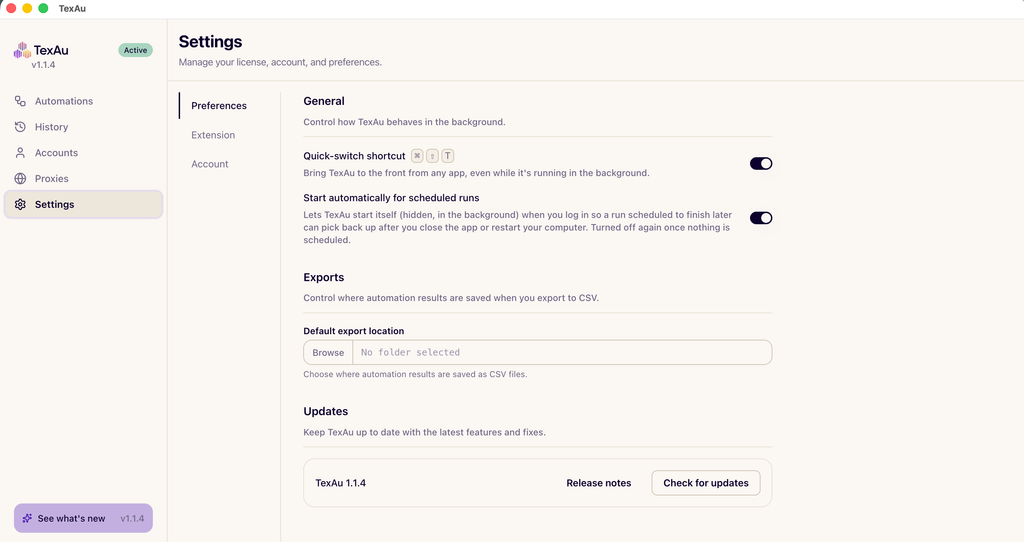
Founders and entrepreneurs can benefit from automating prospect research and building more organized outbound sales processes. Revenue operations teams can use TexAu to improve CRM data quality, synchronize customer records, and create repeatable workflows.
We also see considerable potential for B2B businesses, consultants, recruiters, and growth marketing professionals who regularly work with large volumes of prospect data.
TexAu’s Spreadsheet-Based Workspace
One of the most distinctive aspects of TexAu is its spreadsheet-style working environment. Traditional sales automation often involves moving information between different platforms or creating complicated sequences before performing basic actions. TexAu takes a different approach by making the table itself the primary workspace. Users can import information, organize contacts into rows and columns, and execute actions directly from the relevant data fields.
A Familiar Interface for Managing Prospect Data
The spreadsheet-style interface makes TexAu approachable for professionals who already use Excel or Google Sheets. A table can contain information such as contact names, company names, job titles, business email addresses, phone numbers, company websites, and lead qualification scores.
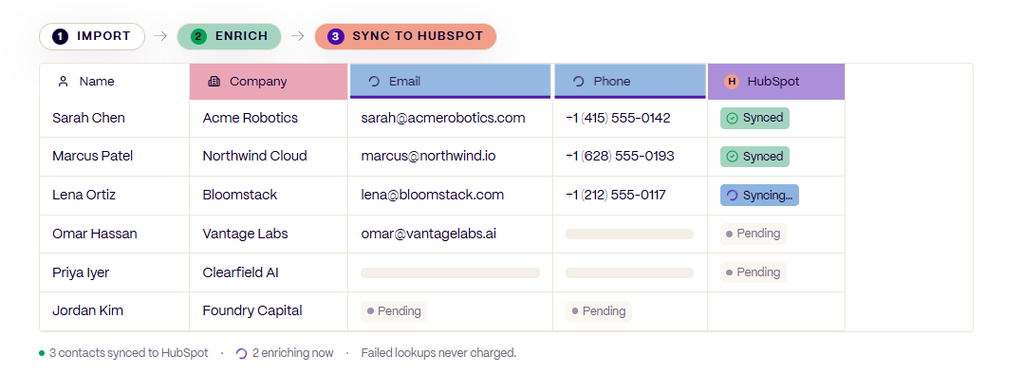
Users can then select a column and execute different actions, including finding missing information, verifying existing data, or generating AI-powered insights. We appreciate the practical structure behind this approach. The prospect data and the actions associated with it remain connected, making it easier to understand how information moves through the sales process. The interface also supports filtering and organizing records, allowing teams to focus on the prospects that best match their requirements.
Importing and Organizing Existing Leads
TexAu allows businesses to work with information they already possess instead of always starting prospect research from scratch. Users can bring in CSV files, existing contact lists, CRM segments, and other supported data sources.
Once imported, these records can become the starting point for enrichment, qualification, verification, and CRM synchronization. For example, a marketing team with an existing prospect database can use TexAu’s enrichment capabilities to identify additional company information and improve the overall quality of its records. We see this as a useful way to make existing sales data more actionable.
Powerful Lead Generation and Prospect Discovery
Lead generation is one of the central capabilities of TexAu. The platform helps businesses discover relevant individuals and organizations based on their target audience and sales objectives. Instead of collecting large quantities of unrelated contacts, teams can focus on prospects that match their ideal customer profiles.
Finding Relevant People and Companies
TexAu supports actions for discovering individuals, researching companies, identifying professional profiles, and locating business contact information. Users can build prospect lists around different characteristics, including industries, company attributes, professional roles, and other available targeting information.
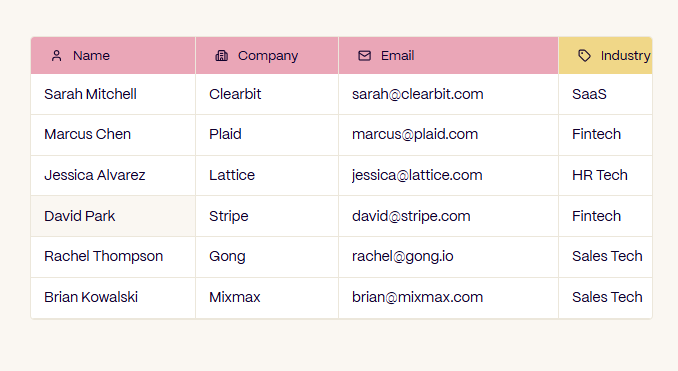
For B2B sales teams, this is especially valuable because reaching the appropriate decision-maker is often more important than reaching a large audience. A business targeting software companies, for example, may want to identify founders, technology executives, or marketing leaders within organizations that meet specific criteria.
TexAu helps connect this discovery process with the enrichment and qualification activities that follow. We believe this integration makes the overall prospecting process more organized and relevant to actual sales objectives.
LinkedIn and Sales Navigator Prospecting
LinkedIn is an important source of professional information for B2B marketers and sales professionals. TexAu supports prospecting workflows involving LinkedIn profiles and saved LinkedIn Sales Navigator searches.

This enables users to work with professional information and move relevant prospects into organized lead generation workflows. Its desktop automation collection also includes specialized tools for discovering people associated with companies, searching professional profiles, and extracting information from Sales Navigator lead and account lists.
For businesses targeting specific industries or professional roles, these capabilities can provide a practical foundation for account-based prospecting. We particularly value the ability to connect professional research with subsequent enrichment and qualification instead of leaving the information isolated in separate lists.
Waterfall Enrichment for More Complete Lead Information
Data enrichment is one of TexAu’s most important features. Finding a person’s name and company is only the beginning of the prospecting process. Sales teams often need additional information before they can determine whether a contact is relevant. TexAu addresses this through waterfall enrichment, which combines multiple data providers within a structured lookup process.
How TexAu Waterfall Enrichment Works
Waterfall enrichment searches different information providers in a predefined sequence. When a provider returns a verified result, the workflow can stop searching that particular field and continue with the next activity. TexAu connects with data providers such as Apollo, Hunter, Snov, RocketReach, Dropcontact, Clearbit, Lusha, ZoomInfo, and others.
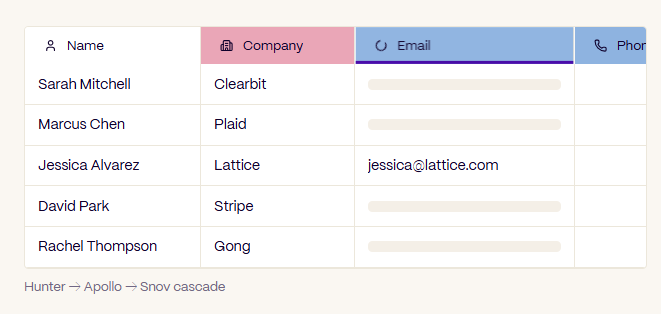
The platform allows different providers to be arranged according to the organization’s data requirements and preferred lookup strategy. We find this approach especially interesting because a business can draw on multiple sources through a single enrichment process. Rather than manually searching different platforms for contact information, users can initiate the enrichment process directly from their TexAu workspace.
Email, Phone Number, and Company Enrichment
TexAu’s enrichment features can help businesses locate professional email addresses, phone numbers, company details, and additional information associated with their prospects. Company enrichment may include firmographic information such as industry, company size, and business characteristics.
The platform also supports enrichment activities involving technological information, hiring activity, funding information, and other business signals. These details can help sales representatives understand the organizations they are approaching and tailor their messaging accordingly.
We consider this particularly valuable for targeted B2B campaigns because understanding a prospect’s business context can improve the relevance of outreach.
Intelligent Data Sourcing and Transparency
TexAu provides controls for organizing enrichment providers and tracking how information is obtained. Its enrichment process can record the source, confidence level, execution time, and cost associated with lookup activities.
The platform also supports field-specific enrichment sequences, allowing different types of information to be retrieved through different providers. This makes enrichment both structured and measurable. For teams managing substantial amounts of prospect data, the ability to understand where information comes from is an important part of maintaining a dependable sales database.
Email Verification and Contact Data Quality
Email verification is another major capability within TexAu. A successful email marketing or outbound sales campaign depends on reliable contact information.
Sending messages to inaccurate email addresses can affect campaign performance and the reputation of sending domains. TexAu includes email verification tools designed to evaluate contact information before it enters an outreach campaign.
Integrated Email Verification
TexAu connects with email verification providers such as NeverBounce, ZeroBounce, Million Verifier, and Kickbox. These services can be incorporated into workflows to evaluate addresses and identify their verification status.
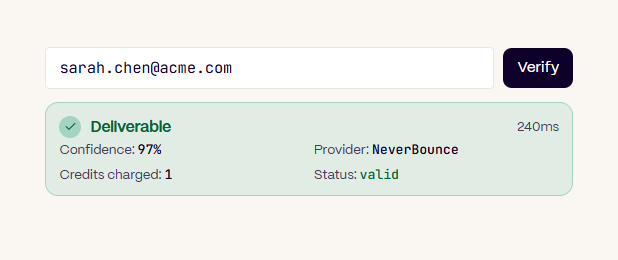
Rather than requiring teams to move their contact lists into a separate application, TexAu allows verification to become part of the broader data preparation process.
Users can evaluate addresses and organize them according to their results. We appreciate how this makes verification a natural stage between lead enrichment and outbound campaign execution.
Verification Results and Workflow Routing
TexAu supports different routing decisions based on email verification results. Addresses can be classified into categories such as valid, risky, catch-all, or invalid, helping teams determine how different records should be handled.

Verification results can also be cached and reused in subsequent workflows. This supports consistent contact data management and reduces unnecessary repeated verification activities.
TexAu advertises a 97% verified email accuracy figure, reflecting its emphasis on maintaining high-quality prospect information. For businesses that depend on email outreach, this focus on contact quality is one of the platform’s most appealing features.
AI-Powered Lead Scoring and Qualification
Not every prospect represents the same business opportunity. Some contacts closely match the target customer profile, while others may be less relevant to the organization’s products or services. TexAu addresses this through customizable AI-powered lead scoring.
Creating Custom Lead Scoring Criteria
TexAu allows businesses to define their own lead scoring criteria through its AI Column feature. Instead of relying on a universal scoring formula, users can describe the characteristics that make a prospect valuable to their business. The platform can then evaluate available prospect information against those instructions.
For example, a company might prioritize organizations based on industry, employee count, technology usage, recent funding, or buying-related signals. The AI Column can return a numerical score, a classification, or another structured result based on the prompt.
We particularly like this customizable approach because ideal customer profiles vary considerably between businesses. An agency targeting local businesses may use completely different qualification criteria from a software company targeting enterprise customers.
Turning Prospect Information Into Actionable Scores
Lead scores can appear directly alongside the corresponding prospect records. Users can filter contacts based on their qualification scores and prioritize the most relevant opportunities. TexAu also supports generating explanations for AI scoring decisions, giving teams additional context about why particular prospects received certain ratings.
This can help sales representatives understand which attributes make a contact attractive. The resulting scores can become part of the automation process, determining which records should move forward into CRM systems or outreach campaigns. We see this as an effective connection between prospect research and sales execution.
AI Columns for Data Analysis and Personalization
Beyond lead scoring, TexAu’s AI Columns provide a flexible way to transform and analyze information. Users can apply AI operations to existing table data without moving information into a separate AI writing or analysis application.
Summarization, Extraction, and Classification
TexAu supports AI-powered summarization of professional profiles, company descriptions, and other text-based information. It can also extract specific details from larger pieces of content and organize those details into structured fields.
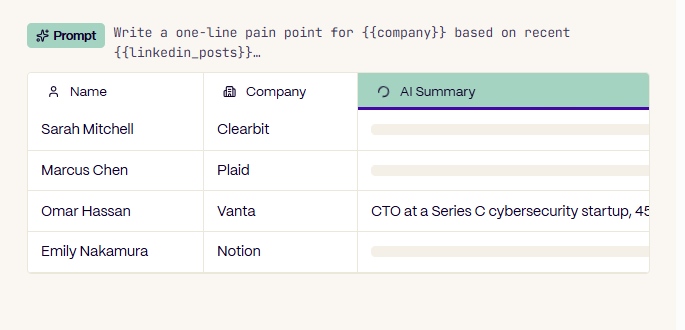
Classification allows users to assign categories to records based on their characteristics. For example, contacts might be classified by industry, professional function, company category, or other relevant criteria. We find these capabilities useful because they convert unstructured information into organized data that can support segmentation and business decisions.
Personalized Outreach Content Generation
TexAu’s AI Columns can also help generate personalized communication content. Users can provide information about a prospect and instruct the AI to create relevant introductory messages, email opening lines, or short descriptions. This creates opportunities to incorporate company details and professional context into outbound communication.
Instead of relying on identical messages for every prospect, sales teams can develop more relevant communication based on available information. The platform also supports translation, allowing users to adapt descriptions and outreach content for audiences speaking different languages. For organizations operating across different markets, these capabilities can contribute to a more localized communication strategy.
Support for Popular AI Models
TexAu supports AI operations involving OpenAI GPT models, Anthropic Claude, and Google Gemini. Users can work with supported AI models through TexAu’s credit system or connect their own API keys. The ability to bring an existing AI provider account gives businesses additional control over their AI-powered operations.
TexAu also includes a collection of prompt templates designed for common data processing and content generation activities. We see this model flexibility as a useful feature for marketing and sales teams with established AI workflows.
GTM Copilot: Building Workflows With Natural Language
One of TexAu’s most interesting AI features is GTM Copilot. The feature allows users to describe a sales or prospecting objective in natural language and have the platform generate a corresponding workflow.
From a Simple Instruction to an Automated Process
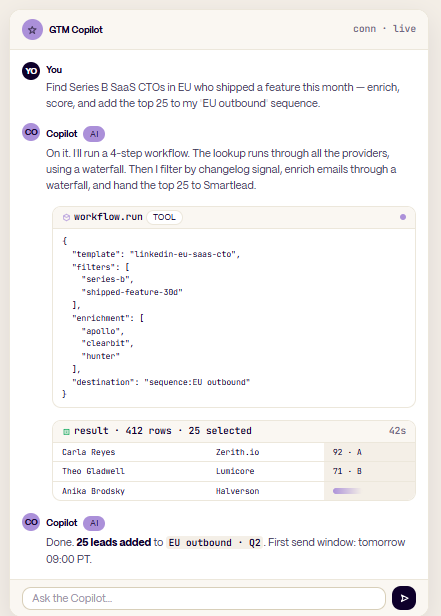
GTM Copilot can interpret instructions involving prospect discovery, enrichment, verification, qualification, and CRM synchronization. A user can describe the type of prospects they want to identify and the actions they want performed. TexAu then proposes the relevant workflow steps, identifies appropriate data sources, and organizes the process within its workspace.
The generated workflow remains editable, allowing users to adjust providers, modify actions, and refine the overall sequence. We find the natural-language approach particularly appealing because it connects business objectives with workflow configuration. Instead of concentrating on technical setup alone, teams can start by describing the result they want to achieve.
Interactive Workflow Refinement
GTM Copilot also supports iterative instructions. Users can ask it to adjust enrichment providers, add qualification criteria, modify filtering rules, or change the destination of processed records. The assistant can explain individual workflow steps and the reasoning behind its choices.
This helps users understand the automation they are creating while maintaining control over its configuration. For founders, marketers, and sales professionals, GTM Copilot introduces an accessible way to build more sophisticated prospecting workflows.
Extensive Automation and Column Actions
Automation is central to the TexAu platform. TexAu advertises more than 200 ready-to-run actions across different categories of go-to-market activity. These actions connect prospect discovery with enrichment, verification, scoring, communication, and customer data management.
Automating Repetitive Sales Activities
TexAu allows users to initiate actions directly from their data tables. Available activities include finding professional information, enriching company records, checking email addresses, generating AI classifications, and updating connected applications.

Actions can also be combined into multi-step workflows. This means businesses can create a process where a lead is discovered, additional information is retrieved, the contact is verified, and the resulting record is prepared for outreach. We see considerable value in this connected execution model because repetitive tasks often consume significant time during prospecting and lead management.
Flexible Workflow Execution
TexAu supports executing individual actions and combining multiple operations into larger automation sequences. Users can create workflows around their own business processes instead of following a single predefined structure.
The platform also supports larger-volume processing and scheduled batches for extensive contact lists. This makes it suitable for both occasional prospecting activities and recurring lead generation operations.
CRM Integrations and Bidirectional Synchronization
Contact information becomes most valuable when it is connected to the systems used to manage customer relationships. TexAu includes CRM integrations that help businesses transfer enriched prospect information into their existing sales environments.
Connecting TexAu With Popular CRM Platforms
TexAu provides integrations for widely used CRM systems, including HubSpot, Pipedrive, Zoho CRM, and GoHighLevel. Its platform documentation also describes support for additional CRM environments through integration and API capabilities.
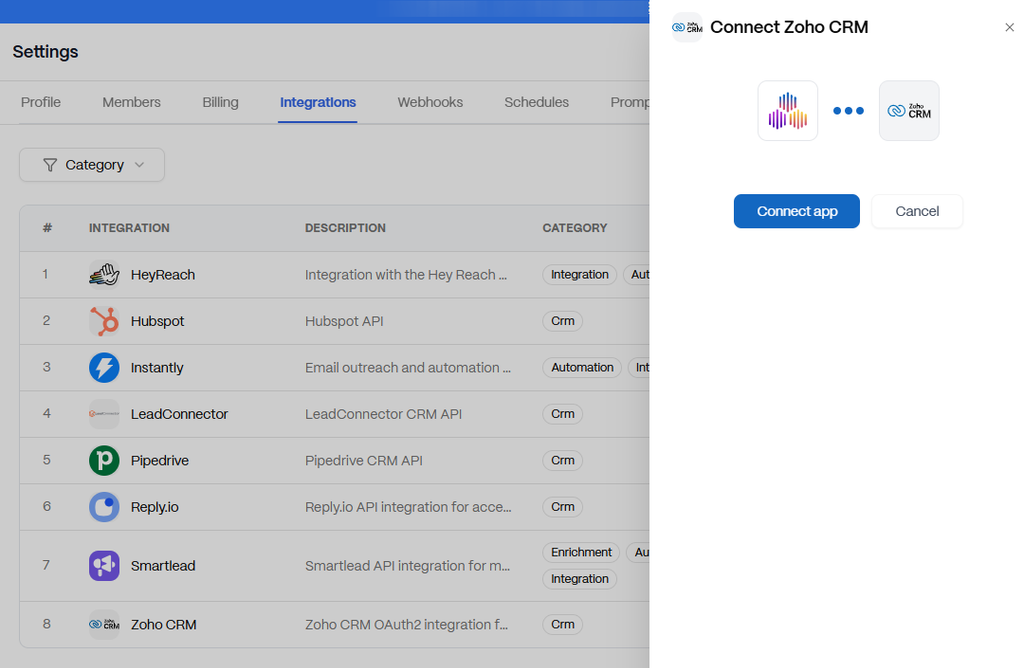
These connections allow businesses to create or update relevant records using data collected and processed through TexAu. We believe this functionality is especially useful for companies that already operate established sales pipelines. Rather than requiring teams to maintain another disconnected contact database, TexAu helps make enriched prospect information available within their existing CRM processes.
Field Mapping, Deduplication, and Lifecycle Management
TexAu supports custom field mapping so information can be transferred into the appropriate CRM fields. For example, an enriched company name, professional email address, or job title can be mapped to the corresponding customer record property. The platform also includes deduplication capabilities to identify existing records and support cleaner synchronization.
Users can configure how incoming information updates existing fields. TexAu additionally supports workflows involving lifecycle stage changes and other CRM events. These capabilities help organizations create a more structured relationship between prospect research, sales activity, and customer database management.
Two-Way CRM Data Synchronization
TexAu also offers bidirectional synchronization capabilities. This allows supported CRM events and record changes to become part of TexAu’s automation processes. For example, updates to a contact or a sales opportunity can trigger relevant actions within an automated workflow.
We consider this particularly valuable for revenue operations teams that want their prospecting processes and CRM information to remain aligned.
Outbound Sales and Outreach Integrations
TexAu does more than collect and enrich prospect information. It also connects with popular outbound sales platforms, helping businesses move qualified contacts into communication workflows.
Integration With Email Outreach Platforms
TexAu supports outbound integrations involving Smartlead, Instantly, Lemlist, Reply.io, Apollo Sequences, and other supported sales tools. Users can transfer enriched and verified contacts into their preferred outreach environment. Information generated through TexAu can also support personalization by providing contact details, company attributes, and AI-generated content.
We like the fact that this connects prospect preparation directly with campaign execution. A marketing or sales team can concentrate on identifying relevant audiences and producing suitable messaging while using its existing outreach software for communication.
Engagement Signals and Follow-Up Workflows
TexAu’s integrations can also help connect outreach activity with subsequent lead management. Depending on the connected platform and workflow configuration, engagement-related information can be incorporated into contact records and automation decisions.
This helps teams organize follow-up activities and maintain a clearer picture of prospect interactions. We see this as an important element of a coordinated outbound sales strategy, especially for businesses managing multiple campaigns.
Workflow Scheduling and Trigger-Based Automation
TexAu includes scheduling features designed to support recurring processes. This allows businesses to configure workflows around regular operational requirements rather than initiating every activity manually.
Automated Scheduling
Users can schedule workflows to operate at particular times or recurring intervals. TexAu supports calendar-based scheduling, cron expressions, and time-zone-aware execution. A business might schedule regular lead enrichment, prospect list updates, or CRM synchronization activities.
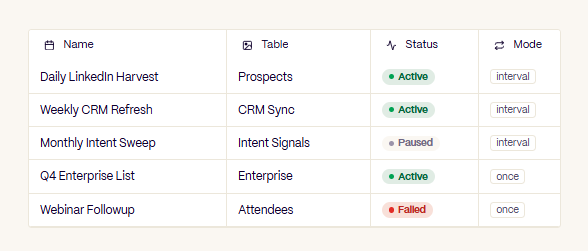
Scheduled execution helps make repeatable processes more consistent and easier to manage. We particularly appreciate the ability to combine multiple automation steps within a single recurring workflow.
Event-Triggered Automation
TexAu also supports workflows initiated by specific events. These can include incoming webhooks, CRM stage changes, form submissions, and supported external triggers. Event-driven automation helps businesses respond to relevant changes within their data and connected systems.
TexAu also provides workflow execution history, concurrency controls, and options for pausing and resuming scheduled activities. These features make the automation environment more manageable for teams running recurring operations.
Prebuilt Workflow Templates and Automation Library
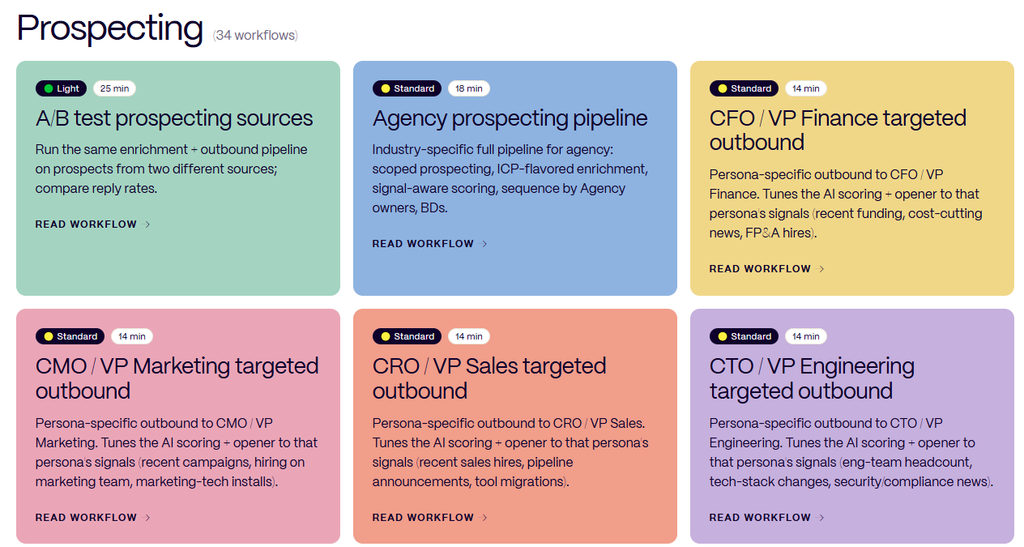
Building repeatable processes is another important part of TexAu. The platform provides reusable templates and a library of prebuilt workflows designed for common sales and marketing activities.
Ready-to-Use Workflow Templates
TexAu’s workflow library features more than 100 prebuilt automation workflows. These cover activities such as prospect discovery, contact enrichment, CRM data management, lead qualification, account research, and outbound preparation. Users can select a relevant workflow and customize it to match their business requirements.
We find this particularly useful because many organizations perform similar foundational activities even when their industries or audiences differ. Prebuilt workflows provide a starting structure that businesses can adapt to their own processes.
Creating and Reusing Custom Templates
TexAu also allows users to save individual actions, action sequences, scheduled workflows, and table configurations as templates. These templates can be deployed across different workspaces and shared with team members.
Version management helps organizations maintain consistent workflow configurations and update them when necessary. For agencies managing similar services across several clients, this is particularly useful. Instead of repeatedly recreating the same process, teams can establish a standardized workflow and customize it for individual accounts.
TexAu Desktop: Social Media and Web Automation
Alongside its GTM workspace, TexAu offers a desktop automation product focused on lead extraction, online research, and platform-specific activities. TexAu Desktop provides a catalog of more than 160 automations covering professional networks, social platforms, websites, and online communities. This broadens the TexAu ecosystem beyond conventional CRM enrichment.
LinkedIn Automation Features
TexAu Desktop includes automation capabilities for extracting information from LinkedIn people searches, company profiles, professional networks, and engagement activity. Users can work with information associated with employees, company followers, post interactions, and professional searches. The desktop catalog also includes LinkedIn connection and messaging automations.

These capabilities can help businesses organize professional prospecting activities and collect relevant information for further research. We see LinkedIn automation as particularly relevant for B2B businesses, consultants, recruiters, and agencies targeting professional decision-makers.
Sales Navigator and Recruiter Lite Automation
TexAu Desktop also includes tools designed for LinkedIn Sales Navigator and Recruiter Lite. Sales Navigator automations cover lead search exports, account search exports, list extraction, profile research, and certain outreach activities. Recruiter Lite automations support professional search extraction and recruiting-related messaging workflows.
These features give users additional ways to organize information from specialized professional platforms. For teams involved in account-based marketing or recruitment, this can help streamline the preparation of targeted contact lists.
X, Reddit, and Community-Based Research
TexAu Desktop supports automation involving X, formerly Twitter. Its automation catalog includes extracting profile information, followers, lists, posts, engagement data, and other publicly available or account-accessible information. The desktop offering also includes actions involving Reddit and Slack communities.

These capabilities can help marketers and researchers explore relevant conversations, professional communities, and audience interests. We see community-based research as a useful complement to traditional B2B prospecting because relevant business discussions often take place outside conventional company databases.
Google Maps and Website Data Extraction
TexAu Desktop also offers Google Maps automation capabilities. These include extracting business listings, gathering business profile information, and collecting review-related data. For agencies working with local businesses, Google Maps research can help identify organizations in specific geographic markets.
TexAu also includes website extraction tools that can retrieve metadata, available contact details, social links, structured data, and technological information. We find these capabilities relevant to local business prospecting, market research, and competitive intelligence.
Additional Platform Automations
TexAu Desktop’s automation catalog extends to platforms such as YouTube, Product Hunt, Crunchbase, GitHub, Pinterest, and Quora. The YouTube tools cover activities such as extracting channel information, videos, search results, and comments.
Product Hunt and Crunchbase-related research can contribute to company discovery and market intelligence. GitHub-related automation provides another source of information for technology-focused research. These platform-specific capabilities make TexAu Desktop a useful addition for teams that collect information from different online environments.
TexAu Integrations and Custom Functions
A major strength of TexAu is its ability to connect different applications and data sources. The platform brings together enrichment providers, CRM systems, outbound sales software, and automation tools within a connected working environment.
Integration With Existing Sales and Marketing Tools
TexAu’s integrations help businesses coordinate information between platforms they already use. For example, contact discovery can involve one provider, enrichment can involve another, and the final information can be synchronized with a CRM.
Users can also connect supported outreach platforms to complete the process. We see this interconnected structure as one of TexAu’s most valuable characteristics. It supports a more consistent flow of information across prospect research, lead qualification, and sales operations.
Custom JavaScript and Python Functions
TexAu also offers Custom Functions for users who want to extend their workflows with additional logic. These functions support JavaScript and Python, allowing teams to transform data, interact with external APIs, and perform custom operations.
Developers and technical marketing teams can use these capabilities to build specialized enrichment activities or connect additional information sources. Custom Functions can operate alongside native TexAu actions within the same workflow. We appreciate this flexibility because businesses often have unique operational requirements that benefit from customized automation.
API-Based Workflow Extensions
TexAu’s API-oriented capabilities also support connecting external services and building more tailored automation processes. Businesses can incorporate additional data sources, create specialized routing logic, and connect internal systems using supported API functionality. For technically capable teams, this creates opportunities to extend TexAu into more customized go-to-market operations.
Team Collaboration and Multi-Workspace Management
TexAu provides features designed for teams and agencies working across different projects or client accounts. Its workspace structure helps organize data, workflows, connections, and users within separate environments.
Separate Workspaces for Different Clients
Agencies can maintain dedicated workspaces for individual clients. Each workspace can contain its own prospect lists, workflow configurations, CRM connections, and related information. This provides a structured way to manage different customer acquisition projects.
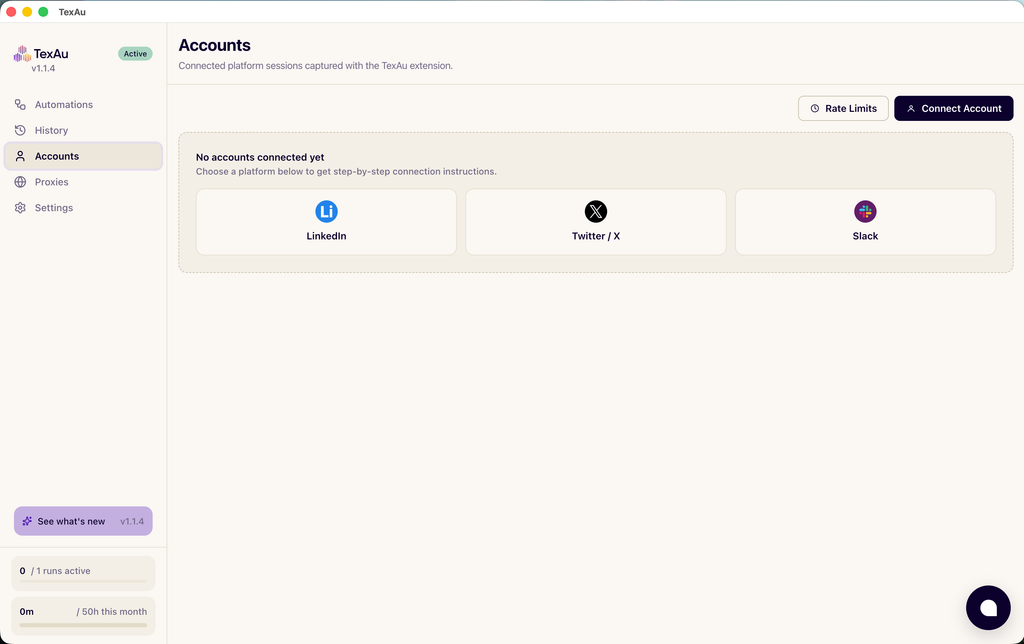
For a digital marketing agency, separate workspaces can support clearer organization across clients with different industries, geographic markets, and target audiences. We see this as particularly useful when managing recurring lead generation services.
Shared Resources and Team Collaboration
TexAu supports shared credit arrangements across agency workspaces, allowing organizations to manage usage at the account level. Templates can also be deployed across workspaces, reducing the need to recreate existing workflows.
Team access and collaboration features vary by subscription tier. The platform additionally provides audit information that helps organizations understand automation activity and data operations. These capabilities make TexAu suitable for organizations that need a more structured approach to collaborative prospecting.
Reporting, Monitoring, and Workflow Visibility
Automation is more useful when teams can understand what their workflows are doing. TexAu includes execution records and operational information that help users monitor automation activity.
Workflow Execution History
TexAu allows users to review information about workflow runs. This can include execution duration, processed records, credit consumption, and the status of individual activities. For teams running recurring processes, this provides a clearer view of how automation jobs are operating. We find this useful for maintaining consistency across repeated lead generation activities.
Data Source and Activity Tracking
TexAu also provides information about enrichment sources and related operations. Users can review how particular records were processed and which data providers contributed information.
CRM synchronization actions can also generate records of updates and related activity. For agencies and revenue operations teams, this visibility supports better internal coordination and reporting. It also helps connect operational effort with the processes used to prepare and manage prospect information.
Security and Data Management Features
Businesses working with prospect and customer information need appropriate data management practices. TexAu publishes information about its security infrastructure and data protection controls. The platform describes encryption for data in transit and at rest, logically separated workspaces, and controls for protecting stored credentials. TexAu also states that it maintains SOC 2 Type II certification and provides information related to GDPR and CCPA compliance.
For organizations working with external CRM systems and customer information, these security-focused features are relevant to evaluating the platform. We appreciate the emphasis on documenting how information is handled because data management is an essential consideration in modern sales operations. TexAu also provides audit capabilities and additional enterprise access controls, including single sign-on support for qualifying plans.
TexAu Pricing and Subscription Plans
TexAu uses a credit-based pricing model for its main GTM platform. One of its distinguishing characteristics is the pay-on-match approach, under which unsuccessful enrichment lookups do not consume credits. This pricing structure connects a substantial part of usage to successful data retrieval and completed actions.
Flexible Plans for Different Business Sizes
TexAu offers Solo, Starter, Teams, and Enterprise subscription options. The Solo plan is designed for individual founders, independent sales professionals, and smaller operations. Starter provides additional credits and team capacity for growing organizations.
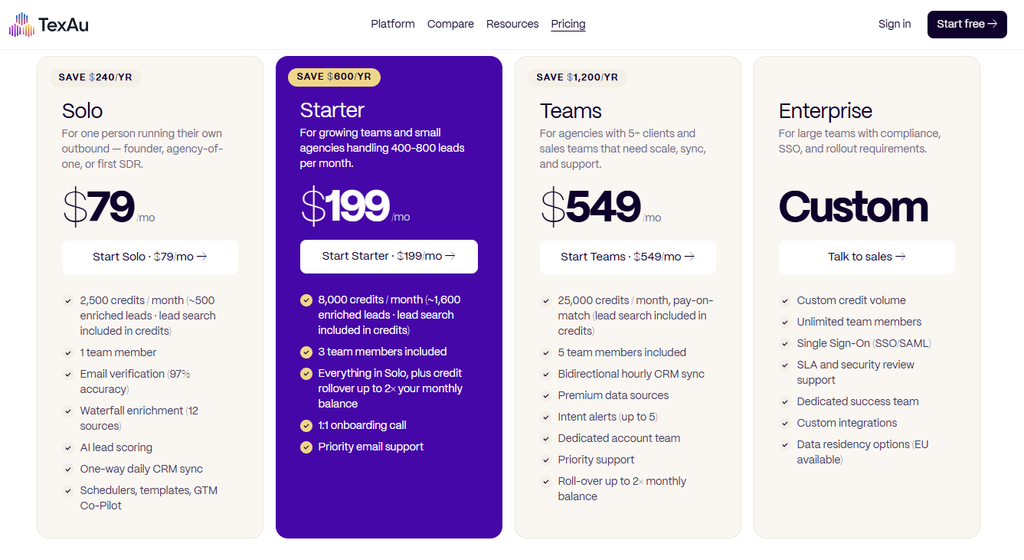
The Teams plan is intended for businesses and agencies that require greater processing volume, collaboration, and advanced synchronization capabilities. Enterprise offers customized arrangements for larger organizations with specialized operational and security requirements.
The platform also provides monthly and annual billing options, with annual subscriptions offering reduced effective monthly pricing. We see this tiered structure as useful because businesses can select a plan that reflects their current operational requirements.
Free Trial and Credit Management
TexAu offers a 14-day trial with 50 free credits and no credit card required. This gives prospective users an opportunity to explore the platform’s workflow features and evaluate them using their own business data. Eligible plans also support rolling over unused credits within the platform’s defined balance rules.
Users can monitor credit consumption and understand the usage associated with different automation activities. We appreciate this emphasis on usage visibility because it helps businesses connect automation costs with their operational needs.
How TexAu Can Improve Sales and Marketing Operations
After examining TexAu’s features, we believe its greatest value lies in connecting several important parts of the customer acquisition process. Many businesses already use different applications for identifying prospects, collecting information, qualifying contacts, and managing customer relationships. TexAu creates an environment where these activities can work together as part of a broader go-to-market process.
Making Prospect Research More Efficient
TexAu can reduce the repetitive activities involved in assembling and preparing prospect lists. Its discovery tools help identify relevant individuals and organizations, while enrichment providers contribute additional information.
Email verification helps prepare contact records for outreach, and AI scoring supports more focused prioritization. We consider this a practical way to organize prospecting around data quality and relevance.
Improving Lead Qualification
The AI scoring and classification features can help businesses evaluate prospects according to their own ideal customer profiles. By combining firmographic information, business signals, and customizable AI instructions, teams can create qualification processes tailored to their goals.

This allows sales representatives to spend more attention on contacts that appear relevant to their offering. For organizations pursuing targeted customer acquisition, that ability can contribute to a more disciplined sales process.
Creating Repeatable Customer Acquisition Workflows
TexAu’s templates, schedulers, CRM integrations, and outbound connections allow organizations to establish repeatable processes. Once a workflow has been configured, it can be reused and adapted across different prospect lists, campaigns, and client workspaces.
We find this particularly appealing for agencies and sales organizations that regularly perform similar activities. Standardization can make day-to-day operations more consistent while leaving teams more time for strategy, communication, and customer relationship development.
Is TexAu Worth Using for Lead Generation?
Based on our review of TexAu’s capabilities, we consider it a compelling option for organizations looking to bring more structure and automation into their lead generation operations. Its combination of contact discovery, waterfall enrichment, email verification, AI-powered qualification, CRM synchronization, and outbound integrations addresses several important stages of the modern sales process.
The spreadsheet-based interface is particularly appealing because it places information and actions within the same environment. The GTM Copilot and AI Columns add another dimension by making automation and data processing more accessible through natural-language instructions.
We also see value in the separate TexAu Desktop automation collection, which extends the ecosystem into social platform research, professional networking, community intelligence, and website data extraction. For digital marketing agencies, the multi-workspace structure and reusable templates can help organize client activities.
For founders and small sales teams, prospect discovery and automated enrichment can support more efficient outreach preparation. For revenue operations professionals, CRM synchronization and data management capabilities provide useful tools for maintaining organized records.
Final Verdict: Our Overall TexAu Review
TexAu brings together a wide range of capabilities that are relevant to modern lead generation, outbound sales, and go-to-market operations. What stands out most to us is its focus on connecting the different activities involved in finding, qualifying, and managing potential customers.
The platform goes beyond basic contact collection by combining data enrichment, verification, customizable AI scoring, workflow execution, and integration with established sales applications. Its spreadsheet-based workspace provides a familiar way to manage information, while GTM Copilot introduces a more conversational approach to configuring automation.
The extensive workflow library, scheduling tools, and customizable templates further support teams that want to create repeatable sales processes. We also appreciate how TexAu’s ecosystem brings together its main GTM platform and desktop automation capabilities, giving businesses multiple approaches to prospect research and operational automation.
From a digital marketing and business development perspective, the platform’s greatest appeal is its ability to turn prospect information into organized, actionable sales workflows. Our overall assessment is that TexAu is a feature-rich and versatile sales automation platform with substantial potential for businesses focused on lead generation and customer acquisition.
For marketing agencies, B2B companies, entrepreneurs, sales professionals, and revenue operations teams, TexAu offers an extensive collection of tools for making prospecting more systematic and connected. We believe organizations looking to improve their lead generation infrastructure and automate repetitive sales activities will find TexAu worth exploring.
Visit the official website: https://texau.com/

Vijay Sood is a seasoned digital marketer with a passion for driving online growth and innovation. With a robust background in developing and executing comprehensive digital strategies, Vijay excels in leveraging SEO, content marketing, and social media to boost brand visibility and engagement. His expertise lies in transforming data-driven insights into actionable marketing campaigns, helping businesses achieve their digital objectives.