
In a time when information is only a click away to find your personal information, such as your address, your phone number, and your family members publicly listed on a site like Whitepages, it can be unnerving. While websites like Whitepages allow you to look up personal information or utilize a people search site, revealing your personal information to strangers, from an acquaintance to a stalker, it reveals your personal information and other information available to the public. They obtained the information from public records and other sources.
Managing your digital identity has become more crucial than ever, and now, with a large database of information managed by one of the world’s largest data brokers, we can help you navigate the process. This guide provides a comprehensive, step-by-step walkthrough on how to remove a listing on Whitepages, helping you protect your privacy and remove your data, putting your privacy back in your hands.
Understanding Whitepages and Its Data Collection
Whitepages uses and gathers information through public records, social media, and other database sources. Knowing how Whitepages fits into the larger Whitepages ecosystem is an important first step to managing your online reputation and starting an effective Whitepages opt-out process.
Whitepages pulls from various sources, including government records like property deeds, court records, and directories. This public information is often available for public viewing with additional information added and gathered from user-submitted data and third-party information, aggregators. Sometimes, even cell phone numbers, names, and addresses show up in listings.
Since this info is self-reported and available to the general public, it is worldwide accessible via any search engine or by means of a people search site. Knowing what kind of information from Whitepages is displayed helps you decide how urgently you need to remove your personal information or initiate a data removal request.
Why You Should Remove Your Information from Whitepages
When your information is easily accessible, you become more vulnerable to misuse of personal data. The primary risks include:
- Identity Theft: With your full name, phone number, and address, identity fraudsters may set up fake accounts or commit fraud.
- Phishing and scams: Criminals can use your number to create convincing scams or even advise you to enter it into fake verification pages.
- Harassment: Scammers will use these records to scam you or your family, and often do so by purchasing your records via data brokers such as Whitepages.
- Unwanted Marketing: Your information may be passed on to third parties, resulting in receiving spam and being called and emailed.
For this reason, users will often avoid using Whitepages entirely by starting the formal process of having their data removed or by using a removal service or data removal service to do it for them.
How to Remove Yourself from Whitepages
Your full name, phone number, past addresses, relatives, and everything are compiled into a searchable profile, which is why mastering your Whitepages opt-out process is crucial.
Step 1: Locate your Whitepages Listing
Visit whitepages.com and search for your full name and your city and state, just as you did to find yourself in the first place.
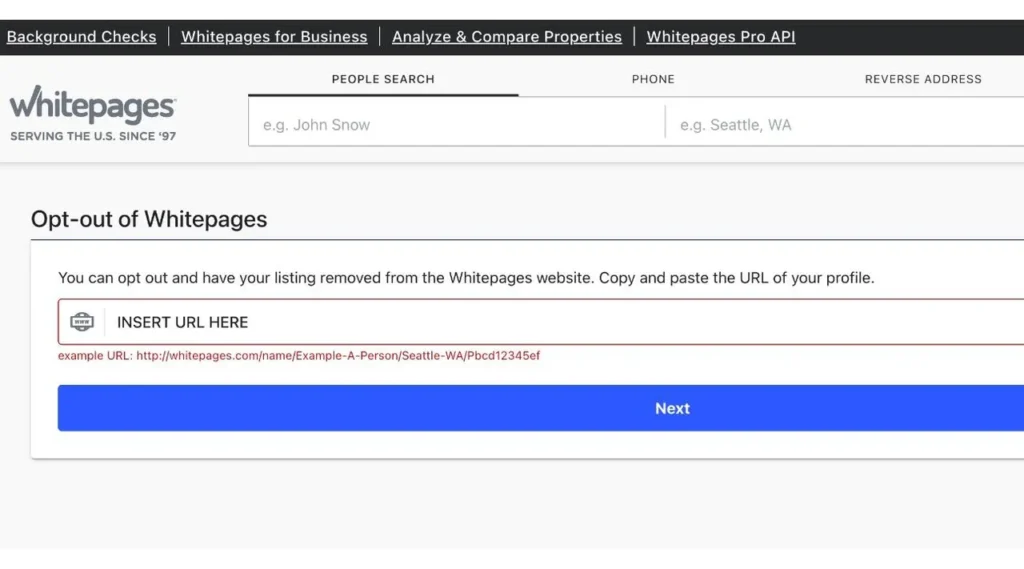
Once you’ve found matches, click through each profile and locate the relevant listing. Depending on the situation, you may need to click “view details” or “view full report.”
Whenever you locate a duplicate or a defunct listing, make sure to copy the profile’s URL or record’s URL and paste it into a document to keep a running tab.
Step 2: Navigate to the Opt-Out/Removal Path
Perform a search of whitepages.com for a “Whitepages opt out page” or “Whitepages opt out process section”; doing so should reveal an opt-out request or related options.
Alternatively, try searching the web for “Whitepages opt out” or “remove my information from Whitepages” if the Whitepages site becomes difficult to navigate; this should ultimately lead you to the right opt-out request portal.
Step 3: Submit Your Opt-Out Request
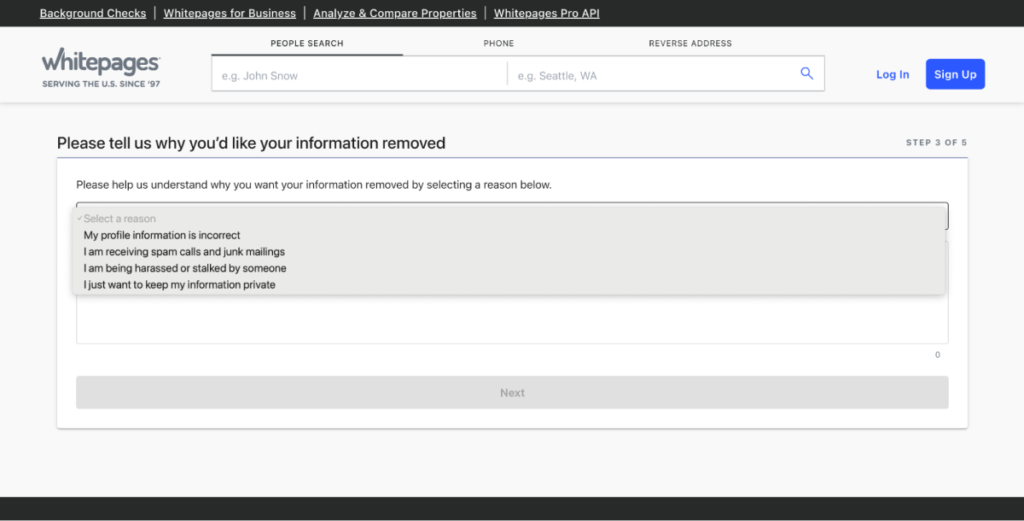
- Either click to submit an opt-out request, or fill out the required opt-out/removal form.
- Paste the appropriate URL(s) in each relevant field
- Fill out the opt-out form in its entirety.
- Select your reason (i.e. Privacy, incorrect information, etc.)
- Provide your email address for verification
- Click or enter a verification code if there is one, or enter another form of verification.
This is the main opt-out/removal step and may be driven by California Consumer Privacy Act (CCPA) rules or state privacy laws.
Step 4: Confirm Removal
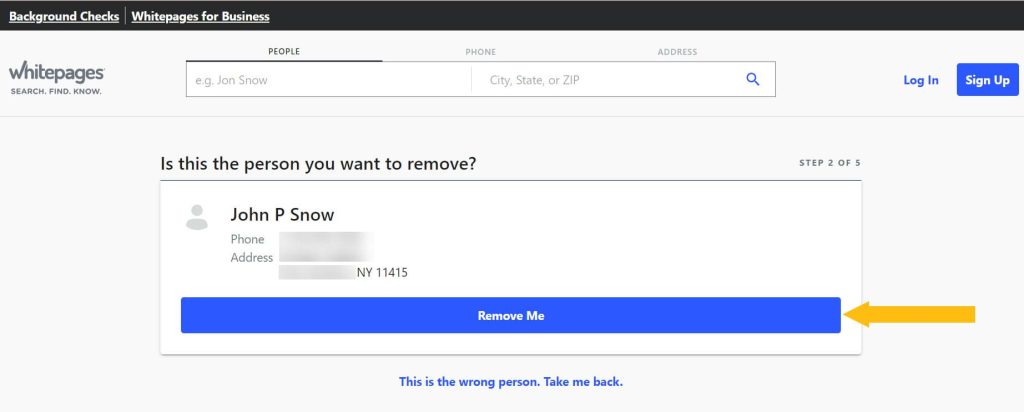
A verification email may be sent to your designated email address; follow any instructions to confirm removal. In some cases, verification may be required via email, while other times you’ll be prompted for a formal identity verification before removal. Confirm that your request was successfully processed a few days later.
Step 5: Remove Duplicates & Variations
If necessary, submit opt-out requests for any other valid URLs and variants such as all alternate names, prior addresses etc. using the same procedure as detailed above.
Wait 48 hours, then check back. Open an incognito/private tab and search your name. If it was successful, nothing related to your name should appear.
Why the Listing Might Come Back
After successfully completing a Whitepages opt-out, your information might reappear, which happens due to the fact that they are continuously updating their databases with information from many sources.
The data may be re-added as it exists somewhere else, such as with other data brokers like WhitePages, Spokeo, etc. Some systems may also add or remove data depending on updates from phone companies and third parties.
This is why many opt for data management services that continually remove their information as they appear online.
Conclusion
Take control of your online data at whitepages.com, but understand that your online privacy should never start and stop with Whitepages. As much of our lives transition to an online presence, active data privacy management becomes a necessity to protect ourselves from harm due to improperly stored data and information. Make sure that you’re checking your online presence often, understand how data brokers work, and always use the official opt-out process, as this will reduce your exposure.
At the end of the day, learning how to remove your personal information, control your public records, and properly execute an opt-out request ensures long-term protection. Privacy is not a one-time action; it’s an ongoing commitment to keep your personal data safe in an increasingly connected world.

Vijay Sood is a seasoned digital marketer with a passion for driving online growth and innovation. With a robust background in developing and executing comprehensive digital strategies, Vijay excels in leveraging SEO, content marketing, and social media to boost brand visibility and engagement. His expertise lies in transforming data-driven insights into actionable marketing campaigns, helping businesses achieve their digital objectives.