Internet shopping has transformed the way individuals search for and purchase the products they need and want. A simple search can generate hundreds of thousands of results within seconds, which can feel overwhelming for customers. This level of competition can also be challenging for businesses that are not major brands like Nike, Home Depot, or Target, as larger companies can afford to invest heavily in SEO campaigns and PPC advertising.
For small companies, this is where Google Shopping campaigns belong. They can help you discover your products. Approximately 76 percent of retail advertisements are composed of Google Ads. That translates to above 85% of actions on all clicks on Google shopping campaigns. However, it is not sufficient to decide to invest in Google Shopping campaigns. You and your associates should take the time to tune up these campaigns, or it will be money down the proverbial drain. This article will take us through the 8 best practices to maximize your Google Shopping Campaigns.
What Does Google Ads Optimization Mean?
Google Ads optimization entails optimizing campaigns to enhance performance and efficiency by maximizing ROI through strategic variations in keyword and audience targeting, bidding, and ad content.
Among the important factors in the optimization of Google Ads are:
- Quality score, which measures the relevance and quality of ads, keywords, and landing pages, influences ad positioning and rank.
- Ad rank determines the placement of advertisements in search results based on payment and quality ratings.
- Return on ad spend (ROAS) is the ratio of revenue to advertising spend, which helps estimate the budget allocation to maximize revenue.
- Lowering cost-per-click (CPC) is achieved through proper bidding and keyword and customer targeting, so the advertisement is shown to prospective customers.
- Writing ad copy that aligns with target keywords and demographics enhances engagement and conversion rates.
All these factors will make your Google Ad campaigns more successful, making your company more visible, cheaper, and more effective overall with your Google Ads strategy.
8 Google Smart Shopping Optimization Strategies
These are some strategic actions that can help you ensure Google Shopping ranks your products and you get more conversions.
1. Maximize Product Titles based on Search Purpose
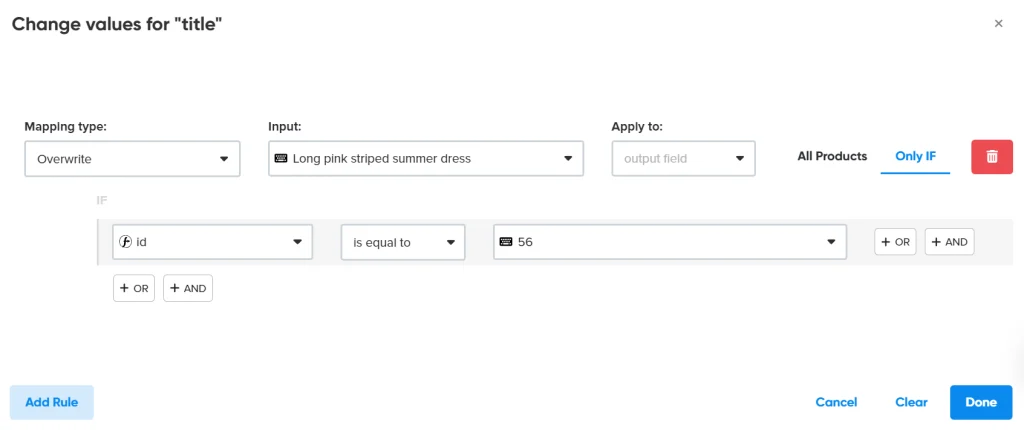
Besides including the right keywords, product titles should be searchable, clickable, and in line with what users are searching for. That is to say, retailers need to add other vital elements of products, including:
- Brand
- Color
- Size
- Attributes
Be aware of title organization, as well. The following is one simple generic title format that is simple to optimize:
Brand Attributes Product Type Model Number.
Remember that various types may require various title structures to fit into your Google Shopping Ads effectively. In the case of apparel, you may use specific attributes to improve your product group visibility in Google Merchant Center.
Brand Gender Product Type Attributes.
2. Make Product Description More Relevant
Space is one thing that you will not be short of in Google Shopping descriptions, as Google provides retailers with a massive 10,000 characters. Sellers should use this to provide shoppers with pertinent information, but they should not overdo the descriptions by using too many words. In most descriptions, some of the most important information that should be included would be:
- Writing descriptions of 500-1500 characters.
- Stress the most notable advantages obtained.
- Add extremely topical properties (size, special features, etc.)
- Label visual elements, such as patterns or designs, to help Google surface the item in related searches.
- Always use correct grammar and punctuation, and the use of special characters should be kept to a minimum.
3. Use High-Quality and Compliant Images
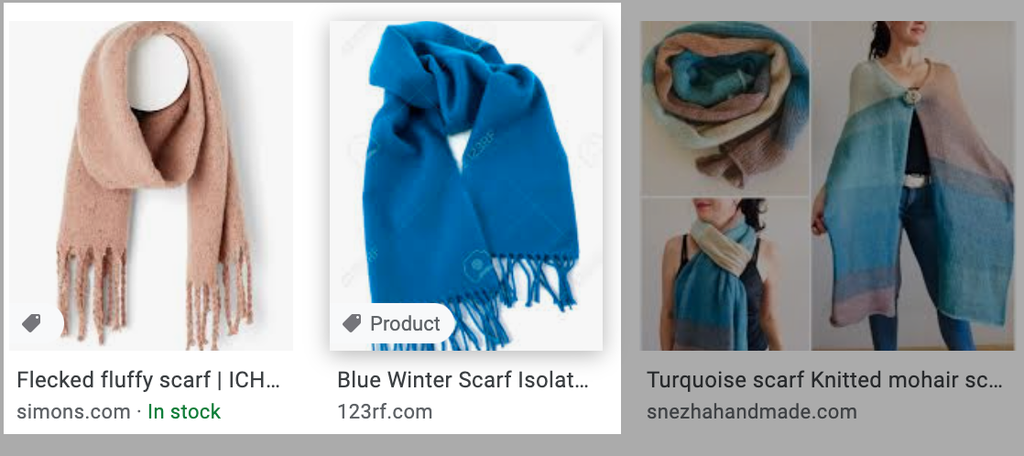
The first opportunity to put your best foot forward with consumers is through images. To ensure that product images are memorable to the shoppers, make sure that:
- All the images are of the highest quality (at least 800 pixels in height and width).
- The primary photo gives a good perspective of the product on white.
- The products are presented in various angles.
- Additional images display product details to consumers, e.g., use, comparative size, advantages, and so on.
- Make sure the variants match the picture (colour, design, size, etc.).
You are encouraged to add at least 3 high-quality images of the product to optimize your Google Merchant Center listing. At least for merchants just beginning their careers and with fewer photos, there is a requirement to fulfill the requirement for their flagship products.
4. Fix Competitive Bids and Budgets
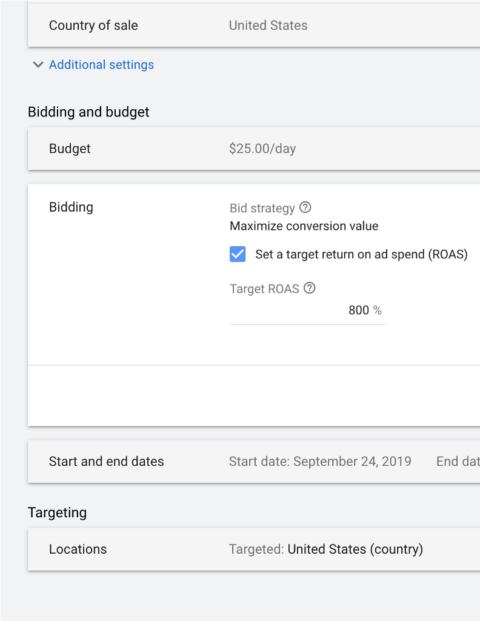
Bidding is a large subject that may be overwhelming. The first step is to assess your product margins and conversion rates to find a bidding strategy that aligns with your objectives. Apply smart bidding, as it has significantly developed over the last several years.
However, as effective as Smart Bidding can be, it still should be closely monitored and managed to ensure that it is helping you meet your business goals and objectives.
5. Test Smart Shopping with Custom Labels
Coming up with your own labels in your product feeds can be a nice concept to segment and experiment with products. In this manner, you can, among others, learn which ones perform better in the Smart vs standard Shopping campaigns.
It is strongly advised to utilize tailor-made labels to separate groups of products, like:
- Top-seller products
- Most reviewed products
- Gateway products
- High-margin products
With a feed solution like DataFeedWatch, it is easy to slice and dice your products using rules. This is one of the rules that can enable you to divide your products into high, medium, and low margin products:
6. Use Negative Keywords
When using Google Shopping campaigns, targeting is as important as identifying your audience. The use of negative keywords enables you to reduce redundant searches and save your budget on futile clicks that are not going to yield any conversions in your Google Shopping Ads.
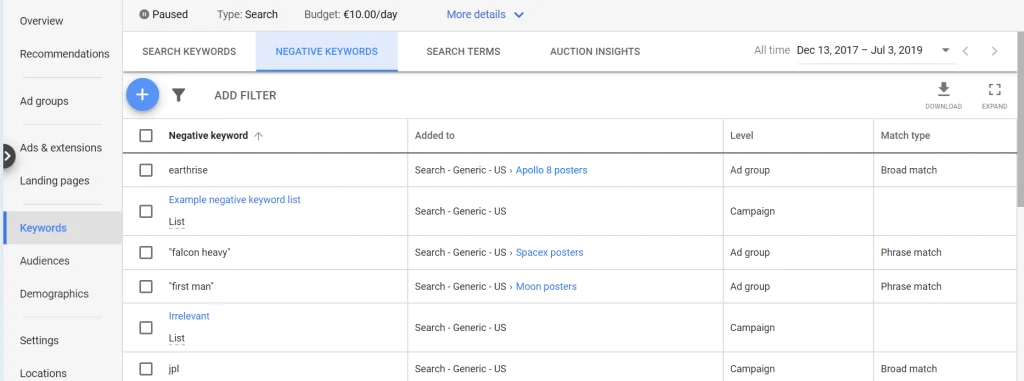
Test your search terms regularly to see which keywords are causing your ads, but do not fit your offer. These are words to strategically add to your negative keyword list to prevent your ads from showing for irrelevant searches. Direct traffic on search terms to the most lucrative ad groups in your campaigns using Optmyzr Negative Keyword Finder – Shopping. It is the equivalent of an A/B test of search queries.
7. Use Ad Extensions
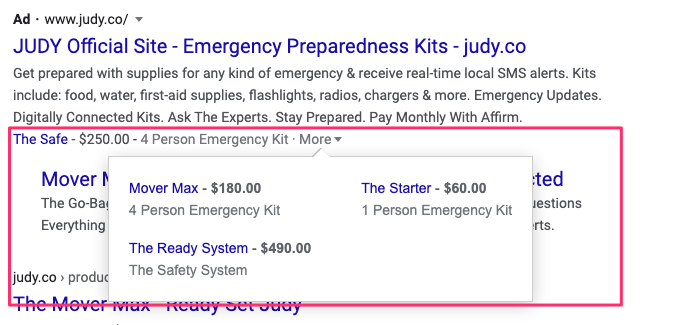
Ad extensions increase the presence of your ads. These snippets give users more reasons to visit your listings, increasing the likelihood of conversions.
Here are a few examples:
- Price Extensions are adverts that display product prices.
- The promotion extensions showcase special offers and discounts.
- Location Extensions to provide the information about stores.
The aim is to provide additional information to the users through search results. Such extensions build authority, enhance trust, and encourage customers to click.
8. Apply Seasonal and Promotional Brochures
Seasonal and special offers can increase the effect of your Google Shopping campaign. Peak shopping seasons, holidays, and events should align with your strategies. Create catchy promotions that attract users, such as offers, discounts, and packages. Change the names and descriptions of your products, indicating the exceptional character of these offers.
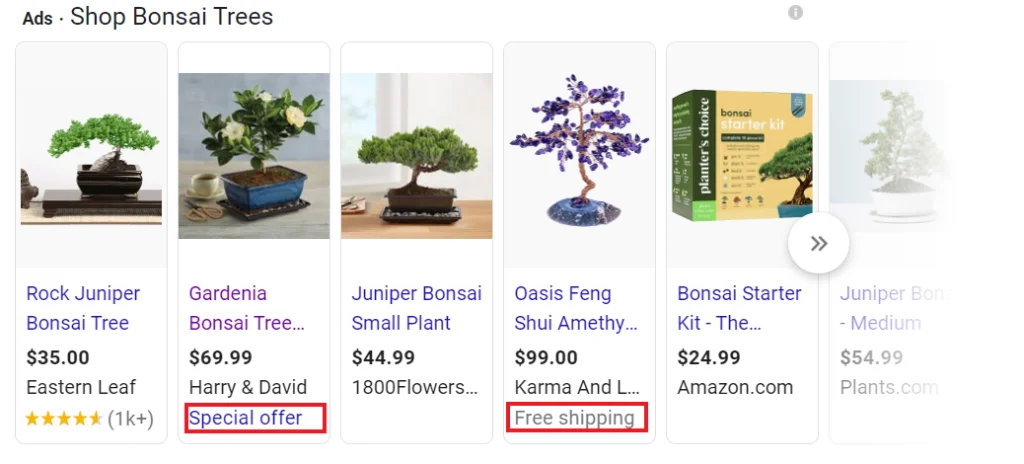
You can also make a seasonality adjustment to help signal Google Smart Bidding when you anticipate conversion rate variations. Taking advantage of seasonality and running powerful promotions will instill urgency, driving conversions.
Conclusion
If you have a lot of data to deal with, Smart Shopping campaigns are the best choice when you want to rely on the numbers and drive more sales. While you do not have as much control compared to normal Shopping campaigns, there are still numerous things you can do to ensure that your Smart Shopping campaigns do well.
You can achieve even more success in acquiring high-LTV customers with the new customer acquisition goal added. And if you have been conducting Smart Shopping campaigns before, you will not have to go through the learning process. With more people staying true to online shopping, it is a good opportunity to start experimenting and see where your Smart Shopping campaigns take you.

Vijay Sood is a seasoned digital marketer with a passion for driving online growth and innovation. With a robust background in developing and executing comprehensive digital strategies, Vijay excels in leveraging SEO, content marketing, and social media to boost brand visibility and engagement. His expertise lies in transforming data-driven insights into actionable marketing campaigns, helping businesses achieve their digital objectives.