A website can suddenly lose rank because of Google algorithm updates, technical SEO problems (slow speed, noindex, broken links), outdated content, lost backlinks, or because other competitors surpassed the website. Always monitor Google Search Console to identify indexation problems, crawl errors, or manual penalties.
Did you know? 96.55% of the content has no traffic from Google, as reported by Ahrefs. In this blog, we will look into the most common reasons for ranking drops and how these can be rectified to improve your search result visibility. Read on for a detailed analysis!
7 Reasons Why Your Website Rankings and Traffic Are Dropping (and How to Remedy Them)
Search engines don’t just play around with your rankings for fun. When your website drops out of the first page, it is usually related to a change in one of three areas: your website, your competition and Google. Knowing this cause-and-effect relationship will help to restore your businesses organic visibility and bring visitors back. Here are few most common reasons and how to fix them:
1. Your Site is Not Optimized for AI-Driven Search & Answer Engines
Search today requires more than evergreen, traditional optimization. Search has refocused on G.E.O. (Generative Engine Optimization) and A.E.O. (Answer Engine Optimization). Your web page can still rank within the top three traditional positions and you can experience a drag in traffic a huge one if AI tools de-duplicate or summary your content, or pull in your competitors.
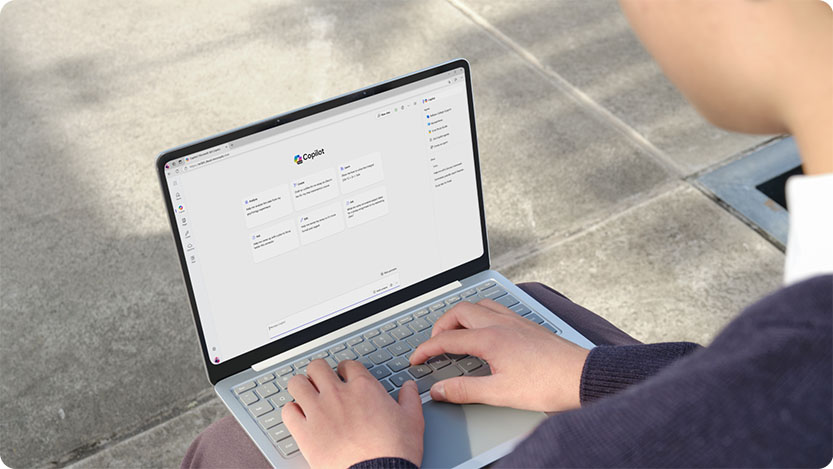
How to identify: Be watchful if your strongest informational pages are witnessing a drop in their organic CTR in Google Search Console even with unwavering positions. Find out if your target keywords are triggering AI Overviews and if your brand is being referenced.
How to Fix It: Structure your web content so that everything is easily pulled and credited from your site by AI models. Use individual-descriptive-headings, list out ideas and benefits in formatted bullet points, and answer in straight-to-the-point blocks with simple, human language to improve your search ranking. Develop extensive topic clusters to establish topical relevance, enhance page content with high-value FAQ sections, and integrate Question Answer tags to facilitate AI extraction and recognition of your content.
2. Overlooking Critical User Experience (UX) Metrics
Google is hyper-focused on how users engage with your pages. If you attract visitors and they immediately bounce, algorithms like RankBrain take it as a negative quality indicator. Bad experiences of the searcher caused by poor design, confusing navigation or irrelevance will result in high bounce rates and very low dwell times.

How to identify: Check your Google Analytics Engagement report. Check engagement time and bounce rates for pages that have experienced a greater than drop in visibility.
How to Fix It: Match your content precisely to the user queries. Improve your page design through clean, easy to navigate layouts and the placement of prominent Call-to-Actions (CTAs). Use engaging multimedia (videos, infographics and images) and include interactivity (quizzes and polls) to avoid a wall of text and hold the user on your page.
3. Messy Meta Tags and Faulty HTML Configuration
Meta tags (titles, descriptions, robots, canonicals and hreflang tags) affect how your website displays in search engine result pages (SERPs) and give instructions to search crawlers on how to treat your pages. Lack of, misdirected or under-optimized tags send confusing signals to search crawlers and lower click-through rates.
How to identify: Conduct a full crawl in WebSite Auditor’s Site Audit tool or go to the Issues page in Semrush’s Site Audit to mark missing or broken HTML tags.
How To Fix It: Draft unique, compelling 50-60 word meta titles as well as 150-160 word meta descriptions, including target keyword in an optimized fashion within each individual page. Be sure to ensure your canonical URLs point towards your canonical link to avoid losing rankings.
4. Flawed URL Structure and Dynamic Parameter Overuse
URLs give essential context to humans and search bots. If your URLs aren’t descriptive (something like /a52b7net.htm) or are highly dynamic, search engines will likely have difficulty indexing them effectively.

How to identify: In WebSite Auditor go to Site Structure > Pages and have a glance at your URLs list. Take note of the lengthy URLs with multiple convoluted dynamic parameters (e.g. ?id=123).
How to Fix It: Switch over to clean, static, descriptive URLs that tell you directly what this webpage will show you (such as example.com/blue-widgets). Use hyphens (-) to space words, but stay away from underscores (_), spaces, or funky symbols. Keep ’em short, simple and straightforward.
5. Sudden Loss of High-Authority Backlinks
Just like having bad links is a bad thing and damages your rankings, having lost good links can be equally damaging as it reduces your domain authority. Other sites close down or delete content, or editors cut out old resource links. Your online presence starts to diminish when you lose the high quality backlinks on which you secured high ranks in the first place.

How to identify: Use the Historical Data > Backlinks section in SEO SpyGlass to view the trend graphs for your links and identify any dramatic dips. Use Lost Links report within SEO SpyGlass to identify which referring domains have just expunged your link and, respectively, may or may not have any reason for it.
How to Fix It: Initiate a link reclamation campaign. Reach out to the hosting site webmaster politely requesting the link removal. Offer your re-developed, higher value content as a thing of value to be re-included. Launch fresh campaigns to build new links to offer your site to search engines.
6. Core Web Vitals Failure (Slow and Unresponsive Pages)
We are currently in a “mobile-first index” era. If your site has a slow load, pauses mid-render, or jumps around as it renders, you’ll not be passing the CWV tests and be providing a bad mobile experience.
How to identify: Analyze your data for Largest Contentful Paint (LCP), Interaction to Next Paint (INP) and Cumulative Layout Shift (CLS) in the Core Web Vitals report in Google Search Console (GSC). Or compare your pages with a bulk audit in WebSite Auditor’s Page Speed module.
How to Fix It: Optimize all images prior to uploading in order to reduce the file size. Use effective browser cache, minify your CSS, HTML and JavaScript and serve stuff through CDN to make your server respond to requests quickly worldwide. Make all graphics with interactive features mobile-friendly.
7. Sneaky Indexing Blocks and Crawl Errors
If your search engines cannot crawl or render your pages properly, they will be entirely removed from the search index. Slight technical mistakes such as accidentally inserting a noindex tag or creating an incorrect robots.txt file can cause your top-traffic pages to be silently de-indexed.
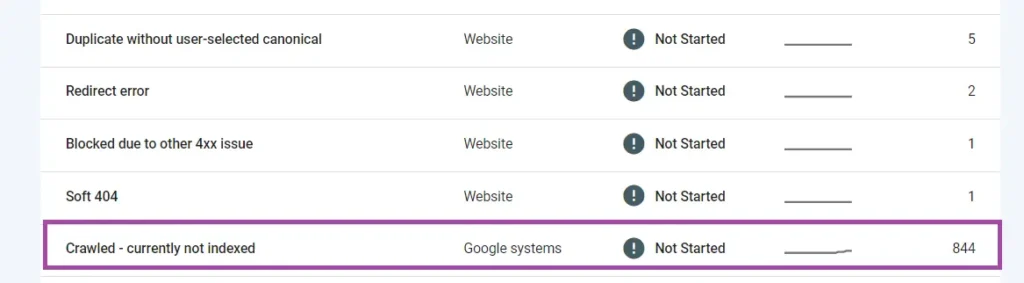
How to identify: Check the Indexing tab in Google Search Console to find the key pages are reported as either “Blocked by robots.txt” or “Submitted URL marked ‘noindex'”. You can compare it immediately with the Site Audit section of your crawling tool.
How to Fix It: Edit your robots.txt file so that ‘sensitive’ paths such as adminpages, login pages and password retrieval pages are available to all. Remove noindex tags that have been accidentally inserted in important pages. Fix dead internal links and pages that give a 404 error, remove redirect chains or loops that are confusing the search engines and, rather than temporary 302 redirects, use permanent 301 redirects when permanently changing the URL.
Conclusion
A fall in Google ranking can have drastic consequences on your website’s traffic, leads and revenue. However, success can be achieved by following the below approach. Find out the reason for decline, optimize your technical SEO, increase your content quality, improve backlinks, and speed up your website’s loading time.
Good SEO is a long-time process that can significantly impact your organic traffic and website rank. It needs to be watched regularly and consistently be adapted to the changes and current search engines. Businesses wishing to recover more quickly and establish a long-term digital presence should focus on improving their organic traffic after a ranking drop.

Vijay Sood is a seasoned digital marketer with a passion for driving online growth and innovation. With a robust background in developing and executing comprehensive digital strategies, Vijay excels in leveraging SEO, content marketing, and social media to boost brand visibility and engagement. His expertise lies in transforming data-driven insights into actionable marketing campaigns, helping businesses achieve their digital objectives.