The new ecommerce market is going to have an extremely tough time with competition, and the business (if it wishes to survive) must become visible immediately through effective display ads. A method that is both the easiest and the most effective for the ecommerce business to catch such buyers is a Pay-Per-Click (PPC) campaign via Google Ads. In other words, ecommerce brands are placing their products in front of the eyes of those who are actively looking for the exact product they need at that very moment through search engine results.
A simple and clear approach to using PPC means that companies should not view it solely from the perspective of costs. Rather, it should be considered a high-powered auction system, where the real victory is achieved by a flawless integration of the ecommerce store with the Google platform, thus ensuring that the first exchanges result in direct, measurable, and profitable conversions. In this article, we will explore how to integrate your ecommerce website with Google Ads PPC, prepare your store for advanced campaigns, leverage data-driven strategies, and overcome common challenges to maximize ROI.
Understanding PPC
PPC or Pay-Per-Click, is a digital marketing structure whereby the advertiser pays a certain fee every time a user clicks on the ad in question. In other words, it is a paid method of promoting your website, as opposed to organic methods of traffic generation. In this method, companies are able to talk with the target group directly and immediately through video ads and get measurable results, as well as control their advertising expenses.
In addition, PPC is very targeted by keywords, demographics, location, and user behavior, which means that your PPC ads will be shown only to the people who are the most potential buyers.
Why Integrate Your Ecommerce Website with Google Ads PPC
It is practically not possible to achieve a sustainable increase in e-commerce sales without a data-driven unified approach. The power of back-end website data connected with Google Ads can unlock potential for huge campaign effectiveness and profitability.
1. Conversion Value Enabled Real-Time Bidding
The main benefit of integration is to become better than simple clicks, advanced bidders, potentially leading to higher profits. Feeding revenue data directly into Google creates the possibilities for versatile, dynamic bidding options. Integration is critical, as it allows Google’s Smart Bidding algorithms to pull in essential, real-time data such as conversion value and, optionally, Cost of Goods Sold (COGS).
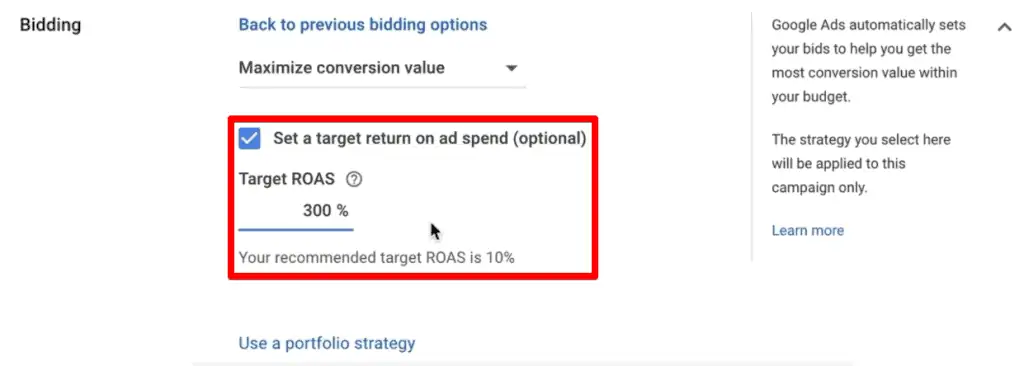
This allows for the implementation of sophisticated automation programs such as Target ROAS (Return on Ad Spend), which makes bid recommendations based on whether a profitable outcome is very likely. This is a great improvement over manual bidding, whereby there is no possibility to react to market changes 24/7 due to dependence on manual optimization.
2. Dynamic Product-Specific Ads Powered
The visual and specific information of Google Shopping Ads cannot be matched with generic text ads. You can automatically enter your whole catalog for such high-converting formats through integration. You can also connect directly to your product feed through the Google Merchant Center (GMC), and Google will automatically create rich Shopping Ads that include images, prices, and availability in the search results.
The visual form of advertising has significantly higher click-through rates (CTR) than a typical search ad, as customers are fully aware of what they are clicking. This screening system will ensure that the traffic you are paying for is a mixture of more qualified leads.
3. Creating an Advanced Audience Profile
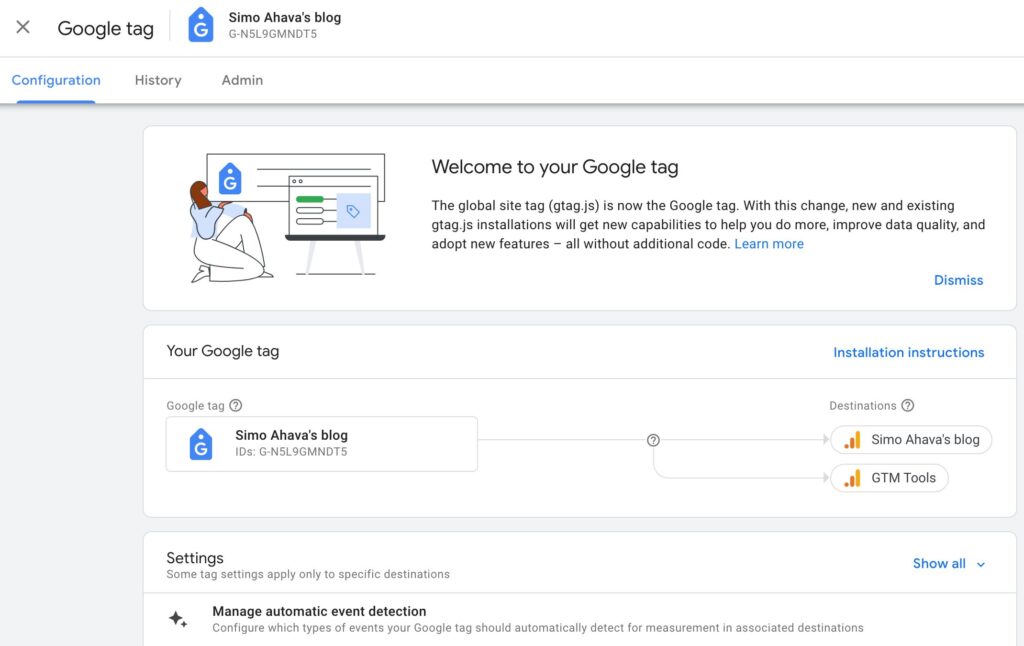
Information about visitors to your websites is like precious metal from which, through integration, you can make a classification of users based on their activities on the site and then turn them from simple visitors into loyal customers. Collecting accurate data on your store is required for this. By using the Google tag, you can create segmented lists of your audience, such as cart abandoners, high-value purchasers, or those who viewed a specific category.
 These lists are essential for creating targeted Dynamic Remarketing PPC advertisements that display products that visitors were unable to buy. This high level of personalized advertising makes the conversion rate skyrocket exponentially among people who are already familiar with your brand.
4. Achieving End-to-End Performance Visibility
It is really hard to track the effects of your ad budget if you do not have detailed tracking of your Google ecosystem, starting from the first ad click and ending with the last purchase. The only way to have the full view is by deeply integrating the systems. Attribution insights form the basic pillar of understanding the role of various PPC campaigns as well as different touchpoints leading up to one conversion, a feature that you can unlock when you connect your Google Ads account with Google Analytics 4 (GA4).
The insights you get from this merged data will let you look at the metrics of post-click, for example, bounce rates and pages per session, and also track the point at which new customers get bored. This is a comprehensive funnel analysis that will give you the opportunity to allocate funds to the safest channels for the most profitable ones.
5. Competitive Advantage with Quality Score
Although commonly known as Search Ads, the relevance principle can be applied to any type of Google Ads campaign. Integration can be used to enhance your competitive edge over the competition by ensuring a flawless user experience. Integration means that the information about the product shown in the ad (fetched from the feed) is precisely the same as the information displayed on the landing page, increasing the relevance of the ad and your overall reputation.
The larger the Quality Score or relevancy signal, the less expensive the Cost-Per-Click (CPC) and the higher the ad positioning. Being able to pay less than your competition, based on the same level of exposure, is key to maintaining high data quality and relevance.
Preparing Your Ecommerce Website for PPC Integration
Your e-commerce website should be fully prepared, both technically and accurately to track and comply before launching any lucrative paid search campaigns. An appropriate configuration will ensure that your product data is verified and accessible to Google’s dynamic advertisement types.
1. Creating a Google Merchant Center (GMC) Link
The first step is to get your product catalog indexed by Google. The Merchant Center is the primary repository for all your product information. The initial step that cannot be negotiated is the creation and connection of the Google Merchant Center (GMC) by connecting a detailed and regularly optimized feed of product data to your store.
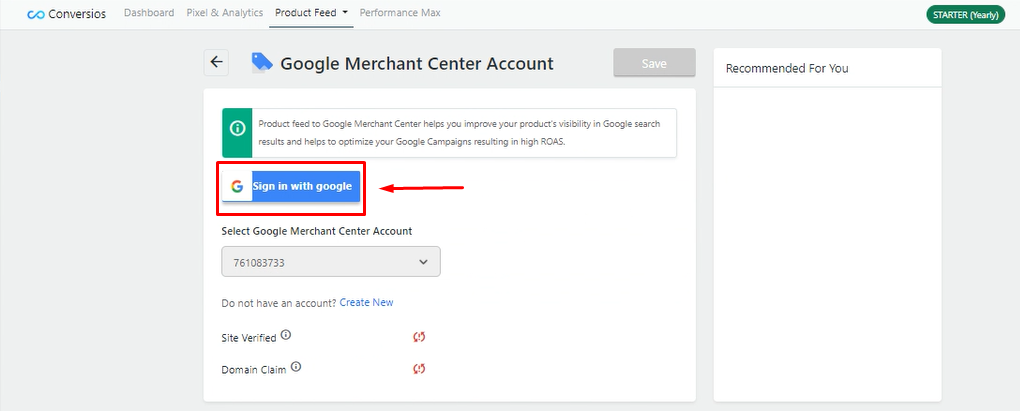
It involves registering and authenticating your web address in the Merchant Center and ensuring that all business-related information and shipping terms align with Google’s expectations.
2. Universal GA4 E-commerce Tracking
Without proper tagging, proper measurement is impossible. It is necessary to install the latest tracking code so that all interactions with visitors can be accurately tracked. At the same time, you should properly install Google Tag (GA4) on every page of your site to monitor key e-commerce activities, such as purchases, adding items to cart, and starting checkout, which are necessary to measure conversions and create remarketing lists.
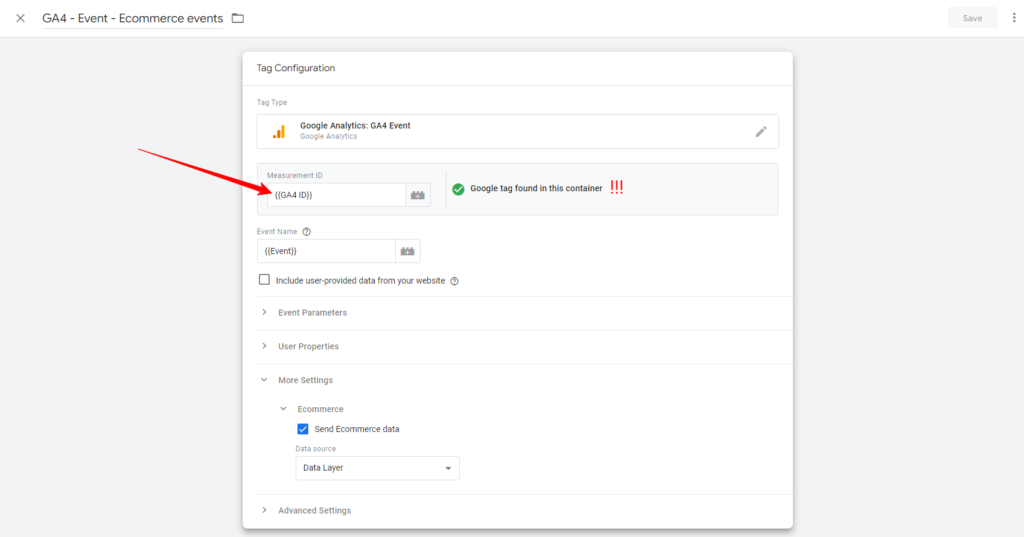
To enable Google Ads to accurately report revenue and avoid double-counting, it is also essential to forward the conversion value and transaction ID to Google Ads.
3. Optimizing and Maintaining the Product Feed
Your Shopping and PMax campaigns will be powered by the product feed, which is why the quality of your product feed will significantly impact the performance of your ads. Ordinary data will generate ordinary results. The product feed should be optimized continuously, going beyond simple needs such as product titles with keywords, high-quality photographs, accurate inventory, and correct price information.
Using optional features, including custom labels (e.g., to group products by profit margin or seasonality), offers the fine control required to structure PPC campaigns and bid rules.
4. Guaranteeing Mobile-First Page Speed and UX
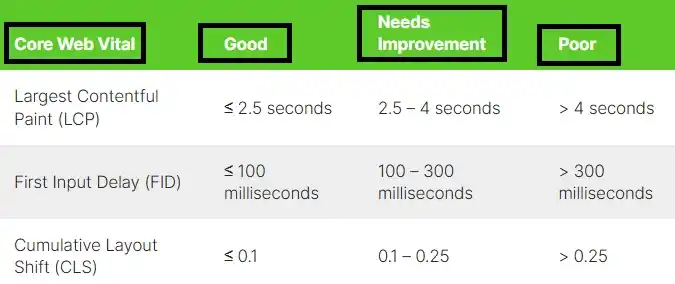
Google measures the quality of your landing pages in relation to its ad ranking, which means the performance of your site directly influences your PPC expenses and conversion rate. Underperformance will kill your ROAS. The pages of your e-commerce site should open immediately and be fully optimized for mobile devices, as most e-commerce customers now use their smartphones to communicate and conduct business.
Pay attention to enhancing Core Web Vitals (CWV) indicators and ensuring a frictionless checkout experience. A quick, user-intensive user experience will maximize conversions and improve the ranking of your ad, reducing your effective CPC.
5. Customer Match Data Uploads
In addition to visitors, one of the most potent and underutilized integration features is leveraging the information you already have about existing customers. This allows you to communicate with your existing customers. To create an advanced segmentation, establish a procedure for routinely importing your customer email lists into Google Ads (under Customer Match).
This enables you to remove existing customers from expensive acquisition campaigns or to differentiate high-lifetime-value customers with loyalty programs and special offers, thereby maximizing customer loyalty and retention.
Creating High-Impact Google Ads PPC Campaigns
Once your ecommerce site is appropriately integrated and product data is flowing smoothly, it is time to move on from traditional PPC ads and adopt the powerful, data-driven PPC campaigns. These campaigns represent the most relevant, reachable, and profitable strategies in Google’s ad ecosystem.
- Performance Max (PMax) Campaigns: An AI-driven campaign on Google will automatically perform the ads placement across Google Search, Google Display Network, YouTube, Gmail, and Discover without your intervention using the Merchant Center feed and Audience Signals to locate high-value shoppers.
- Dynamic Search Ads (DSA): By using only the content of your website, you can automatically generate PPC ads and landing pages to efficiently target long-tail, unexpected search queries and be the perfect match for extensive or poorly visualized inventories.
- Regular Shopping Campaigns by Profit Margin: Use Custom Labeling to Breakout Inventory and then go on with promoting the products with high profit margin as much as you want; however, for those with low profit margin, you may consider pulling back in order to maximize ROAS.
- Dynamic Remarketing Ad Groups: By tailoring the banners that visualize the specific products, names, and price for the audience with the highest intent, such as checkout abandoners, it is now possible to re-access lost sales from those carts that have been abandoned.
- Target ROAS Smart Bidding: On a per-conversion basis, bid adjustments are made automatically to maximize the number of profitable conversions. More budget is directed to those users who are most likely to bring the desired return on ad spend.
Common challenges and how to overcome them
Even if a perfect initial setup can be made, managing a powerful PPC system is still about handling a large number of operational and data quality issues. Preventive auditing, budgeting, and constant improvement are a must-have not only for the optimal performance of your ecommerce campaign but also for efficiency.
1. Merchant Center Diagnosing and Resolving Merchant Center Disapprovals
One of the quickest ways to halt the successful performance of an advertisement is by disapproving of the products. Usually, these issues are accompanied by policy violations because of poor-quality data or false claims. The great problem with product rejections in the Merchant Center is that it is hard to solve the issue, but using accurate and timely product feed optimization to comply with policy requirements for image quality, broken links, or deceptive prices can be a solution.
Always rely on the GMC diagnostics tab and implement automated feed rules to identify and correct the most frequent errors, such as missing identifiers and inconsistent availability.
2. Dealing with Irrelevant Traffic Using Negative Keywords
Search campaigns, although effective, might lead to the consumption of the budget if they are not carefully managed and supervised, especially in the case of non-buying customers. Irrelevant searches are the cause of the advertisement’s reduced efficiency. In the platform of standard Search Ads, you need to continuously check and find unnecessary words from the Search Query Report (words like ‘free,’ ‘used,’ and ‘DIY tutorial’) and inject them as negative keywords into your campaigns and ad groups.
It is an ongoing optimization operation that filters out low-intent traffic, thereby allowing your PPC ads to show only during the searches that have high commercial intent. In addition, it assists you in optimizing your ad spending economy.
3. Addressing Low Conversion Rates Post-Click
If your PPC advertising is successful to the point of generating a lot of clicks but no sales, the problem is not with the advertisement itself but the destination. You have to do some trouble diagnosis work on the landing page and fix the issues.
When the rate of clicking through is high and conversion is low, the landing page was likely an unpleasant experience, or there was a lack of expectation. A/B testing of product pages is necessary to optimize key factors, including product descriptions, trust (as indicated by reviews), calls-to-action (CTAs), and the checkout process.
4. Controlling Budget Swings and Seasonality
E-commerce traffic tends to surge during holidays, sales, or seasonal changes, which means you must adjust your budgets and goals on short notice. The inability to adapt may result in lost sales. Consistently use shared budgets on the campaigns that perform well so that the AI used by Google can use its funds where it will have the most significant impact at the most appropriate times.
When there are expected events in sales, conduct pre-testing with higher Target ROAS targets or larger budgets using Campaign Drafts and Experiments. It offers controlled scaling that minimizes the possibility of overspending on untested changes.
5. Maximize Quality Score of Search Campaigns
A Low Quality Score in Search Ads serves as a punishment because you will be forced to pay more than your competitors to be seen. One of the most critical factors in decreasing long-term CPC in Google Ads is continuous improvement through effective PPC management. Another potential issue is a low Quality Score in standard Search Ads, which can be addressed by dramatically enhancing the landing page experience, i.e., ensuring that the page loads quickly, is mobile-friendly, and is perfectly relevant to the particular ad text that was clicked.
Besides, optimize your ad text to incorporate the target keywords either in the heading or within the description, which increases the Ad Relevance aspect of the score in your Google Ads campaigns.
Conclusion
The transition from simply implementing Google Ads to deeply integrating them with your online store is a modern strategy for maximizing online revenue and efficiency. This fluid, technical link, driven by effective conversion tracking, optimized product data, and AI-powered bidding, is what makes a clear distinction between mere online merchants and real PPC Powerhouses.
Through the deliberate approach of considering the e-commerce platform and the advertising account as one integrated, intelligent system, companies get the opportunity to run Google Ads efficiently and hence achieve higher and more consistent Returns on Ad Spend.

Vijay Sood is a seasoned digital marketer with a passion for driving online growth and innovation. With a robust background in developing and executing comprehensive digital strategies, Vijay excels in leveraging SEO, content marketing, and social media to boost brand visibility and engagement. His expertise lies in transforming data-driven insights into actionable marketing campaigns, helping businesses achieve their digital objectives.