
Dynamic Search Ads (DSA) is one of the features that has been very helpful with Google Ads for many years, allowing advertisers to tailor their campaigns effectively. These operate in a completely different manner from traditional search campaigns, and users sometimes get confused by the unique setup and the best practices required. Nevertheless, if DSAs are correctly used, they can bring great results, particularly when used alongside standard search campaigns. To be able to benefit from these two types of campaigns to the fullest, some modifications and insights are necessary.
DSAs, just the way they are, are the most suitable for your website content, allowing them to automatically come up with relevant ad headlines and relevant landing pages, making it less tedious for you to track your large keyword lists. This process of automation is like plugging up the leaks in the areas that are left by traditional keyword-targeted campaigns and keeps your ads in line with the stuff you are selling now or the services you are offering. In this article, we will explore strategies and best practices for running a successful Dynamic Search Ads feed campaign, helping you unlock the full potential of DSAs and generate effective ad targets.
What is DSA Feed Campaign?
A Dynamic Search Ads (DSA) feed campaign is just like any other Google Ads campaign that depends on the Google bot’s scanning of your website to figure out which pages your ads will be targeting, except that a page feed is used to guide the algorithm. With the help of a feed of the most appropriate URLs and categories, advertisers can tell Google exactly where they’d like their ads to appear, while still allowing the platform’s AI to dynamically create the most relevant ad headlines and landing pages for their customers.
This way, advertisers have more control over where their ads are shown while they still get the advantages of the automated targeting that DSAs provide. A feed can also let you create more targeted ads that focus on product groups or categories that are more interesting to your potential buyers; thus, you can have an easier time increasing the relevancy and efficiency of your ads.
How to Run a DSA Feed Campaign: Step-by-Step Guide
1. Prepare Your Website and Product Feed
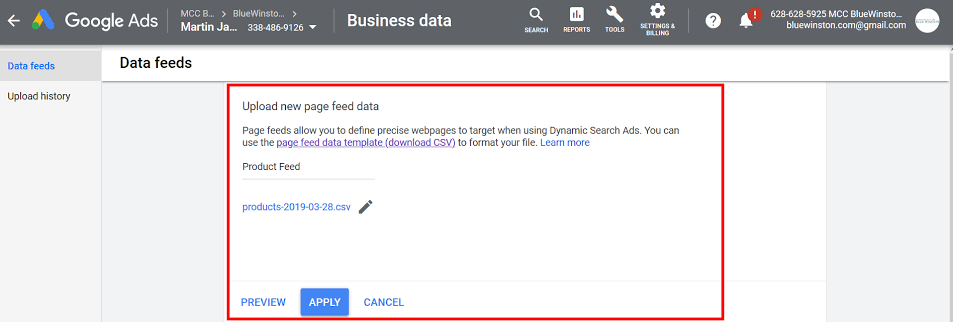
Check your website for optimization! Before setting up your DSA feed campaign, you need to make sure that your website is well-designed with easy-to-find pages that can be crawled or create a detailed page feed (a list of URLs). This page feed should include specific landing pages or product categories you want to target. Helpful metadata like clear titles, descriptions, and the right Google product categories will get Google up and running to pull the relevant ads dynamically and tailor them to user needs.
2. Create a Page Feed
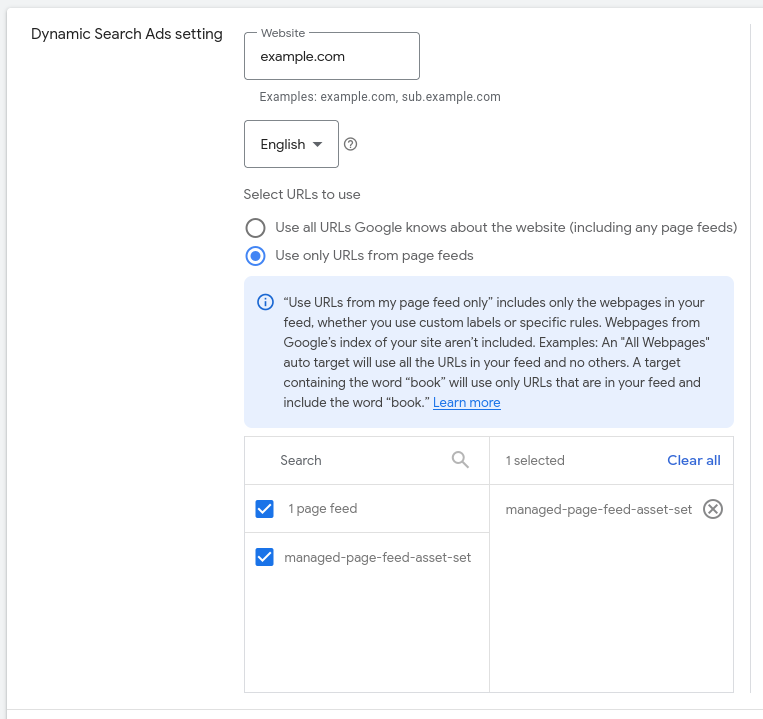
A page feed is just a simple spreadsheet (CSV, XML) with the URLs of the pages you want your DSA campaign to target and optional custom labels that you make up to better organize your feed. Google Ads has a “Business Data” area where you can upload this data. The feed is the one that directs Google to the specific pages so that the ads will be referring to the most relevant products or services, and, in addition, you will be able to divide the campaigns by product lines or categories.
3. Set Up a New Dynamic Search Ads Campaign
 From your Google Ads interface, start a new campaign, select sales and leads as the main objectives, and choose search as the campaign type to generate targeted traffic. Set dynamic search ads as the ad format for the campaign, write your site URL for targeting, or link your page feed as the targeting source.
4. Define Targeting Options
 For steering your campaign in the right direction, you can select the product or services you want to promote from the uploaded file or choose content from your website that best represents your products or services. Angling all pages, specific categories, or pages listed in your feed. Target words you are using in your headlines, like “URL contains,” “Page title contains,” or “Category” labels, for highly detailed targeting groups.
5. Write Compelling Ad Copy
Even though the headlines are created on the fly, you still need to write the descriptions and the rest of the ad that will be harmonious with the dynamically generated headers. You should concentrate on straightforward value propositions, inviting calls to action, and revealing your product’s unique advantages that fit with the landing pages in your feed to simplify user experience.
6. Set Your Budget and Bids
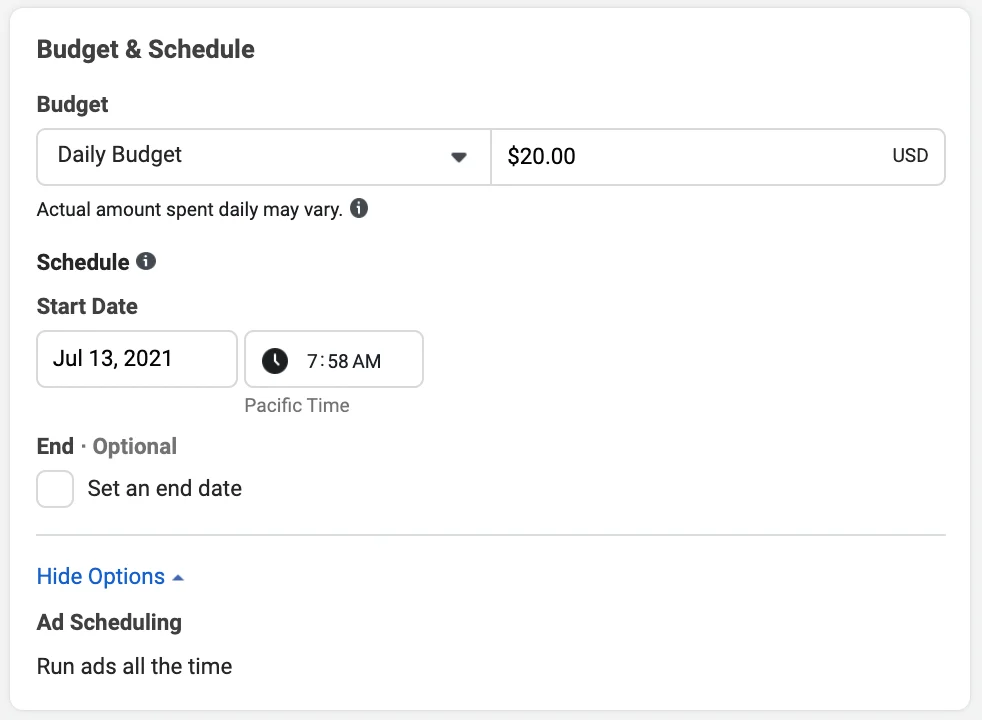
Based on your campaign goals and the amount of traffic you predict to receive, allocate a suitable budget. In order to achieve the best results, go for automated bid strategies that are, for example, Maximize Conversions or Target ROAS to enable better optimization. Moreover, you can set bid adjustments for the specific targets if some categories or pages have a higher potential for performance.
7. Launch and Monitor Your Campaign
If you are not happy with the way you set your campaign, you still have the power to go ahead and do this important job, which means starting your campaign. Impressions, clicks, CTR, conversion rate, and cost per conversion are the basic performance metrics that you should be using to monitor your campaign. Make sure that you thoroughly inspect the search term report so that you can find the irrelevant queries and add them as negative keywords for the budget not to be spent inefficiently.
8. Optimize Continuously

You could have a better page feed, ad copy, and bids by using the performance data to back the decisions. Discover what product categories or URL targets are giving the highest results and then allocate your budgets accordingly. Remember that through the continuous updating of your feed representing inventory changes or new product lines, you can simplify the process to ensure campaign effectiveness and longevity.
Best Practices for Running a Successful Dynamic Search Ads Feed Campaign
Here are the best practices for running a Dynamic Search Ads (DSA) feed campaign successfully, including how to optimize your ad targets.
- Use High-Quality Website Content: The pages of your website that are in the feed should have content that is clear, relevant, and up-to-date, including optimized product page URLs. The good titles and descriptions help Google create more attractive dynamic ad headlines; thus, the ad will be more appropriate and will have a higher click-through rate.
- Leverage a Page Feed with Custom Labels: Use your feed URLs with custom labels to target specific product groups or categories in a more efficient way, simplifying your campaign management. As a result, you can determine which pages Google uses to create ads and easily change bids for different segments.
- Start with Negative Keywords: Initially, add negative keywords to your campaigns to automatically exclude irrelevant or non-profitable search queries that will only waste your budget. Always run through the search term reports and adjust the negative keywords correspondingly in order to continually define your targeting and minimize the amount of spend that is wasted.
- Granular Control Through Segmentation of Ad Targets: The individual-level targeting of specific URLs, page titles, or product categories can be achieved by using separate ad groups or campaigns for each. Such kind of separation not only can deepen the customization of ads and bids for different product lines but also can allow the rise of performance and make reporting through optimization easier.
- Work out the Details and Catchy Ones Too: The more effective way is to dedicate your energy to the creation of compelling descriptions that clearly demonstrate the value of the product or service and contain a strong call-to-action, while the ads’ headlines are auto-generated. This will result in higher click-through and conversion rates; thus, you will be able to better allocate your advertising efforts.
- Keep Your Feed Fresh and Up-to-date: A page feed using new product URLs that have been added and outdated or poorly performing pages that have been removed will be more effective. A clean feed will make sure that ads are always in line with the inventory and business goals.
Conclusion
Dynamic Search Ads feed campaigns are a very efficient way of extending the reach of your advertising while at the same time significantly reducing the amount of manual work that is associated with keyword management. Simply by properly organizing the content of the website and applying the targeted page feeds, DSAs automatically create ads that are pretty relevant to the user, as they closely coincide with their search intent, as well as the availability of the product.
If you want to significantly improve your campaign, you can use top-notch feeds, set negative keywords, and use creative bidding strategies. In general, DSAs provide advertisers with the opportunity to achieve higher results in their Google Ads campaigns with less time and energy spent.

Vijay Sood is a seasoned digital marketer with a passion for driving online growth and innovation. With a robust background in developing and executing comprehensive digital strategies, Vijay excels in leveraging SEO, content marketing, and social media to boost brand visibility and engagement. His expertise lies in transforming data-driven insights into actionable marketing campaigns, helping businesses achieve their digital objectives.