
You’ve probably experienced this silent productivity toll if you spend hours on a daily basis typing emails, drafting Slack messages, writing code comments, or Notion documents. Your mind races ahead of your fingers, and a lot of ideas get lost, condensed, or left out between your brain and the screen.
But Amical is an open-source dictation program designed to fill that void, and very few programs have succeeded in doing it quite like Amical. This detailed Amical review covers everything you need to know: what it is, how it works, its standout features, pricing, privacy approach, platform support, and how it stacks up against native dictation tools.
What Is Amical? An Introduction to the Open-Source AI Dictation App
Amical is an AI-powered speech-to-text software program that’s free and open-source, available for Mac, Windows, iOS (beta), and Android. The idea is basic but ambitious: to enable you to type as much as four times faster while maintaining the same accuracy, context-awareness, and privacy without typing. Most voice input methods simply input a raw transcript into any field you’re typing in, but Amical does more than that by formatting your dictated text in a way that is intelligent for the application you are using.
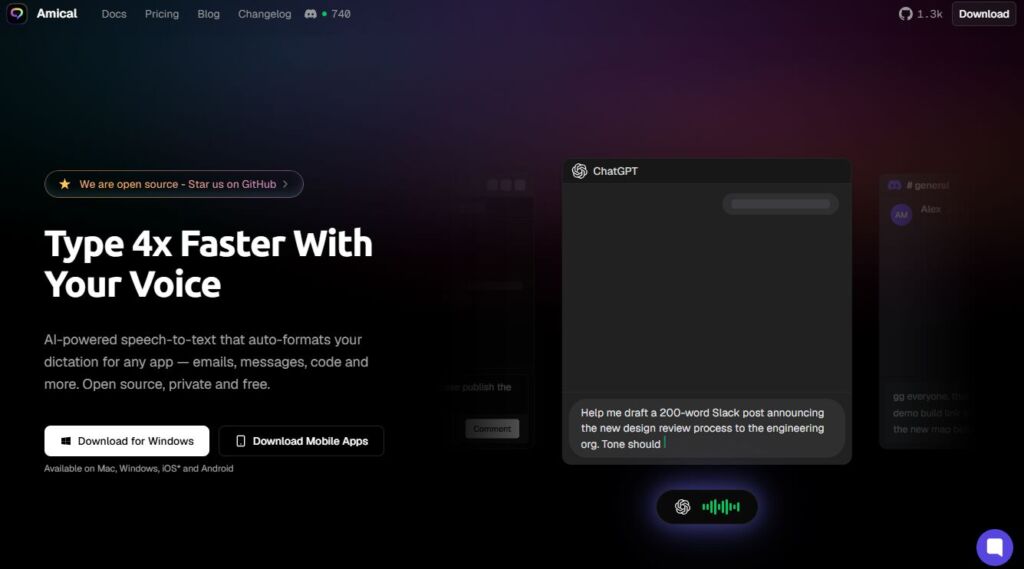
The project is made public on GitHub and has already received more than 1,200 stars (which is a significant number and definitely a positive sign of community interest). Built by Haritabh Singh and Naomi Chopra, it has garnered a global following from San Francisco to Tokyo, with praise from developers, lawyers, content creators, and anyone looking to boost productivity coming in from all corners.
The ability to have generative AI understanding, local model support, and context-aware formatting, all in a beautiful, user-friendly interface without needing to be a developer, is what sets Amical apart from the dozens of voice-input tools that have come and gone.
How Amical Works: AI-Powered Dictation That Understands Context
Amical’s core is a generative AI layer that extends beyond speech recognition. The traditional S2T (speech-to-text) tools, such as the built-in Mac and Windows dictionary, employ relatively simple acoustic models that are based on how the sound waves are translated into text. They’re good at capturing what you said, but they have no understanding of what you meant, how it should be formatted, or where it’s going.
Amical’s approach is fundamentally different. Once you enable Amical with the set keyboard command and begin talking, it can’t simply transcribe your speech. It automatically formats the context of the application you’re working in, with intelligent formatting. Gmail will create well-formatted and well-punctuated prose if you’re composing an email in the app. If you’re composing a casual message in WhatsApp or Discord, it will loosen the formality and might even add contextually applicable emoji. If you’re working in a code editor, such as Cursor, it will know that you may be typing technical terms, function names, or instruction-like sentences.
One of Amical’s best features is its context-aware formatting. Users are consistently impressed by it in reviews. The app effectively functions as a smart proxy between your speech and your typing textbox, but with the ability to comprehend more than just the language, it comprehends intent and surroundings.
Local and Cloud Models: Flexibility and Control
Among the most convenient architectural choices Amical can make is to provide users with the option to choose an AI model that is local or cloud-based. For those who value speed and privacy, they can process everything on their own machine, without any data leaving the device during processing. If users prefer the best possible transcription quality without having to run data through cloud infrastructure, they can choose quicker models which work with the cloud.
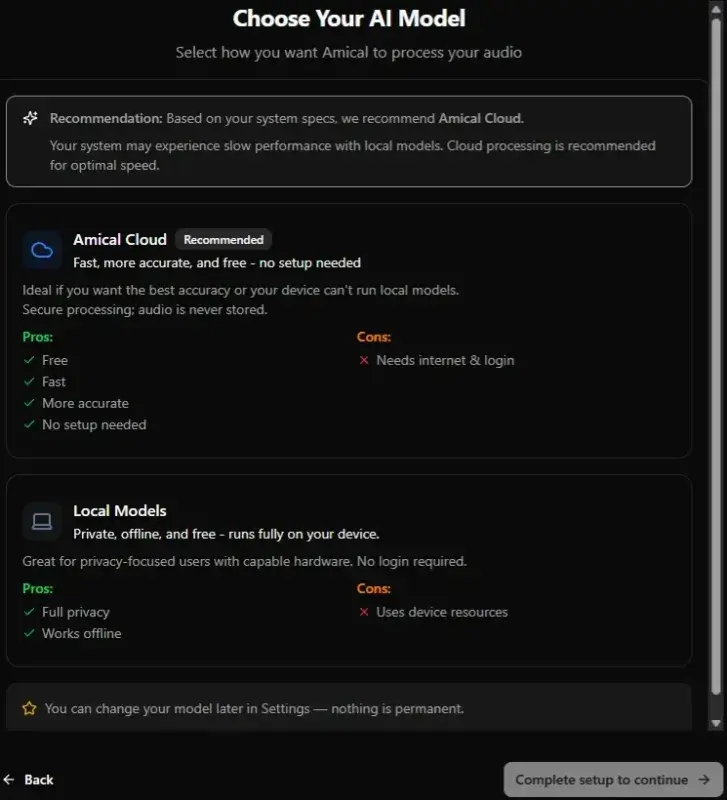
Both options are available to all users, even free tier users, which is quite generous. Switching between local and cloud processing is seamless, giving you the flexibility to experiment and determine what is best for your workflow and comfort with handling data. Local models also have a slightly lower accuracy ceiling than cloud models, but several users say the tradeoff is worth it—particularly because there’s no latency associated with network round trips for local processing.
Key Features of Amical: A Deep Dive
Tailored Vocabulary for Industry-Specific Precision
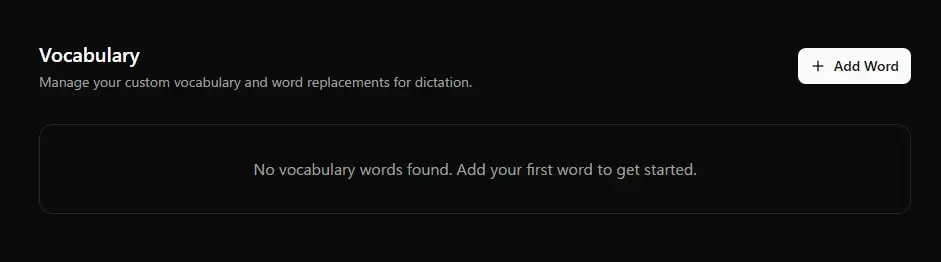
Anyone who has ever dictated technical content knows the frustration of watching their voice input mangle jargon, proper nouns, or product names. Amical counteracts this by providing a custom vocabulary feature that enables you to teach the AI your jargon. For Kubernetes and CI/CD pipelines, legal terms such as SOC 2 compliance and PostgreSQL databases, or product-specific terms such as project code names and client identifiers, you can add them to Amical’s custom vocabulary and get a much higher accuracy rate in your domain while transcribing.
Not a small thing. If there is a world out there where accuracy of a specific term could make or break the output then the vocabulary layer that adjusts to it is very useful. Shared vocabulary support for teams is also included in the premium plan, allowing organisations to have a single set of recognised terms in all members’ installations.
Custom Keyboard Shortcuts for Hands-Free Control
Amical has the ability to handle fully customizable shortcuts for its various functions, so you can dictate without taking your hands out of your working position, switch modes and control the app at will. The default shortcut is Command + Space (or Option + Command + A) on Mac and Ctrl + Alt + Space on Windows. These can all be remapped to suit your preferences.
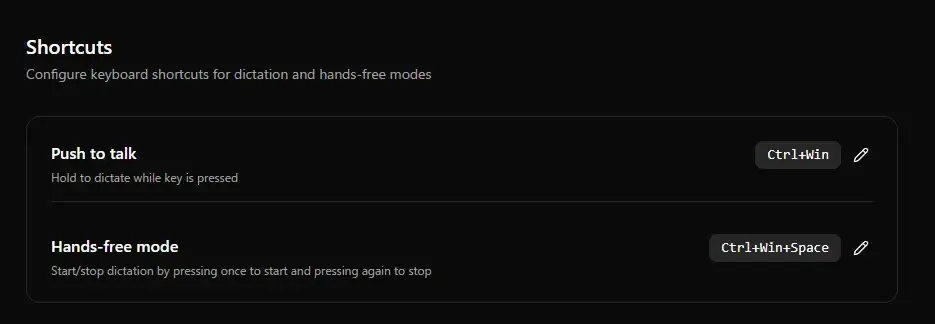
This feature is not just convenient, it’s valuable too. The app’s ability to control an AI dictation tool solely from the keyboard is especially convenient for those who struggle with repetitive strain injuries or have accessibility issues and don’t have to click on a UI button to operate it. Custom shortcuts also give Amical the feel of being deeply embedded in your operating system as opposed to a third party add-on that you must actively navigate to.
Support for 100+ Languages
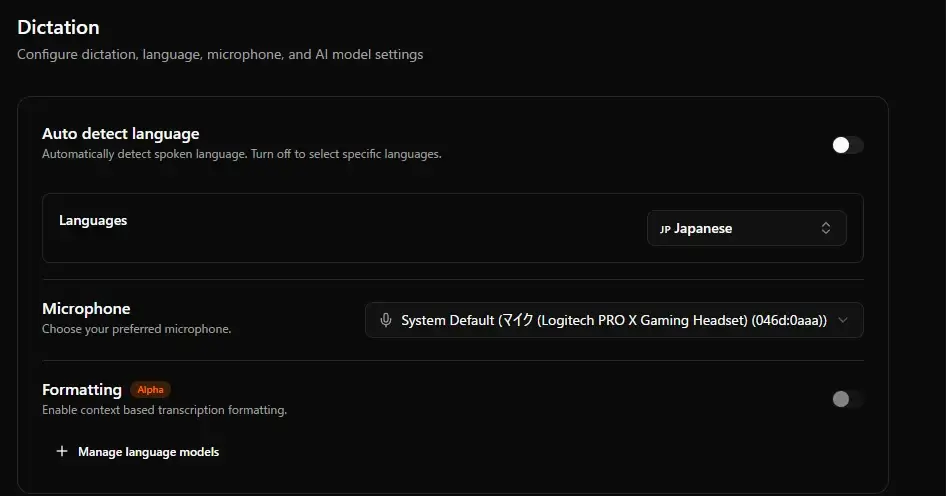
Amical offers dictation services in over 100 languages, including what the team states are native level accuracy. The app seamlessly lets you toggle languages and is even able to handle dictation in two or more languages for those who naturally code-switch in their everyday communication. This level of multilingual support is genuinely rare among AI dictation tools — most competitors focus almost exclusively on English, and their accuracy degrades noticeably for other languages. The international user base of Amical, including an especially large group of Japanese users, is testament to its usability.
Smart Formatting and Autocorrect
Amical goes beyond transcription of what you’ve said, using intelligent post-processing. It auto-corrects grammar, fixes pronoun usage, and can add contextual emoji when appropriate for the platform you’re using. The output you receive isn’t just audio to text—it’s a well-formatted version of your speech that you would be happy to publish, absolutely through the lens of both your writing style and the communication norms of the app you’re using.
Eventually Amical also becomes a part of your vocabulary and style of writing and the more you use it, the more accurate and personal it will be. It is this adaptable feature that sets it apart from tools that give the same output no matter the audience or what the text is being used for.
Platform Support: Where You Can Use Amical
Amical is available for Mac, Windows, iOS (Beta) and Android. These desktop versions are the most developed and feature-rich with the Mac and Windows version providing the complete Amical experience with local model processing, custom shortcuts and all integrations. Support for mobile is growing, and the team said it was continuing to work on making the iOS and Android apps as comparable to the desktop version as possible.
In terms of application integrations, Amical works across a wide range of tools that modern professionals use every day. It is compatible with Google Mail, Slack, Notion, Jira, Cursor, ChatGPT, Discord, WhatsApp, and Instagram, among other platforms. Each integration is context-aware and understands the formatting and norms of each platform and adjusts accordingly. A Jira comment is not the same as a Notion meeting note, but Amical doesn’t miss the mark with the appropriate register and structure.
Amical vs. Native Mac and Windows Dictation
For a true appreciation of what Amical offers, it’s best to compare it side by side with the built-in dictation options that are already available in major operating systems. Mac’s built-in dictation and Windows Speech Recognition work, but are limited. They are built on older speech-to-text technology that transcribes voice-to-text without the use of any generative AI over it, which means the output is simple and lacks formatting. There is no context awareness, no style adaptation, no smart autocorrect, and no custom vocabulary support.
Unlike Amical, Ample is driven by generative AI, providing a very different capability set. It writes like you, understands the context in which you’re writing, formats intelligently, and it learns your vocabulary and style as it goes. The difference in day-to-day experience is substantial—not just incremental. Users who have migrated from native dictation software to Amical invariably report that it is a step change and not an upgrade.
Amical Pricing: Generous Free Tier, Affordable Premium
A big advantage Amical is offering in a sea of costly AI products is its pricing model. The free plan is really helpful and not designed to restrict your use of the software to a paid account. The free plan includes unlimited local dictation forever, 8,000 words per month of cloud dictation, custom vocabulary, AI formatting, support for 100+ languages, all integrations, and access to both local and fast cloud models. There is no data retention and no model training on your data—even on the free plan.
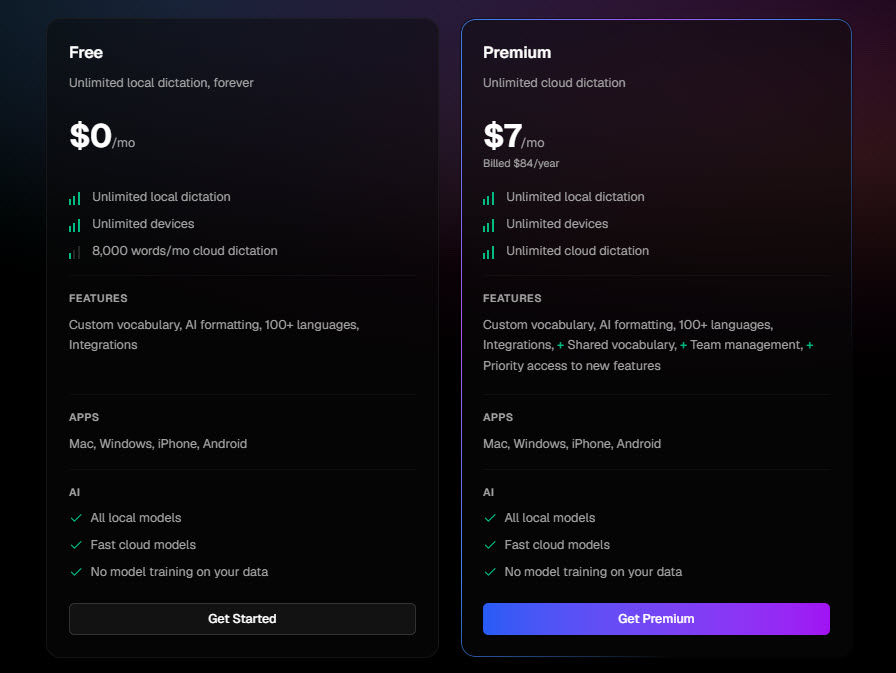
At a flat $7/month (or slightly more monthly) the Premium plan opens up every cloud dictation limit and introduces team features, shared vocabulary and priority access to new features. The premium tier has a competitive price for advanced users who demand high accuracy from the cloud model and require unlimited transcription volume, while competitors such as Whispr Flow and Aqua Voice are much more expensive for similar features.
For larger organizations, Amical has a custom pricing tier that includes all the above plus Private Model Hosting, Custom AI Models, ultra-low latency, SSO/SAML, OAuth, Volume Discounts, Centralized Billing, Seat Based Licensing and SOC 2 Compliance (pending).
There’s a reason why there’s a meaningful Free Tier. Amical is open source, and the free plan also allows technically savvy users to self-host and run all the software on their own infrastructure, without incurring any costs at all on top of the monthly subscription.
Privacy and Data Security: A Core Principle, Not an Afterthought
One of Amical’s most proclaimed values is privacy, and the architecture supports this. Run Amical with local models and the voice data is not sent to an external server, but only processed locally. Amical’s no-data-retention policy means that your audio and transcriptions are never stored or used to train AI models, even with cloud models.
This also works well for users that need to be careful with what they put online – lawyers, healthcare workers, executives, and developers with proprietary code bases. A number of users have noted that local processing is a key factor in the decision to go with Amical because it provides them with actual control over what happens to their voice data.
The open source project also enables anyone technically capable of doing so to independently audit the codebase and confirm these privacy claims. For users who are skeptical of privacy promises made by closed-source commercial software, the ability to inspect the actual code is a meaningful differentiator.
Real-World User Reception and Community Response
Feedback from the community on Amical has been very positive, across a variety of platforms. On AppSumo, reviewers call it useful and accurate, and that it’s fast. On Reddit communities like r/LocalLLM and r/macapps, users praise its offline capability and context-aware formatting as features that set it apart from bare-bones Whisper wrappers or simpler voice input tools.
Amical has garnered the interest of productivity enthusiasts, developers, and AI tool curators on X (formerly Twitter). It’s been compared favorably with other popular tools in the market in Japan, where voice input tools are especially popular. Not long after launch, the app hit 1,000 GitHub stars and OpenAlternative took to the web to celebrate.
A common sentiment from users is the shock of discovering Amical’s free. Several users report transitioning from a paid service (ten dollars or more per month) and finding Amical to be similar or better quality. The combination of local model support, real-time context awareness, and a free pricing tier is unusual enough that users often express disbelief that such a capable tool exists at no cost.
Who Should Use Amical?
Amical is a good option for a variety of users. Professionals who write large volumes of text daily—whether that’s emails, reports, documentation, or code comments—will find the productivity gains from voice dictation significant. Digital marketing teams, in particular, often juggle blog drafts, client briefs, ad copy, and campaign reports across the day, making a tool like Amical especially useful. The compatibility with tools such as Cursor will be a plus, while the custom vocabulary feature will benefit developers who need to accurately dictate technical jargon. For remote workers, who spend most of the day within the chat service such as Slack, Discord, or WhatsApp, context-aware casual formatting will be a blessing.
Amical is especially beneficial for users who have physical disabilities that make prolonged typing uncomfortable or challenging. The app can be used with just keyboard shortcuts, so there is no need to touch the mouse while it is used to dictate, making it seamlessly accessible to an accessibility workflow.
The local model option and the verifiable no-data-retention policy make Amical a more secure option for privacy-conscious users or those handling sensitive data than cloud-only alternatives. For those who are just curious about open-source AI tools and would like to try them out without spending money, the free tier offers a genuine and comprehensive first experience with the product.
What Could Be Better
When you’re talking about any product review, limitations are essential. Amical’s mobile apps for iOS and Android are still in beta, which means they may not yet deliver the complete feature set available on desktop. Users who rely primarily on mobile devices will want to monitor the app’s development progress before fully committing.
Further, local model accuracy is termed by users as “well within acceptable” but not as good as model accuracy in the cloud—which the user must be aware of before selecting the workflow that requires offline models. The cloud dictation limit of 8,000 words/month on the free plan is pretty generous for casual use, but if you’re a heavy user who’s using cloud dictation exclusively, this may be the limit for you.
Final Verdict: Amical Is a Genuinely Impressive AI Dictation Tool
Amical is one of those few programs that actually meets the hype it sets for itself. It’s quick, it’s correct, it’s context-cognizant, and it’s personal. Its being open source and free at its heart makes it even more remarkable. From a developer to a writer, a lawyer to a student, and anyone who just wants to keep up with the pace without being stuck to a keyboard, Amical has a solution to help you along.
Its formatting capabilities powered by generative AI, local and cloud model flexibility, custom vocabulary, multilingual support, and deep application integrations make it way ahead of native dictation applications and close to premium-priced options. With active development, a growing community, and an open-source foundation with transparency, Amical is poised to become an essential productivity tool for anyone who values reclaiming time from the keyboard.
If you haven’t used it yet, you can download it for free at amical.ai and get started without a credit card and account sign-up.

Vijay Sood is a seasoned digital marketer with a passion for driving online growth and innovation. With a robust background in developing and executing comprehensive digital strategies, Vijay excels in leveraging SEO, content marketing, and social media to boost brand visibility and engagement. His expertise lies in transforming data-driven insights into actionable marketing campaigns, helping businesses achieve their digital objectives.