Shopping has evolved from being a physically accomplished task to an interactive, dynamic experience. eCommerce brands are enabled to visually advertise their products to interested consumers globally. These types of ads are a vital aspect of the constant evolution of advertisement and are especially helpful during seasonal sales, product launches, and campaign runs.
It’s all about strategic precision with targeting, presentation, creativity, and continuous adjustments. Businesses, from Google to Instagram and Facebook, now have smart shopping and product ad tools available that were previously nonexistent. However, profitability and success don’t stem from splurging. Instead, it rests on spending in a calculated and intelligent manner. This guide will help you explore actionable strategies designed to capture attention and yield conversions and revenue.
What are Google Shopping campaigns?
Google shopping campaigns serve as online marketing avenues, showcasing your products on Google to increase sales. It’s another form of advertising, enabling users to showcase their shopping ads to potential customers actively searching for a product on Google.
As for shopping ads, they contain images related to your products. In addition to a dedicated Shopping tab, they usually appear at the top of the search results list alongside relevant queries.
You can find free product listings directly beneath them in the Shopping tab. These are shown to users when there are no paid competition ads appearing in Google Shopping.
Best Strategies for Managing Google Shopping Ads
1. Make Sure to Optimize Your Product Feed
Your Google shopping campaign begins with the product feed. It contains all the necessary information to identify your items, such as names, descriptions, prices, and even images.

To make your ads effective:
- Ensure that you combine popular search keywords with precise and straightforward product titles.
- Write concise yet comprehensive descriptions that focus on the product’s key features and advantages.
- Check that your photographs are of high resolution and capture the product at the best angle.
- Always portray accurate stock levels and pricing to ensure your feed is current.
Effective campaigns start with an optimized product feed. A Google Shopping Ads agency can further enhance your feed and help target your intended audience. These specialists can significantly improve ad visibility and ensure that products are optimally showcased.
2. Refine Your Ad Campaign Structure
An optimized campaign structure is a keystone in setting you up for success, which is a critical step in the preemptive work you need to do. For beginners, it can be challenging to understand what capturing the proper structure entails. Your ultimate aim is to have as much control as possible over your product listing ads, as this allows you to bid differently for different products.
Your organic and paid ads won’t work in unison if you treat all your products the same, because there are apparent differences among the products in terms of profit margins, popularity, conversion rates, etc. This is precisely why Google Ads lets you split your products into different groups within your Google Shopping feed. As we mentioned earlier, you can categorize them by category, brand, condition, Item ID, product type, and custom labels.
3. Prioritize Mobile Optimization
As mobile shopping continues to grow, it’s vital to make sure that your advertisements and landing pages are accessible from smartphones. Consider the following:
- Most responsive pages need to load within seconds to avoid high bounce rates.
- Browsers need to be able to access the page through any device, and the page also needs to adjust to the device.
- Mobile images and product details need to be straightforward and easy to read.

Ensuring that your mobile ads deliver flawless execution on campaigns and landing pages will streamline the workflow for users on the go. As a result, your customer interaction will improve, and you will have a higher chance of changing your visitors into clients.
4. Use Negative Keywords to Your Advantage
Negative keywords ensure that your advertisements will not appear for unrelated queries, enhancing your return on ad spend. In turn, this will also reduce click-related expenses. Users who do not wish to buy luxurious handbags will be filtered away when adding terms like “cheap” or “budget.”
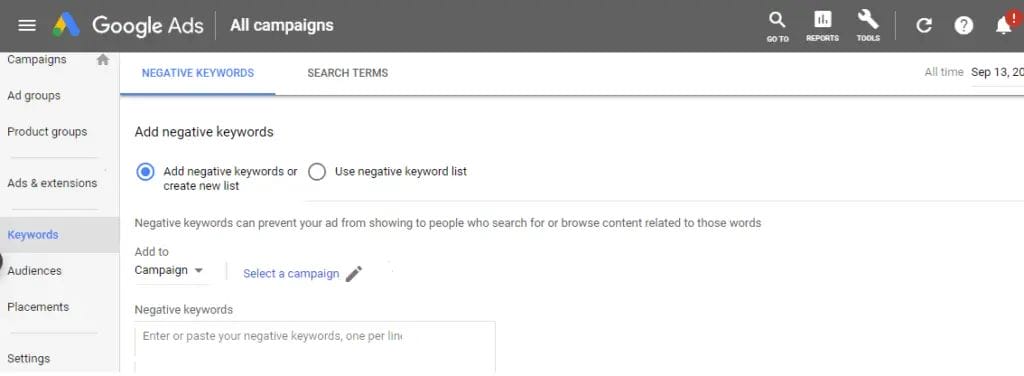
To refine your list of negative keywords, it is essential to check search terms frequently. By identifying and updating irrelevant questions, click-through rates will be enhanced, along with campaign performance. This will enable advertisers to maximize the value of their advertising spend while effectively connecting with their target market through search ads.
5. Split your Products into Ad Groups
You will need an alternative method of controlling the bidding for your ads, as you will not be able to do so by keyword. Instead, you can structure your products using ad groups. Your ad groups are akin to specific departments within a store, particularly when managing your Google Shopping feed. The other key concept here is to ensure that every ad that gets triggered is as relevant as possible.
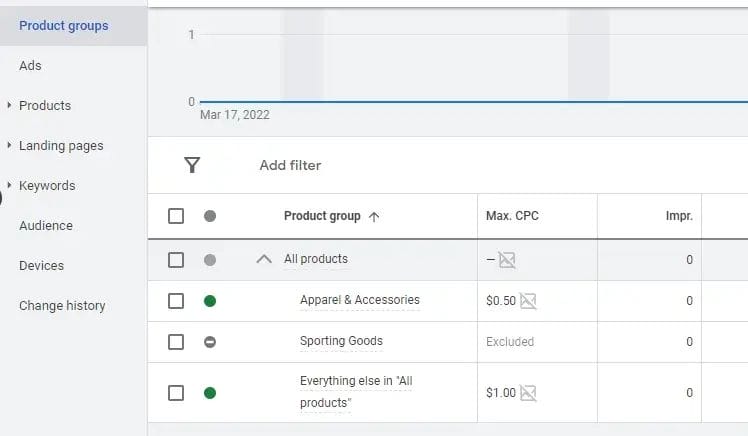
You might have seen that you already have your first ad group from when you created your campaign. This is how you can add extra ad groups:
- Sign into your account.
- Go to the page menu and select ‘Ad groups’
- Click on the + button.
- Choose ‘Select a campaign’ and choose where your ad group will go.
- Name your ad group.
- Set the bid for your Google Shopping ads campaigns.
- Click ‘Create’ and you’re all done.
Now, you are set to cut and further divide your products for your Google Shopping ads campaigns. If you have multi-level categories in your feed, you have to take each level separately to optimize your Google Merchant Center account.
6. Exclude unprofitable products
You can easily stop advertising your unprofitable products—exclude them from your campaign. All you need to do is adjust your bids and mark these products as excluded in your Google Ads account.
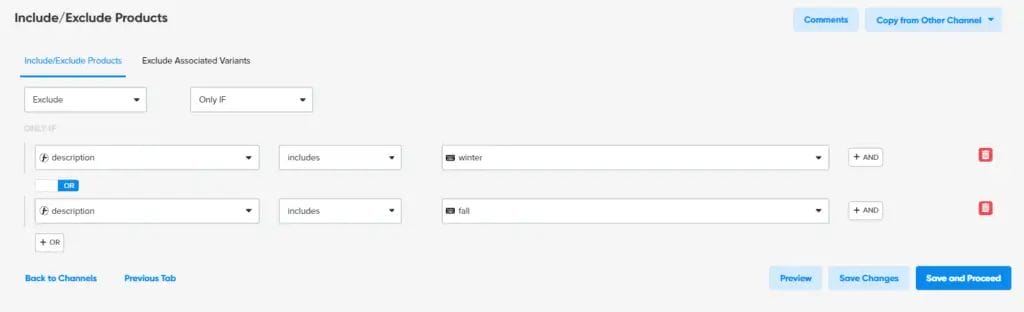
As an alternative, you can use a data feed tool like ours to track down missing products in your Google Shopping feed using the same filters and remove them with a single click. Excluding certain products can be helpful in times when you don’t expect them to sell well. You can identify them and apply a single rule to exclude the entire list.
7. Use A/B Testing
Even if you know your customers well, you still don’t know which image will catch their attention and which one will fail. It is essential to A/B test your images for successful Google Shopping campaigns. Implement various image changes and evaluate the performance.
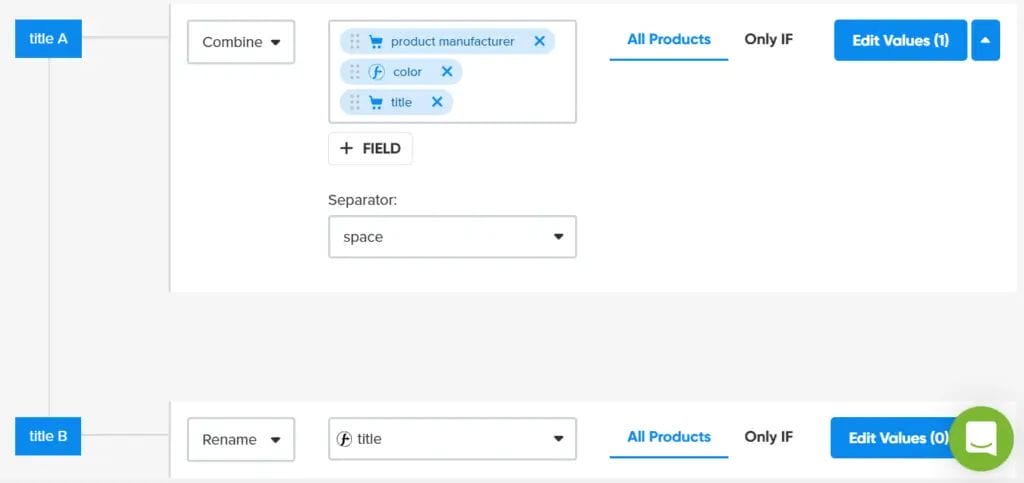
Knowing this will enable you to adjust your images and boost the performance of your Google Ads and Google campaigns. If you are serious about Google Shopping campaigns, you would not want to take a guesswork approach in your Google Ads account; instead, use Google for insights.
8. Bid Adjustments in Your Advertising Strategy
We do recommend using this option while advertising in Google Shopping. Adjusting bids allows you to have more control over the value of clicks. It helps manage who sees the advertisement and when it is visible on Google Search.
Location Adjustments
With the location bid adjustment, it is possible to manage how frequently shoppers see the advertisement based on defined areas. This would be useful in case address-based advertising is also targeted, and there is a noted higher level of city competition in your Google Merchant Center.
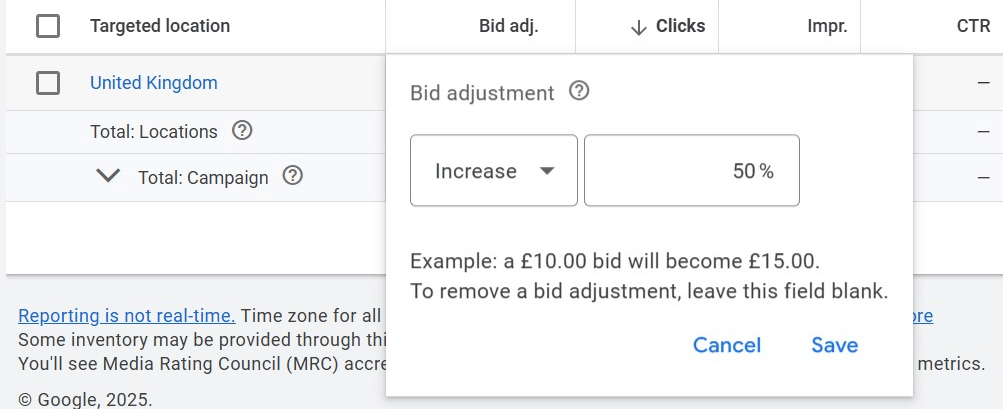
If that is acknowledged, then it is justifiable to bid higher if those sales are very critical for your successful shopping campaigns.
Devices
Now imagine the scenario where most sales are made via desktop, the second-ranking platform is smartphones, and the last is tablets, which are all important for optimizing Google Shopping campaigns. If you do, the bidding can be controlled based on the device, ensuring that ad spending is not wasted.
Schedule
Depending on what is being offered for sale and its location, there are specific weeks and days when the advertising is especially effective.
The Reports tab allows you to check performance for a specific day or hour of the week and can be especially helpful if your cost per conversion appears to spike during weekends and late hours in your Google Merchant Center account.
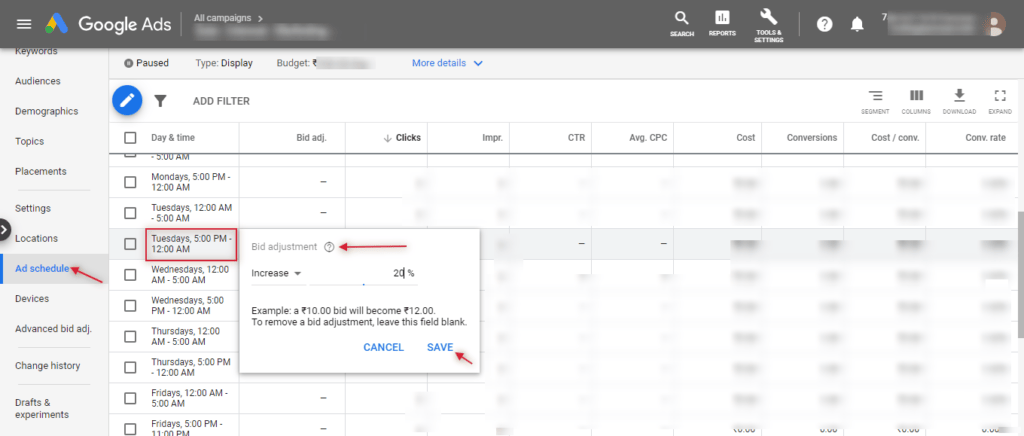
To access the report, navigate to Reports and select View: Time > Day of the Week or View: Time > Hour of Day. If you need to customize bids for days and hours, first set an ad schedule. Navigate to ‘Settings,’ then ‘Ad Schedule’ to create a new schedule.
10. Invest in Remarketing
Consider investing in remarketing to re-engage visitors who did not purchase on their initial visit. Many people scroll through items without taking immediate action, and although those items may not be at the forefront of their minds, the user’s attention is still a possibility.
Take advantage of this opportunity and utilize remarketing to display ads based on their previous visits. This keeps your brand at the forefront of their mind and reminds them of their points of interest. To further improve this strategy, consider incorporating customization. Ads featuring items they had browsed would enrich their experience while enticing them to increase their chances of conversion.
Why are these Strategies Important?
Having a strategic approach to shopping ads, especially with online competition at an all-time high, is no longer optional; it has become a necessity. These strategies ensure that your ads not only blend in but are also highly visible, resonate with the intended audience, and provide the expected returns.
Maximizes Ad Spend Efficiency
Business segmentation, or the division of the audience based on shopping behavior, is a critical factor in preventing overspending. Aligning towards a single segment guarantees that every euro spent is effective and efficient for the brand.
Optimizes Throughs and Conversion Rate
Ads optimized with visuals, headlines, and relevant keywords tend to attract more clicks. Moreover, these clicks tend to have a higher chance of converting into sales, especially when using Google Analytics to track performance.
Boosts Cross-Platform Lev Product Discovery
Cross-platform discovery of products enhances the likelihood of shoppers discovering products they weren’t looking for on Google or Instagram. This boosts visibility and enhances the strategic placement of your products.
Reinforces Brand Reputation
Reinforces brand reliability with harmonious ads reaffirming brand attributes and images likely chosen by the brand in successful shopping campaigns. This aids in raising brand perception, which fosters reliable trust and facilitates the customers’ selection of these products.
Real-Time Results Evaluation
Evaluation is controlled through preset trackers and key performance indicators (KPIs). These result in data-led modifications, whether it be increase or decrease owing to the preset values. Hence, adjustments made based on the results are instantaneous. A strategic approach also permits seamless tracking of your Google Shopping ads campaigns.
Drives Sustainable Business Growth
Advertising fosters a “learning and improvement” cycle for businesses, facilitating customer retention, brand loyalty, and long-term growth through effective bidding strategies.
Conclusion
Properly designed Google Shopping Ads can transform your business from offline to online, resulting in significant revenue increases and better return on ad spend. Appropriately implementing the right strategies, informed by competition analysis, enables companies to market their products effectively, attract their target audience, and encourage sales. However, success requires ongoing management rather than just an initial configuration, as a setup requires adjustment based on consumer activity and platform shifts.
Performance can be improved through proactive data-driven decisions and routine optimizations using Google Analytics for successful shopping campaigns. Flexibility is essential while testing different strategies and refining the game plan using fresh insights. In the rapidly evolving digital landscape, agility is consistently rewarded.

Vijay Sood is a seasoned digital marketer with a passion for driving online growth and innovation. With a robust background in developing and executing comprehensive digital strategies, Vijay excels in leveraging SEO, content marketing, and social media to boost brand visibility and engagement. His expertise lies in transforming data-driven insights into actionable marketing campaigns, helping businesses achieve their digital objectives.