Do you need more downloads for your app? Facebook might be your answer. With 1.4 billion active users globally, Facebook has become the go-to platform for advertisers and marketers. No matter what audience you are trying to reach, most likely they will be found on Facebook. Hence, take the opportunity to advertise your app on Facebook.
One of the key benefits, other than the user base, is the ability to hyper-target specific users. This means businesses have the option to define what their ideal customers look like, including their interests, location, and age. In this article, we’ll walk you through a step-by-step guide to setting up Facebook App Install Ads to help you maximize downloads and drive engagement.
Step-by-Step Guide to Maximize Mobile App Installs Using Facebook Ads
Facebook’s App Install Ads will enable you to reach the target audience and get more downloads. This instruction will guide you through the process of setting up the carousel ad campaign and optimizing it for the best results.
Register App On Facebook for Mobile Apps
There is something important we must cover before jumping into ads on Facebook Ads Manager and setting up the first mobile app install campaign: that is, you will need to register as a developer on Facebook. In case you are not a developer yourself, provide this helpful link to your developer so that they can assist you and complete the setup in App Dashboard.
In the following sections, you will learn how to register your application, install the iOS or Android Software Development Kit “SDK,” add app events that may be relevant to your objectives and business, and more. While SDK installation is optional, we encourage our clients to at least install the Android SDK, as it allows for greater tracking and ad targeting, which translates to better insights.

As advertisers, the more we can get, the better, as that information can be used to make decisions, build custom audiences, and optimize our app campaigns. Adding events is also optional, but my advice would be to add them because they pertain to your business (app install, app launch, add to cart, in-app purchase, etc.) so that you are able to target users more effectively using those actions and build custom audiences with that data.
Are you not sure if you did this already? Or maybe you are wondering if you registered correctly? To fully verify if your app is registered and ready to run in campaigns, you must enter your Facebook App ID into Facebook’s App Ads Helper.
Establish Your Objectives in the Mobile App Campaign
We can now move on to setting up the campaign after completing the previously mentioned tasks. It is important to note that there are two major Facebook campaign objectives that you should focus on: app installs and conversions.
App Install Campaigns
If your intent is to get more downloads for your mobile application, you should choose “App Installs” as the campaign objective while creating a new campaign. This campaign objective will run advertisements targeting people within your intended demographics (which will be discussed in detail later) who are more likely to take action. The campaign will be centered around this aim.
Conversion Campaigns
If you want to target warmer audiences who already have your application and want to encourage them to use it again, you can try testing out different campaign objectives like “Conversions.” With this campaign objective, be sure to set a conversion event location, which in this case is your app, at the ad set level.
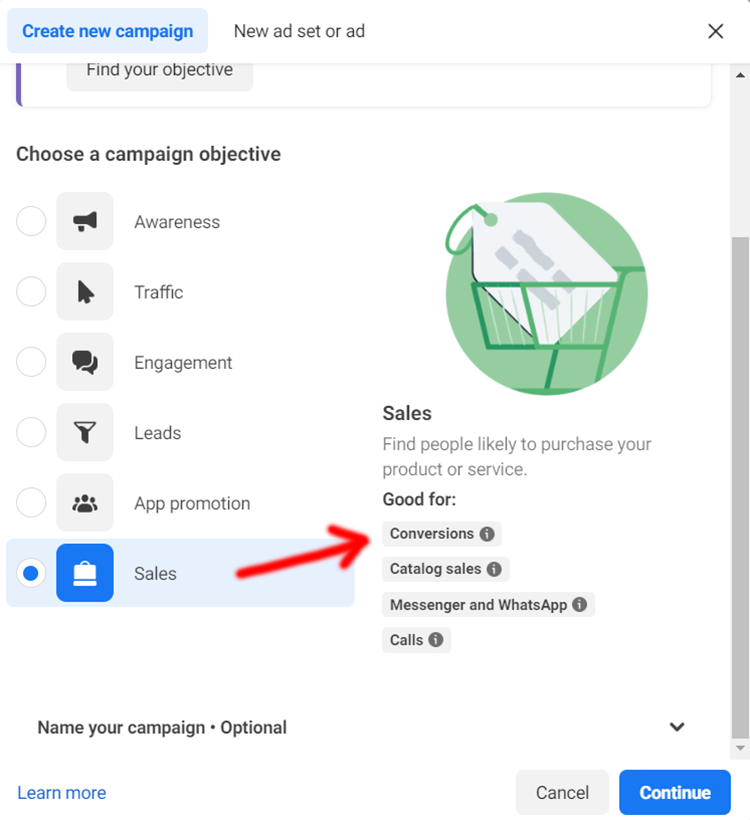
To do this, you select your app, the app store that it resides in for this particular campaign and ad set (either iTunes or Google Play), and choose an app event that you want the ads to optimize for, for example, in-app purchases, as shown in the screenshot above.
Focus on a Mobile App Campaign: Target Your Audience
Now that we’ve selected the campaign, let’s move to the ad set’s targeting options. For which audience would you run campaigns? who is most likely to install and use your app? Test and learn!
Though some targeting options may feel limitless given your market and business objectives, there are people in different phases of the funnel that are reachable. Whether it’s a cold audience from an awareness campaign aimed at driving installs or a warmer audience for a re-engagement campaign aimed at getting the user to continue using the app, everyone has to try it out to find out what works and what doesn’t.
Create Killer Facebook Ads For Mobile Apps
After setting up the campaign and ad set, let’s look at the ad level. App ads share similarities with other ad formats. You can have a text field above your creative call-to-action button or headline, but instead of aURL landing page, you also have the option of adding a deep link.
Here’s how you can create effective Facebook ads for mobile apps using all components of the ad.
1. Text
When your goal is to run a campaign, ad copy that serves the campaign’s objective, resonates with the target audience, and describes the app in terms of solutions, benefits, features, or promotions to encourage new installs. There are no strict rules regarding ad copy length; therefore, try writing both long and short variations to examine which resonates better with your audience. Even though shorter copy outperforms longer ones in most circumstances, there are situations where long-form copy does well.
2. Headline
Make the most out of your large and bolded headline by incorporating powerful words. For a completely new audience whose engagement you are attempting to capture, provide a summary of the app alongside its name. For a warmer remarketing audience, attempt to test a promotion or detail an exciting solution so that the user will come back and engage.
3. Creative
Pick ad creatives that match the features of your ad copy. Facebook and Instagram allow static images and video creatives in their app campaigns, so test them both. While images capture attention effectively, videos are even more effective. This is because they give less room for imagination and allow users to connect to the brand and offerings instantly.
4. Deep link
Implement deep links to make it easier for your users to download your app. This will improve your conversion rates while also reducing bounce rates. A deep link will not only redirect users to your app from the ad; it can also redirect them to specific pieces of content.
5. Call-to-Action Button
Want to get that action with extra effort? Always include a CTA button if you want your users to take action, for example, by installing the app or one of the other options shown above. You can also create click-to-call ads on Facebook for both reach and website traffic campaigns.
Conclusion
Now, you are all set to run your first ad campaigns on the Facebook mobile app. Let them roll and monitor the results. After some time, generate reports to track the performance and determine which elements of the campaigns are successful and which are not. After that, start the testing phase with the numerous options at your disposal, such as ad set targeting, campaign objectives, and even specific components of the ad. Remember to always keep in mind that users will only remain engaged if you keep on entertaining them.

Vijay Sood is a seasoned digital marketer with a passion for driving online growth and innovation. With a robust background in developing and executing comprehensive digital strategies, Vijay excels in leveraging SEO, content marketing, and social media to boost brand visibility and engagement. His expertise lies in transforming data-driven insights into actionable marketing campaigns, helping businesses achieve their digital objectives.