Google has recently launched Feed Rules, a self-service feature aimed at assisting some merchants in managing their data feeds directly on Google Merchant Center.
In this blog post, we will analyze what Feed Rules does. If you want to learn more and understand its differences with DataFeedWatch rules, continue reading.
What Are Attribute Rules?
If you are a novice user and have never worked with feed rules before using Google Merchant Center, allow me to explain what attribute rules/feed rules incorporate and why they are useful:
“Attribute rules allow you to alter your data so that it meets our product data specification requirements. Use attribute rules to fix errors and assist us in understanding the data within your data source. This article explains how to set attribute rules for your product data.” — Google
As the quote has demonstrated, attribute rules are no longer mandatory but only necessary if you have several feeds and wish to set up overarching rules, especially if you are configuring supplementary feeds. If you are unfamiliar with supplementary feeds, check this article to learn what supplementary feeds are.
When to Set Up Attribute Rules?
Feed rules have numerous different uses, although they can be grouped into three categories:
1. Add or Change Required Data
This category includes information that Google requires but that you have not yet sent in your product file or that is sent in the wrong format. Usually, Google disapproves or gives warnings for missing product information. With knowledge of the changes that need to be done, you can now take the first steps towards creating a feed rule.
2. Add Additional Information
Apart from the optional information that Google controls, you can also customize your feed in many ways. For example, you can put additional parameters in the product name or add metadata such as the gross margin of your items. You can then use this to structure your shopping campaigns.
3—Remove Irrelevant Data
Issues may arise due to an excess of irrelevant information in a product feed and a business may be unable to use a product feed that they genuinely need. Optimize and repair bulk data with Feed Rules for your convenience!
Google Merchant Center Feed Rules
During the years spent handling eCommerce campaigns of different clients, we have noticed how Google Merchant Center is giving more power to retailers by allowing them to edit product data to fit the Google Shopping feed requirements through Feed Rules.
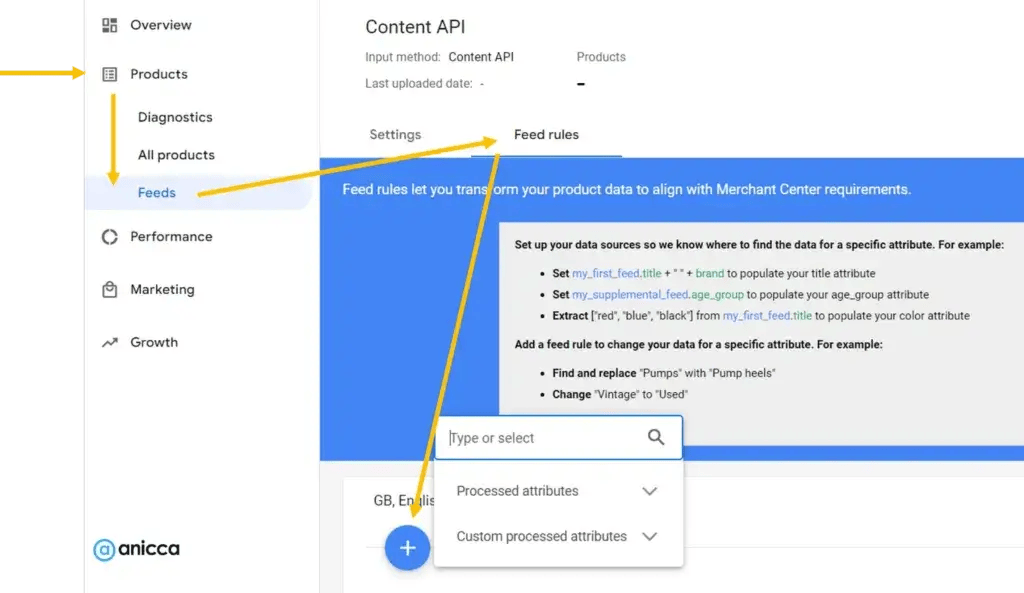
When we apply feed rules, it becomes remarkably easier for our clients to fix a multitude of problems at one time. This simplifies modifying a product’s title, description, images, and other important details. The product listings become better, but it also makes it easier to automate data uploads in the future.
This means that listings will not just be accurate but up to date, making the system less prone to human errors along with allowing for consistent updates, which, in return, would enhance the performance of shopping ads and campaigns.
5 Essential Feed Rules in Google Merchant Center
1. Fill in the empty missing attributes
If a few important attributes are still not included in the feed, then it underperforms. While these attributes are not mandatory, they would positively aid in improving feed quality or assist in campaign structure.
Product types and colors are examples of attributes that can be built out using feed rules. To build these attributes out, certain information must be present in your feed, such as a title or a description. Thus, your feed rule reads, “If the title contains black, set the color to black.”
2. Fix mistakes in product title
There are some regulations that product titles must comply with. For instance, your titles cannot include free delivery or promotional code offers.
In certain cases, however, those elements could be automatically fetched from your website. By using feed rules, you can eliminate such elements so that your titles are not erroneous. To apply feed rules, choose the data source you plan to change. Typically, this is your primary feed. If you have a supplementary feed with titles, you should choose that one.
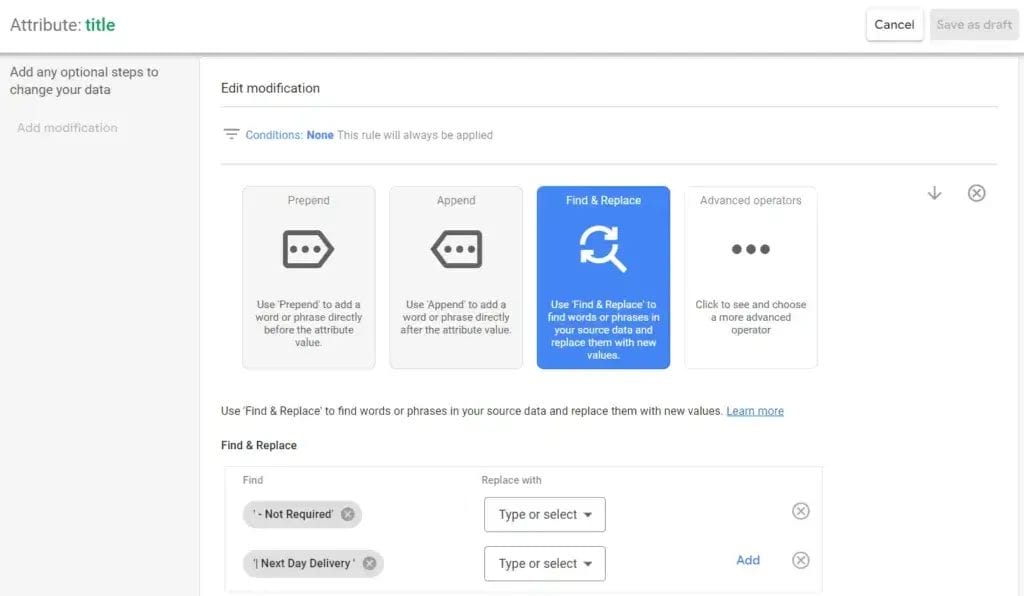
When you have chosen a data source, add a modification for Find and Replace, and then add a rule. A command box will open for you to select an attribute or type in an entry you want to set manually.
In this case, type the text you would like to exclude from your title. From the example, we will be excluding two elements. In the replace with field, you do not have to put anything if you want to simply remove the element. Click OK at the bottom when you are satisfied. In the right-hand panel, you will see rule previews. This panel will display the applied rules in sequential order as the other rules are applied.
3. Assign custom label
Custom labels are an effortless and fast method to categorize products based on predetermined standards. For instance, to mark all products that are discounted.
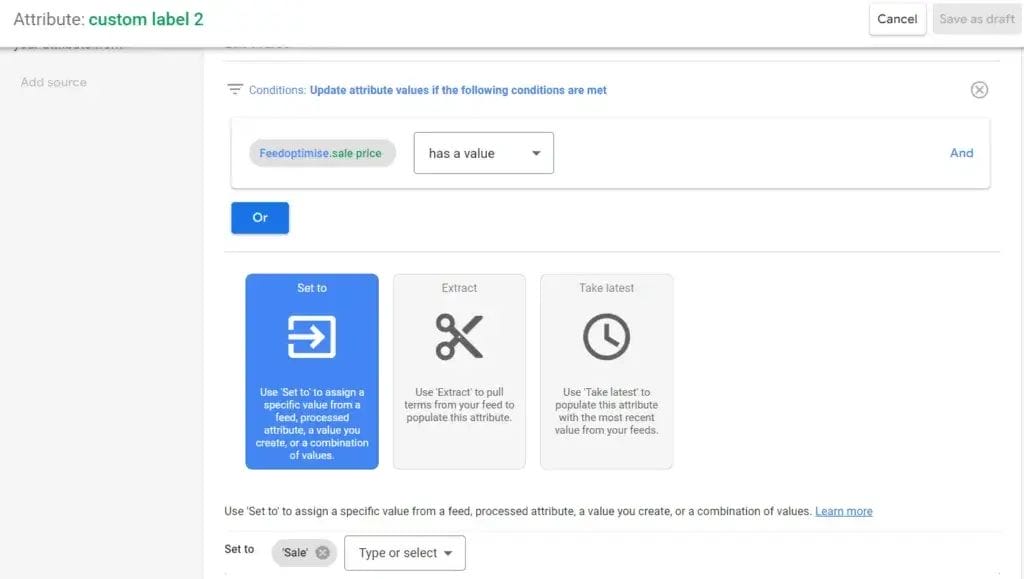
For this scenario, I combine the other submitted attributes to build the criteria. As we know, a sale price must be submitted with the primary feed for sale products. We can pull on this element and apply a custom label to all products that have a sale price.
With this rule, the value becomes dynamic as products flow in and out of sale. That tag can then be used to build campaign structure or to optimize or report on. Since we are not editing a value but generating one, there will be no modifications to append under this.
4. Add text to product titles
Another effective way to use feed rules for titles is to add text based on specific criteria. This is the easiest way to add relevance based on a set of core keywords. Using this rule, you can improve the feed quality for stronger match rates in relevant searches for your products.
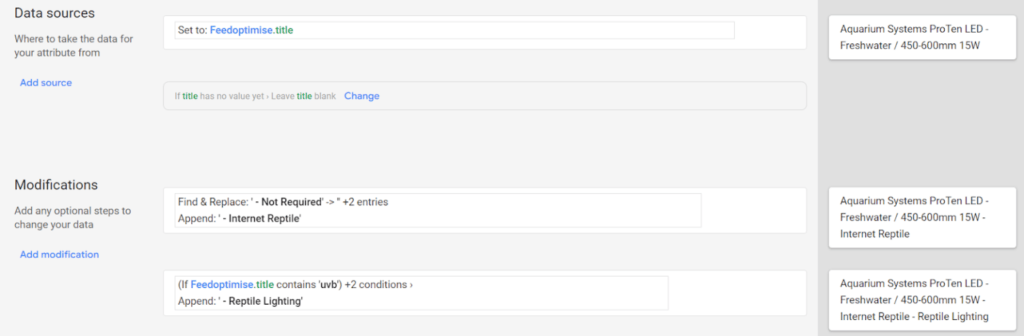
This method can be extended to product descriptions as well. If you are using multiple rules for titles, make sure to place them in the proper sequence. The preview feature can assist you with this.
5. Constructing product categories using URL’s
The product types attribute is often among the messiest and hardest attributes to amend successfully. Even though type is only a recommended attribute and is not used directly in ad serving, it is an extremely important attribute when it comes to account structuring.
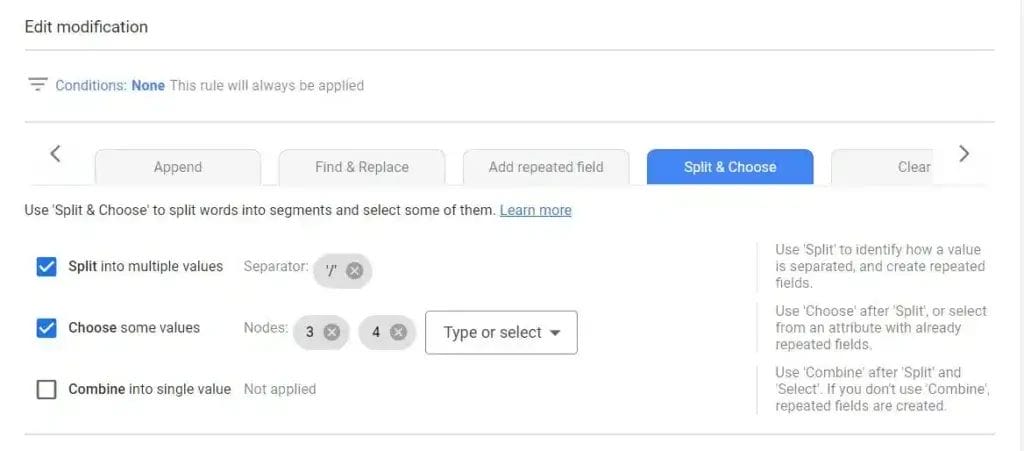
In the end, account structure can optimize or limit your performance; hence, you value it more as an important attribute. Depending on the structure of your site, feed rules may be able to assist with this. Using the split and choose method, it’s possible to construct product types using the breadcrumb structure of your URLs.
Benefits of Implementing Feed Rules in Merchant Center
Proper listing of merchandise is essential for attracting customers and driving sales on the internet. Google Merchant Center has sophisticated capabilities to help marketers manage shopping product data feeds for optimum visibility in shopping ads and relevant queries. Using feed rules gives you the option to edit and customize your product data more thoroughly with the aim of improving campaign results and increasing product visibility.
Here are what we find to be the major benefits for marketers utilizing feed rules in the Google Merchant Center.
1. Save Time Altering Product Data
With feed rules, it is easy to make changes to your product feed in bulk without the need for changing individual items. Titles may be modified, details improved, and descriptions optimized using standard conditions and actions, and these would result in managing your product data more efficiently.
2. Personalized Product Feed Management
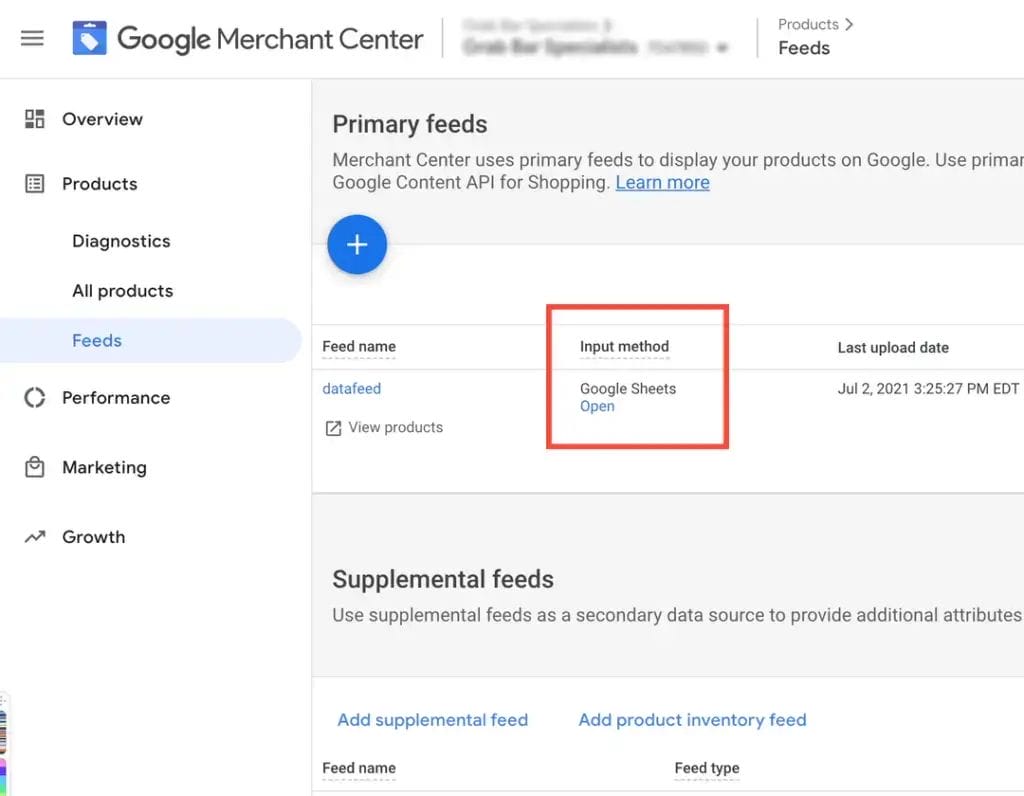
Feed rules will allow you to customize your product feed to fit your requirements. With rules, you can categorize and organize products so that they show under their appropriate categories, which increases the relevance of your product listings, making it easier for customers to find products.
3. Advanced Product Performance
Your product data complies with Google standards thanks to feed rules, which lowers the chances of disapproval. Your listings become more visible and appealing to customers because attributes such as price, availability, and condition are enhanced.
4. Improved Automation and Workflow
Merchant Center’s feed rules enable the creation of automatic rules for minimal supervision. If you use a static feed file, you can set rules that automatically lower product prices during sales or change inventory levels based on existing data. Automation saves time while ensuring the product data is accurate and up-to-date.
5. Enhanced Flexibility and Control
There is no other form of control that can be compared to feed rules, as they enable virtually limitless dominance over the product data. You can enable merging and editing of several attributes to create custom rules that perfectly fit your brand and marketing strategy. Moreover, the ability to adjust to market changes and customer preferences is enhanced.
Conclusions
To sum it up, it is very important to follow the five feed rules if you want to maximize your product visibility and ensure that your customers have a seamless shopping experience. Correctly executed product data not only increases the chances of your products being displayed in relevant search results but also improves your general online marketing.
By keeping the correct and relevant information and following the rules set forth by Google, you would be able to avoid potential account suspensions while making the most out of your digital storefront. You cannot ignore the importance of regularly optimizing your feed, as the dynamic nature of e-commerce would always have you competing with others in the industry. If you take the time to use these rules correctly, your business will be on the right track for continued growth and success. Start today and see the difference in your online sales.

Vijay Sood is a seasoned digital marketer with a passion for driving online growth and innovation. With a robust background in developing and executing comprehensive digital strategies, Vijay excels in leveraging SEO, content marketing, and social media to boost brand visibility and engagement. His expertise lies in transforming data-driven insights into actionable marketing campaigns, helping businesses achieve their digital objectives.