Performance Max offers asset groupings, among other improvements to Google Ads. Asset groups, similar to ad groups in Google Ads, arrange campaigns into categories (for example, themes or audiences).
Asset groupings, a collection of “creatives” (images, videos, headlines, extended headlines, and descriptions), are used to create an inventory of all appropriate ad formats for your advertising goal.
What are Performance Max asset groups?
Performance Max asset groups incorporate a variety of “creatives,” including photographs, videos, headlines, long headlines, and descriptions. Create several asset groups for keywords and advertising. An asset group functions similarly to an ad group (ads are divided into categories within a campaign).
How Does Asset Group Work?
Asset groups can be utilized to generate an inventory for any ad format. Each item in an asset group can be integrated with any other asset in the group to generate advertising for Google Search, YouTube, Gmail, Google Maps, Display, the Discover feed, and Google partner websites.
The next critical step in the Performance Max campaign is “Audience Signals.”Audience signals can be thought of as audience suggestions that tell Google who we believe the ads are most suited for.
After that, you’ll create an asset for a certain audience, which, when combined, will help Google identify the right customers. If we use asset groups and audience signals correctly, we can attain campaign performance similar to Performance Max campaigns. Doing so can increase customer engagement and perhaps double your ROAS and conversion rate.
How to create asset groups in Performance Max campaigns
Remember that you can create multiple asset groups for each campaign. So, if you have two distinct audience types for the same campaign, you may create asset groups for each campaign, and Google will dynamically develop and target your ads to those audiences.
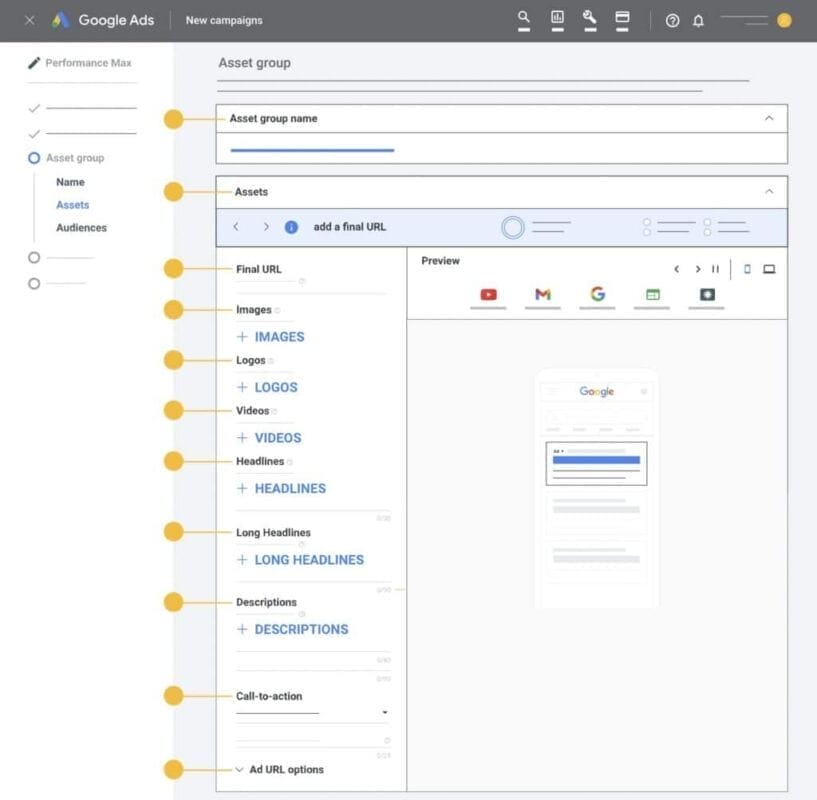
Add your Final URL
Google will immediately take this URL from your Google Merchant Center.
You can disable URL expansion and specify a specific page; however, this is not recommended.
Add pictures
You may either submit images or have Google search your website for images.
If you choose to scan your website, Google will retrieve images from your site and social media profiles. You can look at Google’s picture specs for Performance Max asset groupings.
Add logos
Again, you have the option of uploading or scanning your website for logos. If you opt to scan your website, Google will retrieve your favicon and use it as your logo.
Add videos
Videos must last more than 10 seconds.
(You can also add the URL of your YouTube channel, and Google will pull videos from it.)
If you don’t add any videos, Google will construct them for you based on the platform on which your advertising will appear.
Add headlines
The way “suggestions” work is that Google creates headlines based on your website.
Whether you use ideas or not, make sure your headlines are interesting and catch your users’ attention.
Add a call-to-action
Set your call to action to “Automated” to allow Google to handle it. Because we’re in the machine-learning world, it’s preferable to stay with Google’s recommendations for this part.
Tips For Creating Assets In Performance Max
Here are some guidelines to remember while creating assets for your asset groups. We’ve discovered that while creating asset groupings, consider the products you’re promoting and the demographics you’re targeting, which can help you design intriguing and relevant commercials. There are a few things to look out for, however.
Headline & Description Asset Best Practices
When creating your headline and description elements in Performance Max, try to make them unique and of variable length. Avoid utilizing many headlines that are extremely similar. Google will combine your headlines and descriptions, and in certain situations, use two headlines in a single ad, so any that are nearly identical will send out the same information twice.

As a result, it is vital to produce separate headlines that complement one another, keeping in mind how they will read when combined to convey an overall message to your audience.
Image Asset Best Practices
When uploading image assets, we advise against utilizing them in your Merchant Center Product Feed. When using Performance Max for Retail, you will develop shopping ads with a significant amount of content and product photographs; therefore, avoid employing them.
Instead, use lifestyle or collection highlight photographs that are relevant to the goals of your asset group. As with the headlines and descriptions above, choose photos that complement other assets, and consider how images may be served in your advertising.
Image & Video Asset Best Practices
If you do not include a video in your Performance Max asset group, one or more video assets may be created from other assets that you have prepared. This will be a collection of your photos and headlines. So keep this in mind when creating more assets.
Optimising Assets In Performance Max
You will have little control over how and when Google displays each asset. However, you can view and change each asset’s performance across all ad channels. After your ads have been running for a while, you may check the asset report inside your asset groups to see the performance label for each asset.
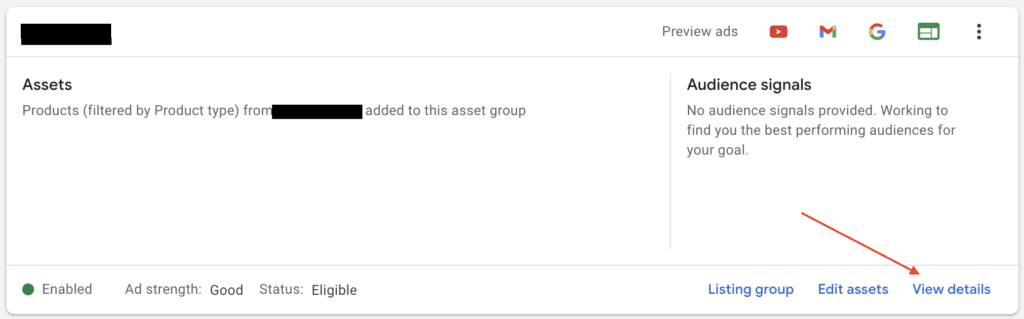
Click ‘see details’ under your asset groups to access your asset report. The Performance column will show a list of your assets together with outcomes. This is among four possible values:
- Low – performing against all other assets of the same kind over properties is a low asset.
- Good – performance against all other assets of the same sort is a benefit.
- Best – among all the assets of the same kind on one or more properties among their greatest performers.
- Pending – will be recorded until sufficient information is at hand to provide a performance rating.
Assets with a low performance rating could be assessed and updated to increase performance when compared to other existing assets. It is vital to understand that performance is measured ‘against’ other assets. As a result, certain good assets may be demoted to low when you develop higher-performing assets in the future.
Listing Groups In Performance Max
The items you wish to highlight have to fit the Performance Max campaign’s asset category. Dynamic and performance max smart shopping ads offer your products on display networks. Performance Max replaces Smart Shopping here.

Using listing groups requires a Google Merchant Center account and a list of approved products created or manually entered from your website. Your product listings are then arranged using listing groups based on Merchant Centre defined criteria.
Your Performance Max campaign advertising allows you to serve ‘all things,’ select divisions, or specific products depending on your choice. Attributes including category, brand, item ID, condition, product type, channel, and custom labels help to construct listing groupings. Add listing groups by clicking the pencil sign next to “All goods” to create a sub-division.
Best Practices for Setting up Asset Groups
Developing asset groups for Performance Max campaigns requires matching the creative assets to the objectives of your campaign, audience, and the several platforms where your advertising will show up. These are some best practices to make sure your asset groups produce the greatest possible outcomes.
1. Set clear campaign goals
- Determine your key marketing goals before you begin creating asset groups.
- Ensure that the assets you share (headlines, photos, videos, etc.) reflect these goals and communicate directly to your target audience.
2. Align assets with target audiences
- Develop asset categories based on specific audience personas or intent signals.
- Create separate asset groups for cold audiences (general awareness content) and retargeting audiences (product-specific or conversion-driven messages).
3. Utilize a variety of assets
- Upload a range of creative components, such as headlines, descriptions, images, and videos. Google will test many combinations to find the most efficient one.
- Ensure that all assets are visually and textually consistent with your brand’s messaging.
- Use the required image and video file sizes and formats to ensure maximum compatibility with Google’s ad placements (e.g., YouTube, Display, Search).
4. Produce high-quality visuals and videos
- Quality graphics increase engagement. Make sure your photographs and videos are clear, engaging, and relevant to your intended audience.
- To accommodate different ad positions, use videos of variable lengths, such as 6-second bumper ads and 30-second ads.
- Include strong calls to action (CTAs) in your videos to encourage users to do the appropriate steps.
5. Create Engaging Headlines and Descriptions
- Create clear, eye-catching headlines that are consistent with your main point.
- Use variations in your descriptions to express different benefits or offers.
- Use keywords judiciously in your content to improve relevance to search queries.
6. Evaluate multiple variations
- Avoid using a single version of your assets. Provide multiple variations of headlines, pictures, and videos so that Google’s AI can figure out which combinations work best.
- Try using alternative value propositions, CTAs, or messaging angles in your headlines and descriptions.
Conclusion
Performance Max campaigns depend heavily on asset groupings, which let advertisers deliver focused, high-impact advertising via Google’s extensive channel network. You help Google’s machine learning systems to test and provide the most successful combinations to your intended audiences by classifying creative materials such as headlines, descriptions, images, and videos. This guarantees campaign success and helps to match ad distribution with your marketing goals.

Vijay Sood is a seasoned digital marketer with a passion for driving online growth and innovation. With a robust background in developing and executing comprehensive digital strategies, Vijay excels in leveraging SEO, content marketing, and social media to boost brand visibility and engagement. His expertise lies in transforming data-driven insights into actionable marketing campaigns, helping businesses achieve their digital objectives.