In the rapidly evolving world of digital marketing, Google Ads’ Performance Max campaigns have become an influential, AI-fueled tool for marketers seeking to drive the most conversions across Google’s whole network. From Search and Display, YouTube, and Gmail, Performance Max provides unmatched reach and automation. However, the allure of AI optimization for ad performance is enticing.
Still, most advertisers are tired of dealing with issues that result in subpar campaign performance or no movement at all. One must learn to diagnose and fix these types of problems to get maximum benefit from this new campaign type and realize a good return on investment (ROI). This article will discuss common issues associated with PMax campaigns and provide helpful tips on optimizing your Google Ads to achieve success.
Ways in Which You Can Fix Performance Max Campaign Problems
For your Performance Max campaign to not just run but work, utilize these essential areas for improvement and debugging:
1. Fix Low Impressions and Reach
If your Performance Max campaign isn’t capturing impressions or generating meaningful traffic, the issue usually resides in deeper settings or data signals.
- Patience During Learning Phase: A newly launched Performance Max campaign, or one that has undergone extremely recent modifications, needs a “learning phase” in which Google AI accumulates data and optimizes. This may take 1-2 weeks. Be patient during this period and avoid making many extreme changes. Also, wait for policy review, which may take 24-48 hours, before hoping for your ads to appear.
- Sufficient Budget and Bid Strategy: Bidding too little or too low will limit how much your ad can bid in the auction. Review your budget, specifically examining trends between “campaign 8/4-10” and “campaign 31/21-26,” so that it aligns with your conversion objectives. For maximizing conversion value or conversions, make sure your selected bidding strategy is suitable and possesses sufficient data to learn from.
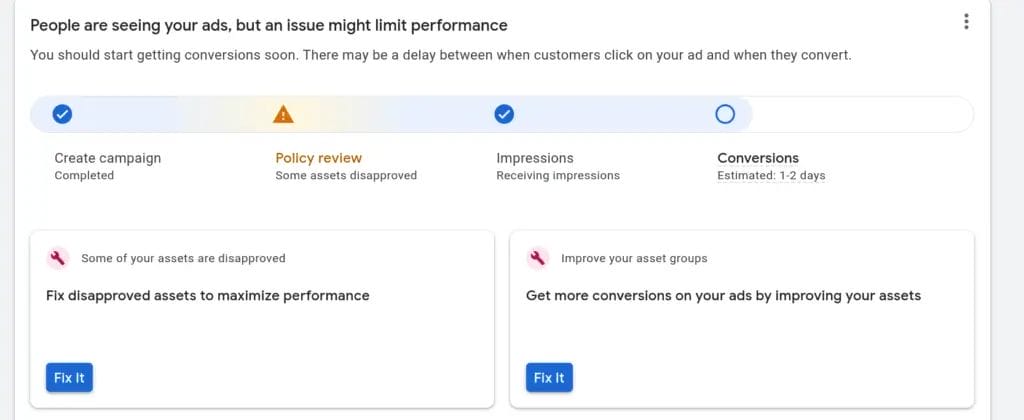
- Perfect Conversion Tracking: Performance Max has a high concern for accurate conversion data. If you busted or misconfigure conversion tracking, the AI simply won’t be able to learn and optimize effectively. Ensure all the conversion actions are firing as intended.
- Diverse and High-Quality Assets: Your provided assets are utilized by the AI to write ads. If your asset collection isn’t diversified sets of high-quality images, videos, headlines, and descriptions, ad performance will suffer. Use full creative asset coverage in order to give the AI more assets to experiment and optimize with.
- Strategic Final URL Expansion: “Final URL expansion” lets the campaign direct traffic to the most appropriate pages on your site that match a user’s search request. If turned off, your visibility might be severely reduced. Make sure to turn it on unless you have a legitimate business reason to decrease landing pages using URL exclusion.
- Audit Location Targeting: While PMax is sweeping, overly focused location targeting can unknowingly suppress impressions. Re-audit your “location targeting” to ensure it is aligned with your desired audience reach.
2. Improve Conversion Performance and ROI
Once your Performance Max campaign is driving impressions, the next step is to make sure those impressions are turning into valuable conversions and positive ROI.
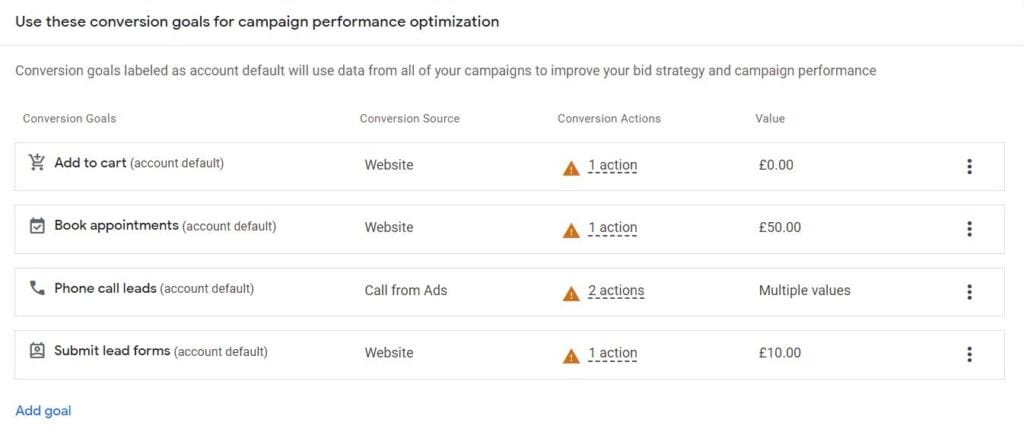
- Maximize Your Bidding Strategy: Your “bid strategy” must serve your business goals directly. To get the highest “conversion” quantity, use “Maximize Conversions.” If revenue is of most significant concern, choose “Maximize Conversion Value.” Set a “target” CPA or ROAS only after some amount of conversion data (3 weeks or more ideal) has been built up.
- Asset Relevance and Quality: Ensure that all “asset” aspects (headlines, descriptions, images, videos) are high-quality, engaging, and very relevant to the advertised service or goods within said individual “asset group.”
- Assess and Replace Perforators: Regularly examine individual asset “ad performance” in your asset groups. Replace any “Low” performing assets with new, better-performing creatives to continually “optimize” your “ad” mixes.
- Structured Asset Groups: Organize your asset groups in a logical order, such as classic “ad groups,” by themes, product categories, or offers.
- Tap into Confident Audience Signals: “Audience signal” is not exact targeting but provides significant indications to the AI about who your target buyer is. Provide confident signals with first-party data (customer lists), custom segments by “keyword” interests or “url” visits, and relevant Google Ads audience segments. The more specific the signal, the better the AI can find the right users.
- E-commerce Product Feed Optimization: For “e-commerce” companies that are leveraging “Google Shopping” in PMax, product feed quality is the most important thing. Make sure to have proper product information, title descriptions with good “keyword” phrases, and high-quality product images. Product group exclusions can be used to control “inventory” levels and concentrate on profitable products.
- Strategic Page Feeds and URL Exclusions: Although “Final URL expansion” is substantial, you may have to “exclude” some “url” types (e.g., non-commercial websites). You can do “exclusion” rules at the campaign level or by returning a “page feed” of target URLs, you can instruct the AI to show ads for such pages only when “Final URL expansion” is not enabled.
- Smart Negative Keywords: While broad “keyword” targeting is constrained, you can insert “negative keyword” lists at the account or campaign level (if offered as a beta feature or by using “Google Support”) to avoid your ads appearing on irreverent “query” terms for Search and Shopping inventory. This improves your targeting and minimizes wasted spend.
3. Press More Insights and Leverage
The machine-learning aspect of Performance Max can sometimes feel mysterious. But Google gives you good tools to decipher “ad performance” and make sound choices.
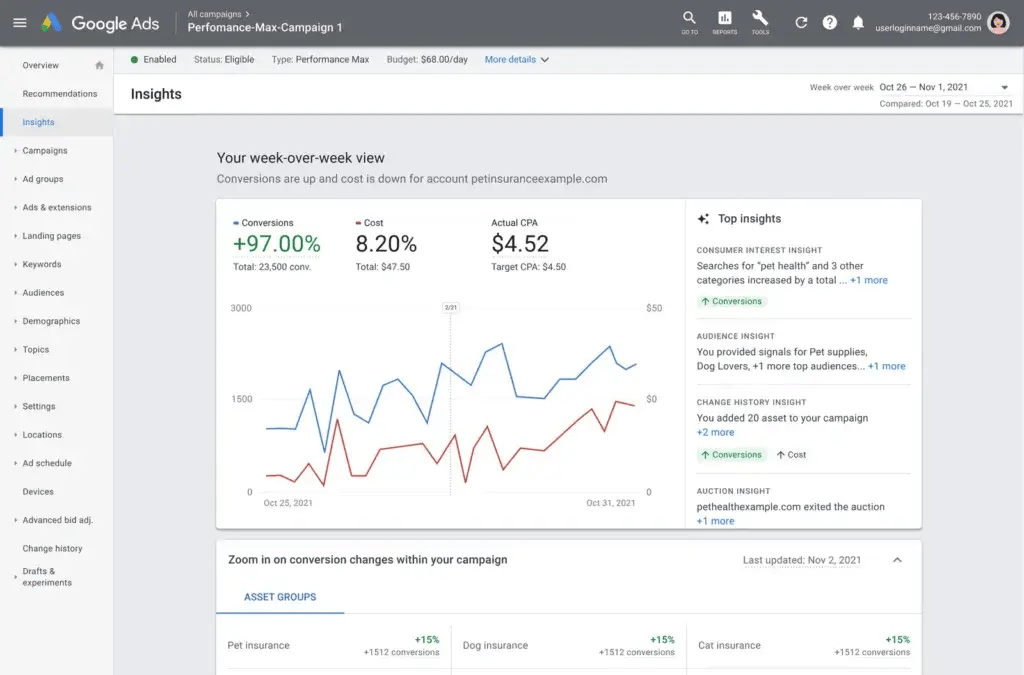
- Utilize the Insights Page: Regularly review the “Insight” page in your Google Ads account. This provides “data from Performance Max,” including top audience signals, “search” trends, and valuable “impression” and conversion breakdowns by channel. This is your window into how the “AI” is operating.
- Asset Reporting for Creative Effectiveness: You can “judge” how your assets are doing through the asset report. This will inform you what headlines, descriptions, images, and videos are doing best to engage your audience.
- Testing with Scripts: If you’re a more experienced “advertiser,” using a “script” will allow you to test, such as you can test a PMax campaign against other “campaign type”s, so you can discover more about performance variations.
- Brand Suitability Settings: If your concern is brand safety, use brand exclusions to exclude your ads from showing on specific publishers or for certain “keyword” phrases.
Conclusion
Efficiently optimized and managed Performance Max campaigns present a unique chance to scale your ad business and deliver strong ROI across the Google “network.” While the native “AI” and automation may initially be a “black box,” awareness of what goes on behind the scenes and strategic intervention is the solution. Utilizing strong conversion tracking, offering a rich and varied inventory of ad “asset”s in well-defined “asset group”s, optimizing your “bidding strategy,” and using “audience signal”s, you can influence the mighty Google Ads “AI” towards your intended actions.
Keep in mind that ongoing monitoring, leveraging on-hand “insight” data, and readiness to “tune” based on performance patterns inherent between particular campaign date ranges such as “8/4-10” and “31/21-26” are all essential characteristics of an effective “specialist” in this dynamic setting. Don’t “set and forget,” but instead actively work with your “PMax campaigns” to consistently yield maximum value for your organization.

Vijay Sood is a seasoned digital marketer with a passion for driving online growth and innovation. With a robust background in developing and executing comprehensive digital strategies, Vijay excels in leveraging SEO, content marketing, and social media to boost brand visibility and engagement. His expertise lies in transforming data-driven insights into actionable marketing campaigns, helping businesses achieve their digital objectives.