For a while now, Google Shopping has helped online retailers market their products and serve their clients efficiently. Buyers have the simplicity of looking for a certain item and being offered numerous brands to choose from.
This document will describe, in detail, how Google Shopping works and how it can be used to benefit your business.
What are Google Shopping campaigns?
Google Shopping campaigns are excellent tools for advertising your products on Google. They are particularly useful when looking to increase sales of a product. This type of strategy is also known as online marketing, and it helps you display your adverts to people actively searching for products similar to yours on Google.
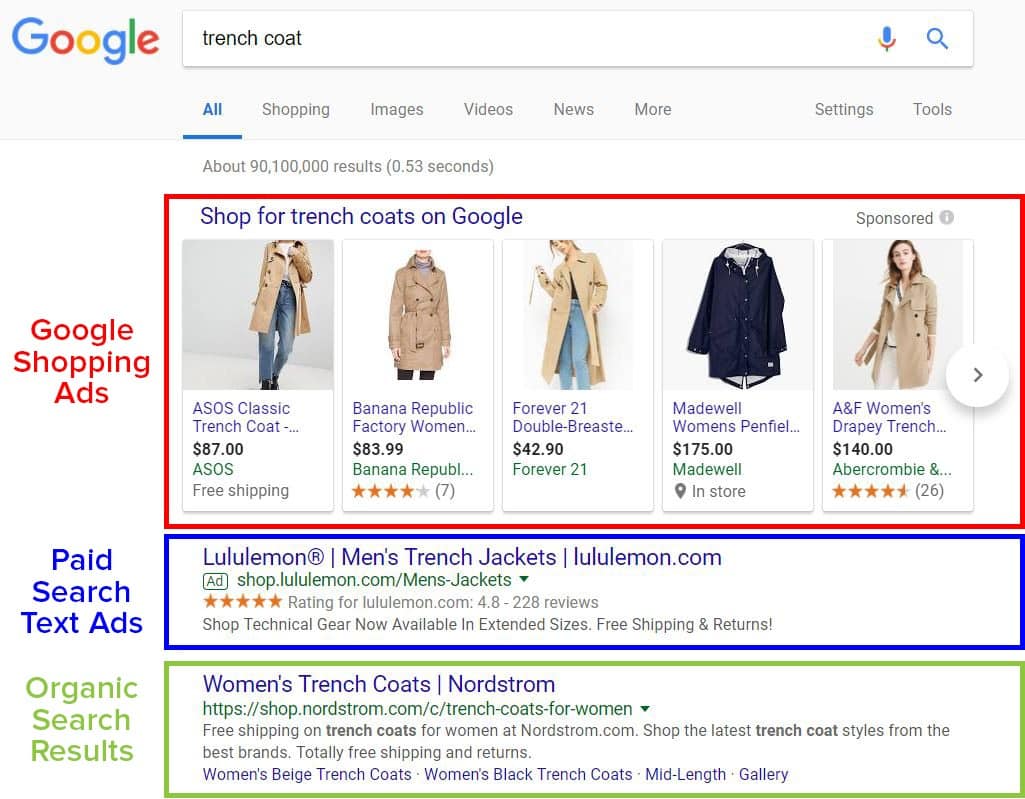
Shopping ads consist of images of the product that is being sold. These ads are usually placed on the top of the search results page or the Shopping tab, if there is one in relation to the search made.
Below the shopping ads, there is a shopping tab containing unpaid product ads where users who search for products without competing paid ads are displayed.
What is the process underlying Google Shopping ads?
Compared to standard search ads, Google Shopping ads function quite distinctively. Rather than relying on keywords, it uses a product feed, which is a file that you upload that contains relevant information related to your product, such as the titles, description, price, and images of the product.
This product feed is kept in Google Merchant Center, from which Google automatically constructs listings. When a consumer types a relevant product into the search bar, Google uses its algorithm to pair the query with the corresponding listings from your shopping campaign, which are shown in the shopping tab or the search page results.
As soon as it is associated with a Google Ads account, you can create a Shopping campaign along with selecting a bidding strategy. You pay according to the bid settings when customers click the advertisement and come to your website and you pay each time they do so.
The Importance of Google Shopping Ads
Compared to regular product searches and social media ones, shopping ads are like an entirely different league. But why is that the case?
Retailers are constantly looking for a way to differentiate themselves online to boost product sales and discovery. This is why Google Shopping ads have become a crucial advertising channel. And there is much more to it, including:
- Capture High Purchase Potential Users: Shoppers looking for particular items are in Google’s target audience and are ready to spend money. Google Shopping Ads will put your offers right in front of them, increasing the chances of conversion.
- Appealing Advertising Style: Users are more likely to click on an ad if they can see eye-catching product images rather than words. Since images of products beat text ads, your offerings will have a greater chance of being clicked on and purchased.
- Greater Competitive Advantage: With beautiful product displays, you can beat your competitors who only use text ads, enabling you to rank higher.
- Smart Ads: Google’s superb AI will automatically fit relevant searches to your products, ensuring accurate audience ads so you can rest and enjoy results.
- Insightful Statistics: Collecting information concerning the ad’s performance, clicks, and sales will improve your understanding and enable more precise campaign adjustments to achieve targets.
Three Advantages of Google Shopping Ads
As shopping ads frequently show at the top of the Google search results page, your product’s visibility can increase significantly. Let’s explore some of the other benefits.
Leads are well qualified when they come to the website
When people reach your site, they have already done a price and aesthetic comparison with your competitors. This means your ads are designed for people who have the intent to make a purchase.
Analytics enable you to create your own custom reports
The specific analytics data from your ads will help you structure new advertising campaigns. This powerful data will help you meet and exceed your goals.
Maintaining competitiveness
Results of Google Search are expected to feature more AI integration (Google Search Experience) Advertisements will likely be centered around AI assisting the user in making a purchase. If your product data is right and complete, then it could maximize sales.
How to Add Products to Google Shopping
To list your products on Google Shopping, you must follow a certain procedure. Here is a breakdown of the steps you need to take to accomplish this task.
Step 1: Create a Google Merchant Center Account
Set up an account
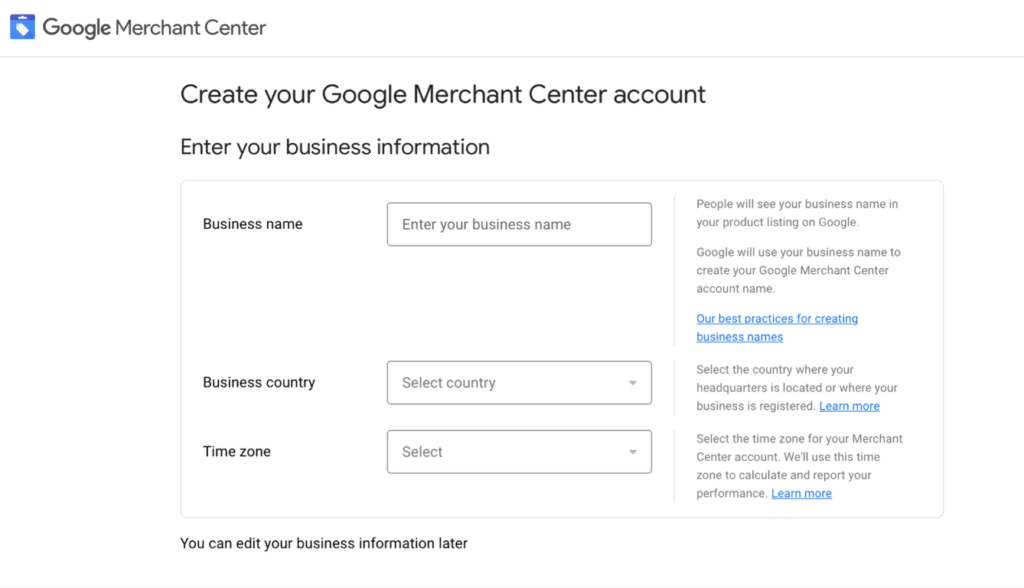
To begin, go to Google Merchant Center and create an account. Here is where you will manage product listing, inventory, data feed, and Local Inventory Ads (LIAs).
Verify and claim your website
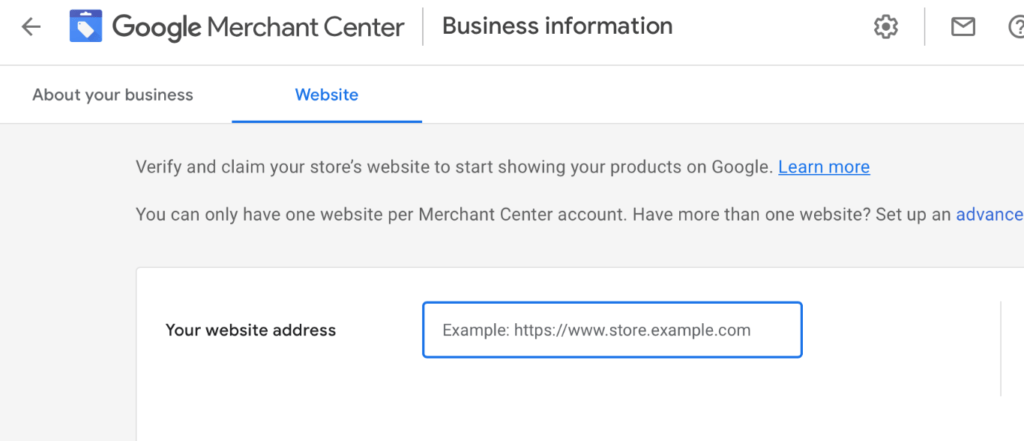
Normally, Google will need to verify that you own the website. Verification can be done through adding an HTML tag, using Google Tag Manager, or even Google Analytics.
Enable surfaces across Google
If applicable, turn this option on to feature your products on more Google surfaces without incurring additional charges.
Step 2: Optimize Product Photos
As Google Shopping is image-centric, high-quality images of the product are very critical. The photographs you use for the listing are fetched directly from your website, so they must meet the quality demands set by Google:
- The background should be light and solid in color to ensure attention to the product.
- Both shadows and glares must be eradicated to ensure even and clear lighting.
- The product ought to be visible in the scaled image, ideally 75-90% of the image.
- Blur, pixelation, or excessive compression should be avoided.
Step 3: Create a product feed
The backbone of your Google Shopping listings lies within your product data feed. Google attempts to pair your products with the most suitable searches by utilizing various attributes like titles, descriptions, prices, and availabilities to the utmost. Listing your products in a way that attracts customers is what necessitates your attention.
Automated feed
Use an automated XML or CSV file to keep an accurate and updated feed when managing a large product catalog. This technique will drastically decrease the chances of manual errors. Your product data can be exported into these formats by numerous eCommerce platforms like Shopify or WooCommerce.
Essential attributes
To earn Google’s approval, it is essential to include Und, Title, Description, Link, Image link, Availability, and Price. For support on sought-after and suggested attributes, the Google Sheets within the Merchant Center can guide you for the time being.
Scheduled updates
You should set automatic uploads in place because Google feeds must be updated every 30 days. A Google Sheet may work for smaller catalogs that don’t update frequently, but larger catalogs will need daily updates so that they can be better managed.
Step 4: Link your Google Ads account
To make use of the Shopping campaigns, Google Ads must be connected with the Merchant Center account. This allows Google Ads to promote your product listings to the customers searching for them.
Access linked accounts
Sign into your Merchant Center account and from the top right corner, click on Settings and go to Linked accounts.
Connecting Google Ads
Click on Google Ads and provide the Google Ads customer ID of the account you want to link. Then click on Link to complete the connection.
Step 5: Create a Shopping Campaign in Google Ads
You also need to create a new shopping campaign in your Google Ads account. In this section, set the campaign objective, budget, bidding strategy, and target audience.
Open Google Ads
Select your Google Ads account, click on Campaigns, then New Campaign.
Select campaign goal
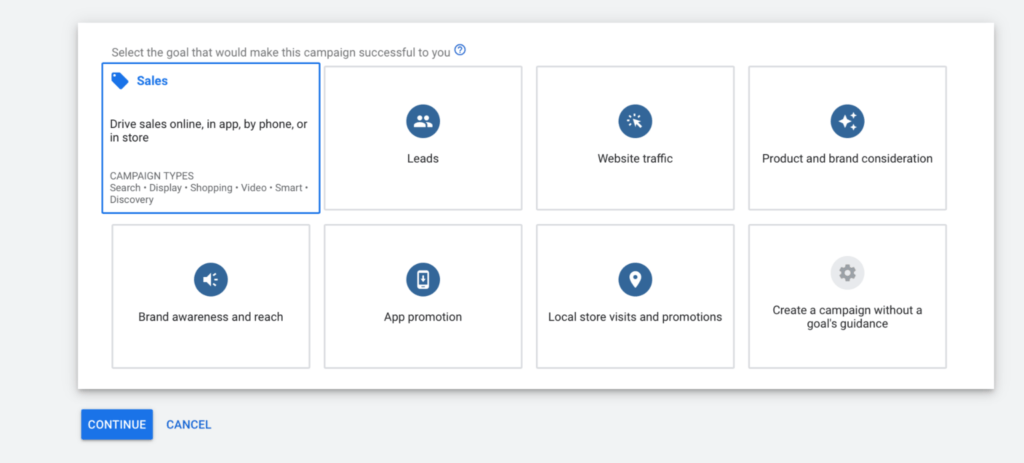
Pick an objective that your company is focused on, for example, sales, leads, or website traffic.
Choose campaign type
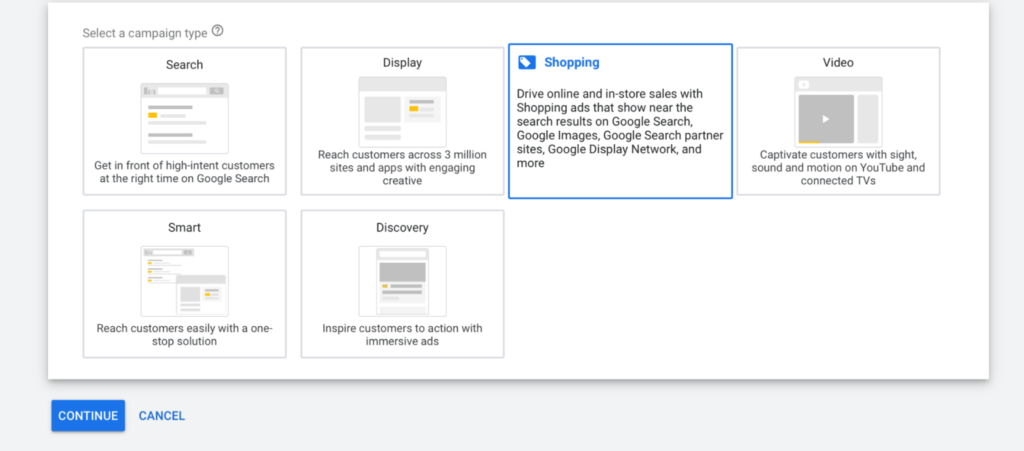
For your Google Shopping ads campaign type, choose Shopping and ensure that the appropriate Merchant Center account and country of sale are selected.
Optional—Add product feed
If needed, select the additional product feeds for certain items or products that are sold in some countries. You can create feed labels in your Merchant Center account.
Set strategy and budget for bidding
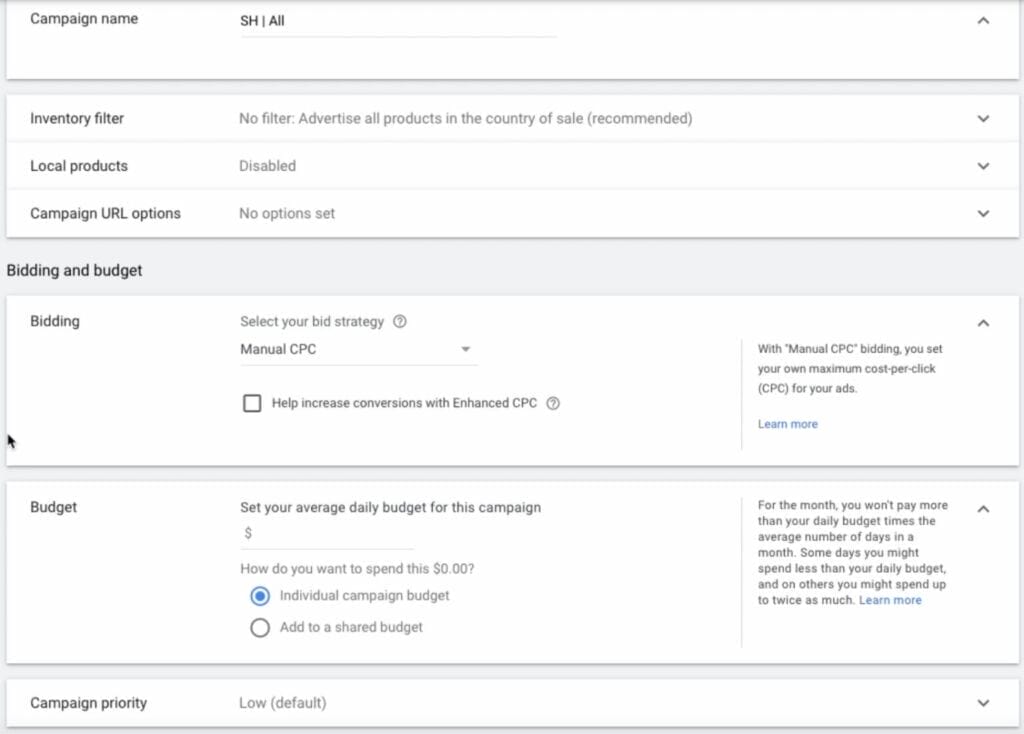
Pick a bidding strategy that works best for your goals. Maximize Clicks will give you more traffic, Target ROAS is for a return-focused strategy and Manual CPC will give you control over spending per click. Ensure your budget caters to your advertising objectives by setting a daily budget.
Options to target
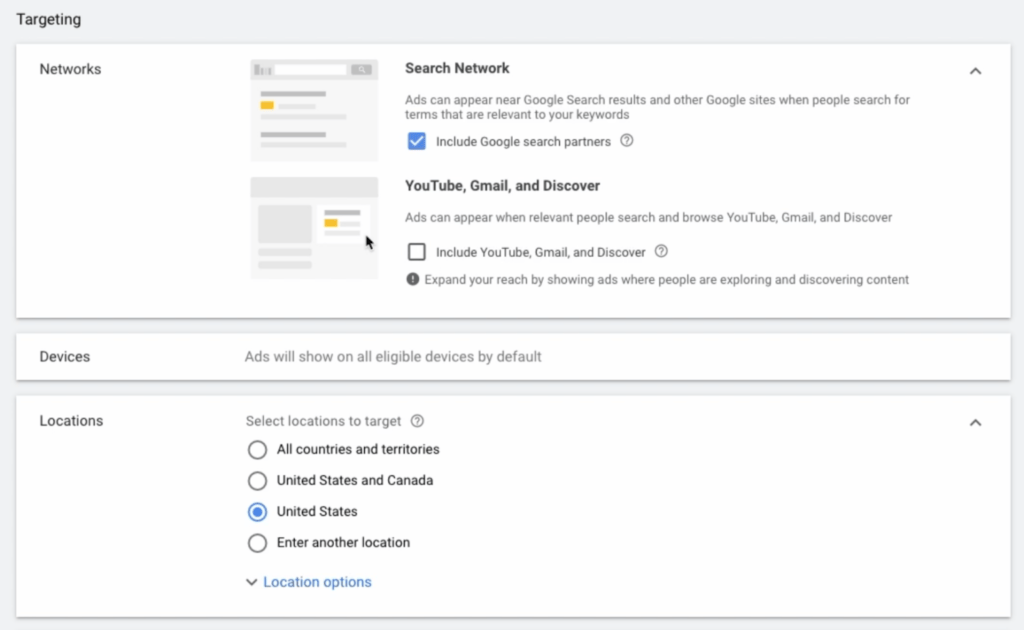
Modifying location settings to cater to specific geographic regions is necessary. This feature is more advanced and will allow your ads to reach more specific audiences.
Save and continue
Make sure to review all settings and when everything is done, click Save and continue to proceed with ad group creation.
Create Ad Groups
- Ad Group name: Pick a descriptive name for your ad group, such as “Winter Collection – EU – Q1.”
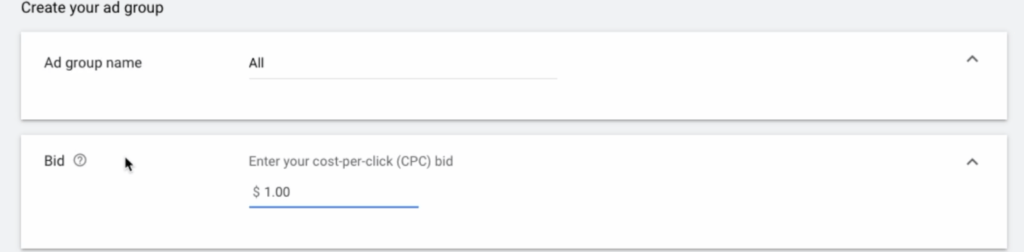
- Set bids: Set a bid amount that you want to pay for this ad group based on your available budget and advertising strategy.
Step 6: Monitor after launching your campaign
Now that your Standard Shopping campaign is live, be sure to keep track of its performance and make changes as frequently as possible to ensure you yield the best results.
Launch the campaign
Set your parameters and go live in Google Ads.
Track important performance metrics
Employ Google Analytics and Google Ads tools to follow up on impressions, clicks, sales, and ROAS (Return on Advertising Spending).
Enhance Frequently
Change budgetary and other performance scaling strategies to maximize performance ROI.
Administer stock
Keep stock records updated to prevent advertising products that can’t be supplied, with may spoil user experience and impact campaign efficacy.
Google Shopping Ads Best Practices & Requirements
To improve your Google Shopping campaigns, follow these tips. This includes further guidance on how to establish your Google Shopping feed.
Use lifestyle images
These images convey a narrative, facilitating users’ connection to the advertisement. Consider testing both options to determine which one has greater appeal to your demographic.
Sales of clothing items tend to increase when the apparel is displayed in a model’s photograph.
Upload multiple images
Providing more images increases shoppers’ understanding of the product and, ultimately, their purchasing satisfaction. You may append up to 10 images for each product using the attribute additional_image_link.
Use the right product data from the start
The nature of the data you choose to append to your products comes with surprising consequences that will affect the products’ performace. Well-constructed ad names, ad descriptions, and advertising prices will increase the impression and conversion rate of your ads.
Take note, however, that once an ad group has been set, Google circumvents any editing of the product data.
If you observe that some of your products are displaying incorrect information, remove those products from the ad group and reassign them with the correct data from the beginning.
Add negative phrases
Unlike text advertisements, shopping ad campaigns do not use phrases. In these cases, negative key phrases can be added. This option limits advertisements to display for certain questions where the brand knows that a conversion will not happen.
To develop a negative keywords list, search term reports and Google Keyword Planner are great sources.
Drop non-performing items
Stop spending advertisement money on items that have a high cost-per-click on ads. Optionally, you may include items that do not sell at all.
Integrate Performance Max with shopping ads
To improve the outcome, operate a Performance Maximization (PMax) campaign in combination with your regular shopping campaign. These help marketers make use of Google’s intelligent systems.
Google network coverage is available to PMax campaigns as well as variable bidding methods, rather than shopping campaigns. More campaign assets are required at the start than with a standard shopping campaign, but it’s beneficial to run both types of campaigns.
Enhanced tactics for success in Google Shopping
These Google Shopping campaign tactics require more technical skills, but with some preparation, they can be implemented at any time. Here are some advanced suggestions to help you achieve optimal performance.
1. Automate product data alterations with Feed Rules
Feed rules replace your other offer descriptions. For instance, set up rules for products to be categorized as “new” or “limited stock.” By doing so, you ensure that your listings are constantly updated, requiring little to no supervision.
2. Use Performance Max Campaigns to enhance visibility
These campaigns are designed to use machine learning to advertise your products not just in shopping ads but throughout almost the whole Google ecosystem, including YouTube and Display. If you want to target new audiences who go beyond your existing shoppers, this option is great.
3. Utilize RLSAs to target shoppers who have already interacted with your brand
Remarketing Lists for Search Ads (RLSAs) allow you to re-engage with customers who have visited your website. Choose between observation mode to passively watch their actions or targeting mode, where you direct your ads to these familiar customers to aid their shopping experience.
4. Use Local Inventory Ads to generate traffic into your brick-and-mortar store
Local Inventory Ads are unique in the sense that if you have a physical store, LIAs feature the stock available to order for customers in your area. They even include a buy-online-pickup-in-store (BOPIS) feature, which allows you to gain more foot traffic through your doors.
5. Remain Competitive Using Auction Insights
Modification of bids and budgets in Auction Insights of Google Ads can help stay competitive against rivals in the business. Allocation of specific amounts in this area is recommended.
Conclusion
Google Shopping offers a unique platform that enables businesses to showcase their products to buyers who have high purchase intentions. Businesses are able to utilize detailed analytics to boost customer traffic and conversion by optimizing their product listings and employing smart bidding techniques. The combination of visual elements with targeting of specific audiences gives that platform the essence to become a must-have for any business operating in e-commerce. Regardless of whether you are a small business owner or a big retail company, learning how to use Google Shopping effectively can improve your visibility and sales online. With proper policies set up, it is a gateway to reaching the right audience at the right time.

Vijay Sood is a seasoned digital marketer with a passion for driving online growth and innovation. With a robust background in developing and executing comprehensive digital strategies, Vijay excels in leveraging SEO, content marketing, and social media to boost brand visibility and engagement. His expertise lies in transforming data-driven insights into actionable marketing campaigns, helping businesses achieve their digital objectives.